DxO ONE - User Guide - Copyright © DxO Labs 1999-2015 - All rights reserved 68
Connected capture modes
Composition grid and shooting parameters
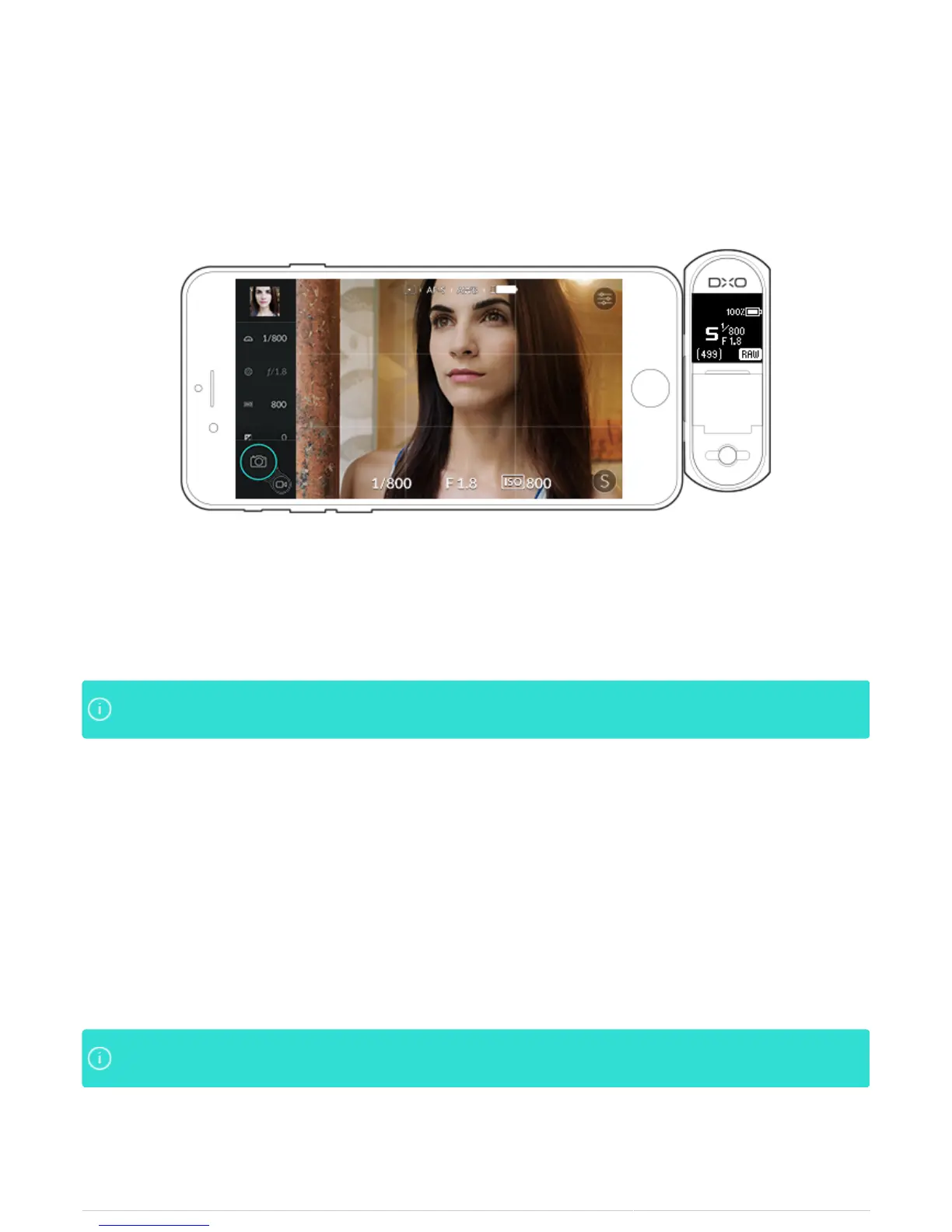
The DxO ONE iOS application has a built-in composition grid and a display of the principal shooting parameters.
1. To display the grid and shooting parameters, sweep the screen towards the bottom (when held horizontally).
2. To hide the grid display and parameters, sweep the screen towards the top.
The grid has two vertical lines and two horizontal lines so you can use the “rule of thirds” whenThe grid has two vertical lines and two horizontal lines so you can use the “rule of thirds” when
composing your photos.composing your photos.
3. On the upper part of the screen, capture settings include:
Metering mode
●
Focus mode
●
White balance mode
●
iPhone battery charge level
●
4. On the lower part of the screen:
Exposure compensation indicator
●
Shutter speed
●
Aperture
●
ISO sensitivity
●
The display of the grid and the information can be activated or deactivated in the Capture settingsThe display of the grid and the information can be activated or deactivated in the Capture settings
tab of the program settings.tab of the program settings.



 To Next Page