DxO ONE - User Guide - Copyright © DxO Labs 1999-2015 - All rights reserved 92
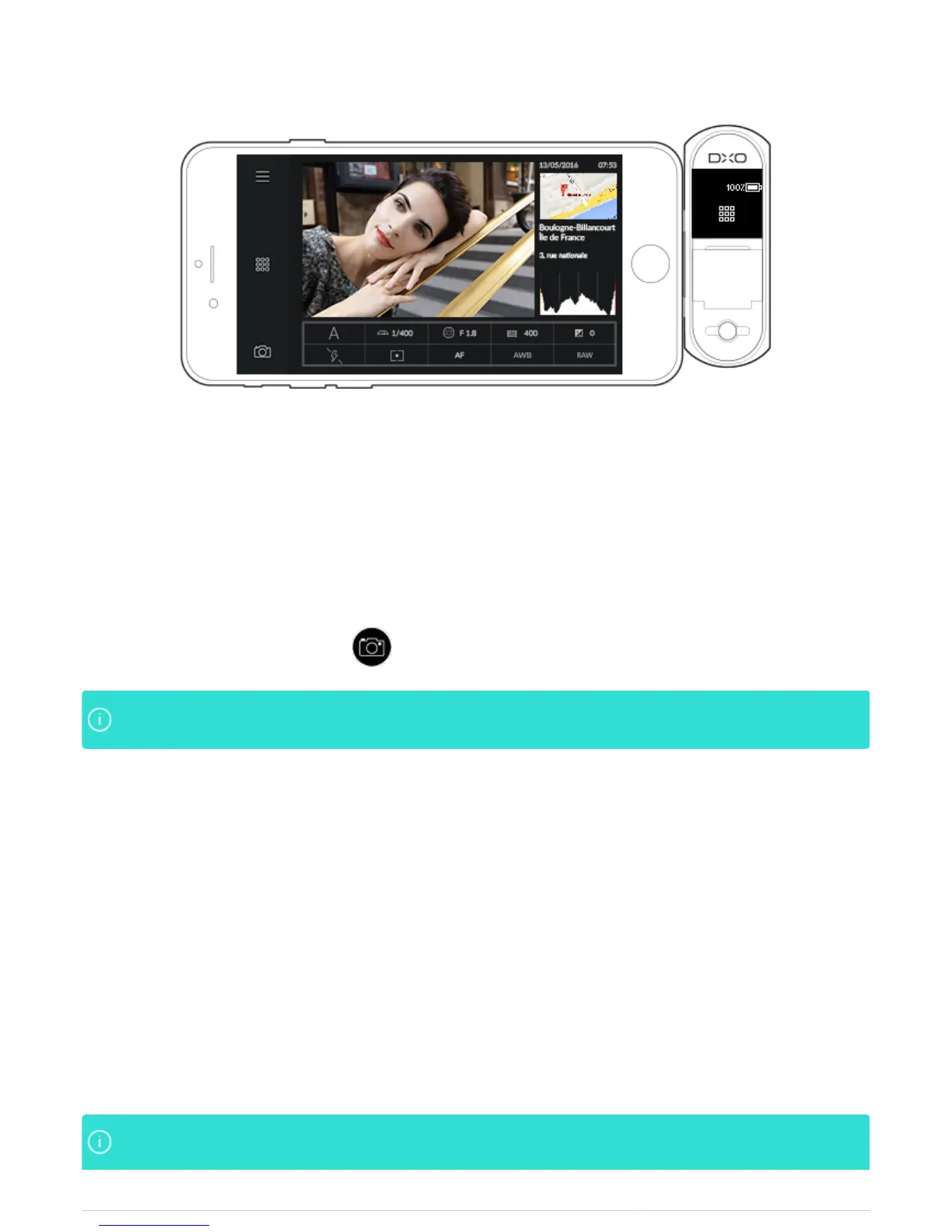
This page includes:
A preview of the selected photo
●
The date and time of the shot
●
A map showing the location of the shot
●
A histogram
●
A table summarizing the following information:
●
Exposure mode, shutter speed, aperture, sensitivity and exposure compensation
●
Flash status, measurement mode, AF mode, white balance and file type
●
To return to Capture mode, tap on the pictogram at the bottom left.
You can display the shooting location in the iOS Maps application by tapping on the thumbnail of theYou can display the shooting location in the iOS Maps application by tapping on the thumbnail of the
map.map.
6. When using the toolbar in Grid mode, you will be able to:
Access information (messages, user guide, About section)
●
Switch to image selection mode
●
Return to capture mode
●
7. In Single-image display mode, the icons are divided to the left and to the right. To the left, the icons let you:
Access information (messages, user guide, About section)
●
Switch to Grid mode
●
Return to Capture mode
●
To the right, the icons let you:
Share photos
●
Indicate your favorite photos
●
Delete photos
●
You can use the iPhone display to review photos that are stored on the microSD card of the DxO ONEYou can use the iPhone display to review photos that are stored on the microSD card of the DxO ONE



 To Next Page