EBS
Ink-Jet Systems
®
EBS-6100 Printer User's Manual
Paragraph 6 - SERVICE and maintenance
20070529#20.5
115
6.3.6. Reduced partial vacuum
PROBLEM REMEDY
The partial vacuum in
cylinder R3 has dropped so
much that the ink is not
sucked out of the gutter,
the gutter is flooded with
ink and the phase error can
occur.
Check whether the vacuum pump runs - the characteristic
whirring sound is heard when the lamp V91 on the internal panel
comes on. The pump starts and stops in cycles to suck ink from
the gutter.
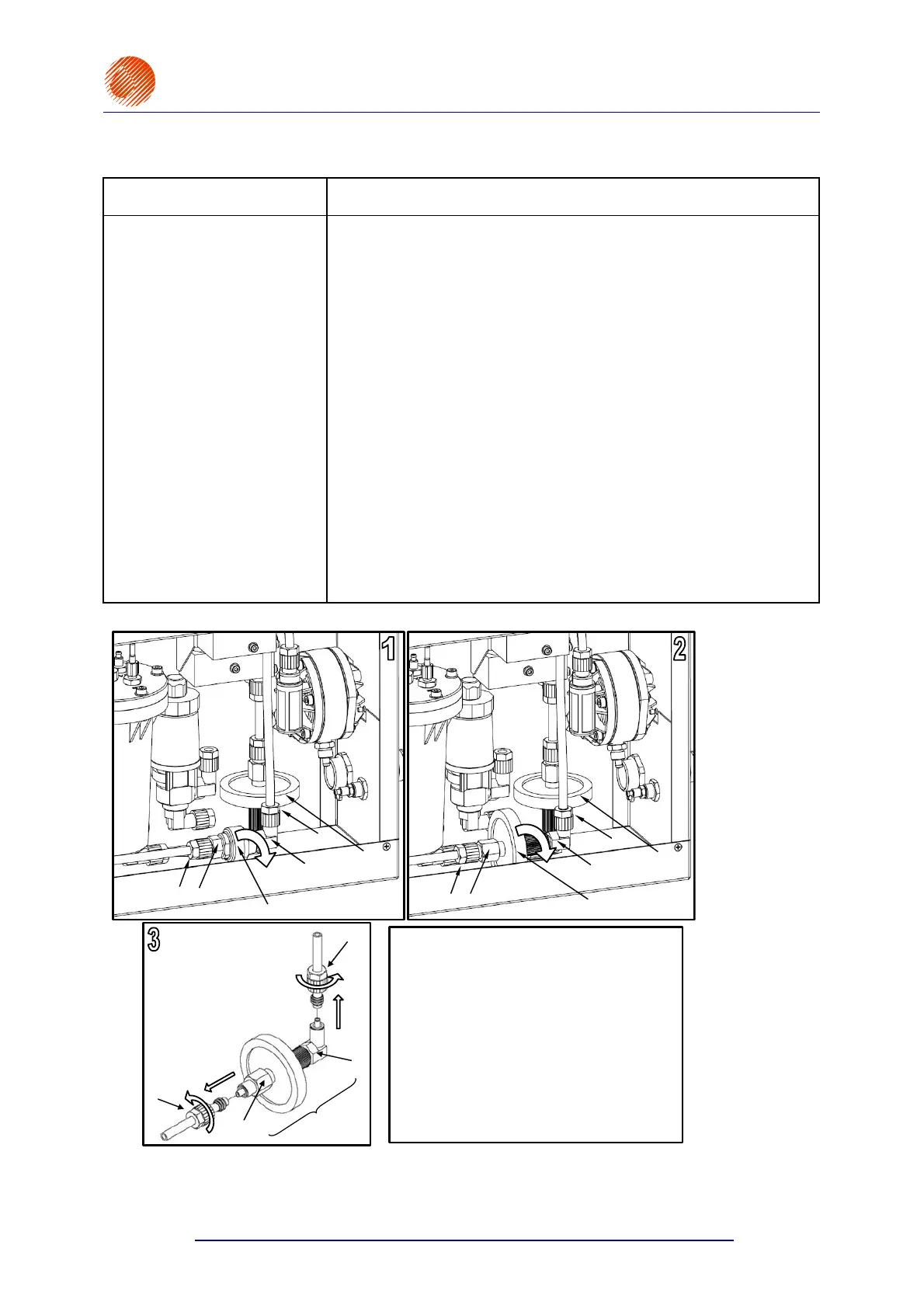
Check whether the air filter is clean. If it is dirty, replace it (see
Fig. 6.3.6.1).
Check for proper connection of all piping between the vacuum
pump and the cylinder R3.
Check and possibly increase the value of partial vacuum with the
SET VACUUM command in the SERVICE menu - see
Fig. 6.3.6.2.The rated value falls into the range between 6 and
10%. If you increase the value [%], the cycle time of the pump
extends. If there are no other reasons for pressure drop, the
cycle time has been increased to 100% but the ink is still not
sucked from the gutter properly, this may indicate that the
vacuum pump has worn out.
NOTE: If the vacuum pump operates properly, then any increase in
the negative pressure by more than 25% may result in an
ink-pressure-drop error INK PRESSURE DROP.
air filter (new type)
main ink filter
air filter (old type)
main ink filter
new type air
filter
switch the printer off in the service mode,
pull out the air filter (old type – FIg. 1 or new type –
Fig. 2) from the printer,
unscrew nut of filter coupling , while holding the
coupling at the same time,
slide down the nut and tube from the filter coupling
(Fig. 3),
unscrew nut of filter coupling , while holding the
coupling at the same time,
slide down the nut and tube from the second
coupling (Fig. 3),
replace the existing air filter with the new one (new
type – Fig. 3),
assemble all the components in the reverse order,
switch the printer on and check whether the
connections are tight.
Fig. 6.3.6.1.



 To Next Page