EBS-6100 Printer User's Manual
Paragraph 4 - Operating the Printer
EBS
Ink-Jet Systems
®
90
20070529#20.5
you wish to print fast (Speed : FAST) and produce 7-dot single-row prints, this frequency
should be 8920 Hz. For more information refer to 4.6.3 Defining the Maximum Print Rate
for a Given Text File, 4.6.4 Information for advanced users and 4.6.5 Problems with
reaching the maximum print rate when a shaft-encoder is used.
4.6.3. Defining the Maximum Print Rate for a Given Text File
Irrespective of whether the printer works with an internal generator or a shaft-encoder,
you should follow the procedure given below in order to define the maximum print rate for
a text file with selected fonts (also called the generators or character matrices):
1. In the TEXT SERVICE submenu to create a text file using the font for which the maximum
print rate is to be determined.
2. Use the PRINTING PARAMETERS command from the PRINTING submenu to set the
required print parameters, especially the Speed, Interleave and Resol. dot/cm
parameters and also to set:
• Mode to NORMAL,
• Generator to GEN,
• Cnv spd m/min to a relatively small value (e.g. close to the minimum setting).
3. Start printing the text file with the START PRINT command from the PRINTING submenu.
4. Check on the terminal display in the printer status window (after "/") whether the height of
the vertical row matches the height of the selected font.
5. Move back to the PRINTING PARAMETERS command and the Cnv spd m/min option.
6. Press the ¡ key and hold it down until the value of the Cnv spd m/min parameter stops
increasing. After the maximum travel speed has been achieved, this value stops
increasing. This is the maximum print rate for the selected font and for the
Speed, Interleave, Resol. dot/cm print parameters and for other parameters.
NOTE:
• The above procedure can only be applied when timing pulses are generated by an
internal generator (not by the shaft-encoder). When the shaft-encoder is used, the print
rate cannot be controlled automatically as the control program has no impact on the
frequency of pulses generated by the shaft-encoder.
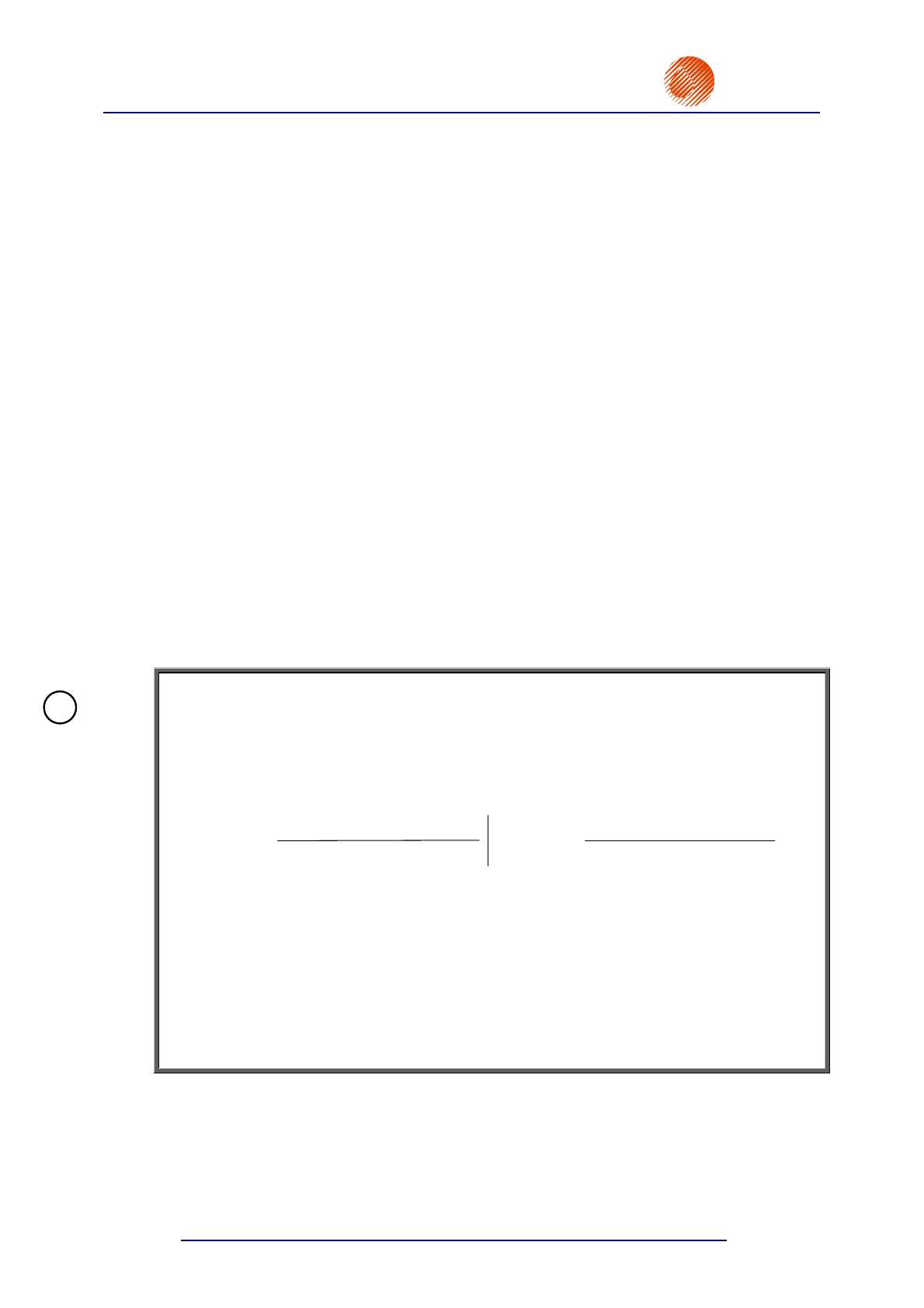
• In order to determine resolution (number of characters per centimetre or characters per
inch) of the overprint, use the following formula:
R
R
CHARACTER WIDTH + DISTANCE
dot/cm
chr/cm
=
2.54 * R
R
CHARACTER WIDTH + DISTANCE
dot/cm
chr/in
=
where:
R
chr/cm
- resolution defined as a number of characters per centimetre,
R
chr/in
- resolution defined as a number of characters per inch,
R
dot/cm
- resolution defined as a number of dots per centimetre; it is the same
as the setting of the Resol. dot/cm print parameter,
CHARACTER WIDTH - width (number of dots) of a character for the selected font,
DISTANCE - a distance (number of dots) between characters; it is defined by the
Distance subfile parameter.
For example, if you select Latin 16x10, the character width is 10. If Distance=2 and
Resol. dot/cm=24, the resolution is 2 characters/cm or 5,08 characters/inch.
On determining the maximum print rate for the printer which works with a shaft-encoder, you
should stop printing and modify the setting of the Generator parameter to SHAFT. See also
section 4.6.4 Information for advanced users and 4.6.5 Problems with reaching the
maximum print rate when a shaft-encoder is used.
!



 To Next Page