EBS
Ink-Jet Systems
®
EBS-6100 Printer User's Manual
Paragraph 4 - Operating the Printe
20070529#20.5
89
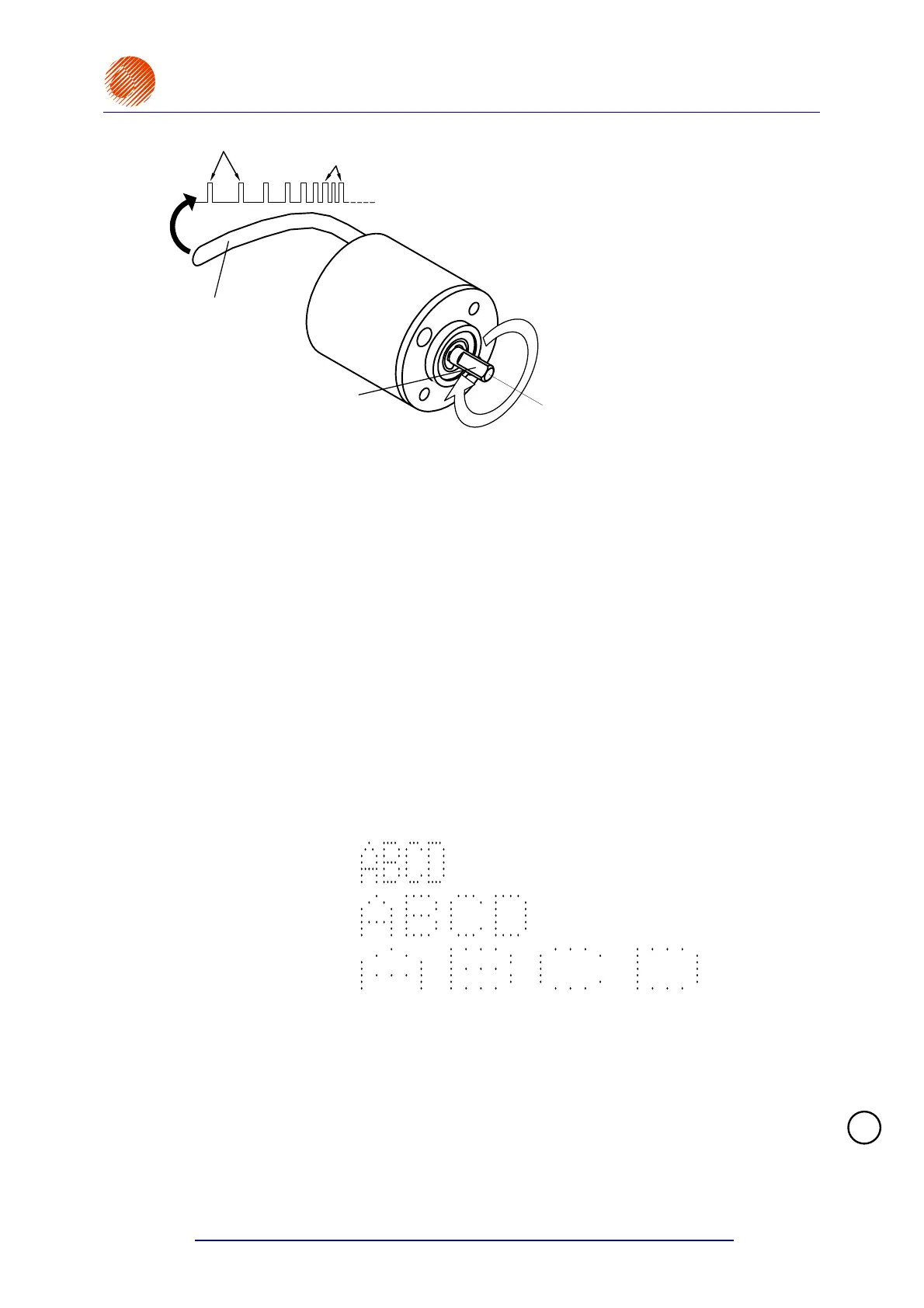
Signal cable
SHAFT-ENCODER axle
Pulses for slow rotation of the SHAFT-ENCODER axle
Pulses for fast rotation of the SHAFT-ENCODER axle
This manual does not
contain any description of
the types of mechanical
gear to be used to couple
mechanically encoders
with conveyors. A variety
of solutions is available
and specific user
requirements can fully be
met.
Fig. 4.6.2.1. Shaft-encoder
The timing frequency (print rate) is influenced by two print parameters (available with the
PRINTING PARAMETERS command from the PRINTING submenu):
The Enc const p/m parameter (see section 4.4.3.5 Print Parameters) parameter defines
the number of pulses generated by the shaft-encoder while the object covers a distance
of 1m. If the shaft-encoder is used for timing purposes and the Enc const p/m parameter
is set to a constant value, no increase or decrease in the conveyor travel speed has any
impact on the characters width.
The setting for the Enc const p/m parameter can be determined by measuring the
encoder constant with the CONVEYER MEASUREMENTS service command - see also
section 4.4.4.11 Defining Some Print Parameters by Measuring Conveyor Travel
Speed.
The Resol. dot/cm parameter (see section 4.4.3.5 Print Parameters) parameter defines
image resolution. The resolution is expressed as a number of dots/centimetre. The visual
effect of a change to the parameter is a change in the width of characters (graphical
images) and the length of the entire text file.
Below you can see a sample print "ABCD" which looks different for various settings of the
Resol. dot/cm parameter; the travel speed is constant (NOTE: in order to make the
overprint legible, it is not shown to scale):
Resol. dot/cm:24
Resol. dot/cm:12
Resol. dot/cm:6
Rough measurements of the timing frequency (in Hz) can be taken with the ROWS SPEED
command from the PRINTING submenu. When the settings are displayed with the application
of the ROWS SPEED command, you can change the rotational speed of the encoder axle (by
changing the transmission ratio) and observe the changes on the terminal display. The
command can also be used when the system works with an internal generator.
As the printer cannot control the frequency of pulses generated by the external encoder, the
allowable settings can be exceeded and the overprint deformed - see section 6.3.9 Some
vertical rows of the print are . In order to avoid such deformation, the timing frequency
should be chosen in such a way that the settings offered by the ROWS SPEED command do
not exceed the maximum print rate. The rate (given in m/min) depends on the font applied
and on print parameters such as Speed, Height, Interleave, Resol. dot/cm. For example, if
!



 To Next Page