EBS
Ink-Jet Systems
®
EBS-6100 Printer User's Manual
Paragraph 2 - Installing the Printe
20070529#20.5
15
A description of how to reconnect connectors after the unit has been delivered:
• Tank R3: RET - to connect a return pipe in order to transfer ink from the
head gutter back to the tank;
VAC - to connect the tank to a vacuum pump.
• Valve manifold: V3 - to connect ink bottle to V3 valve
in the valve manifold.
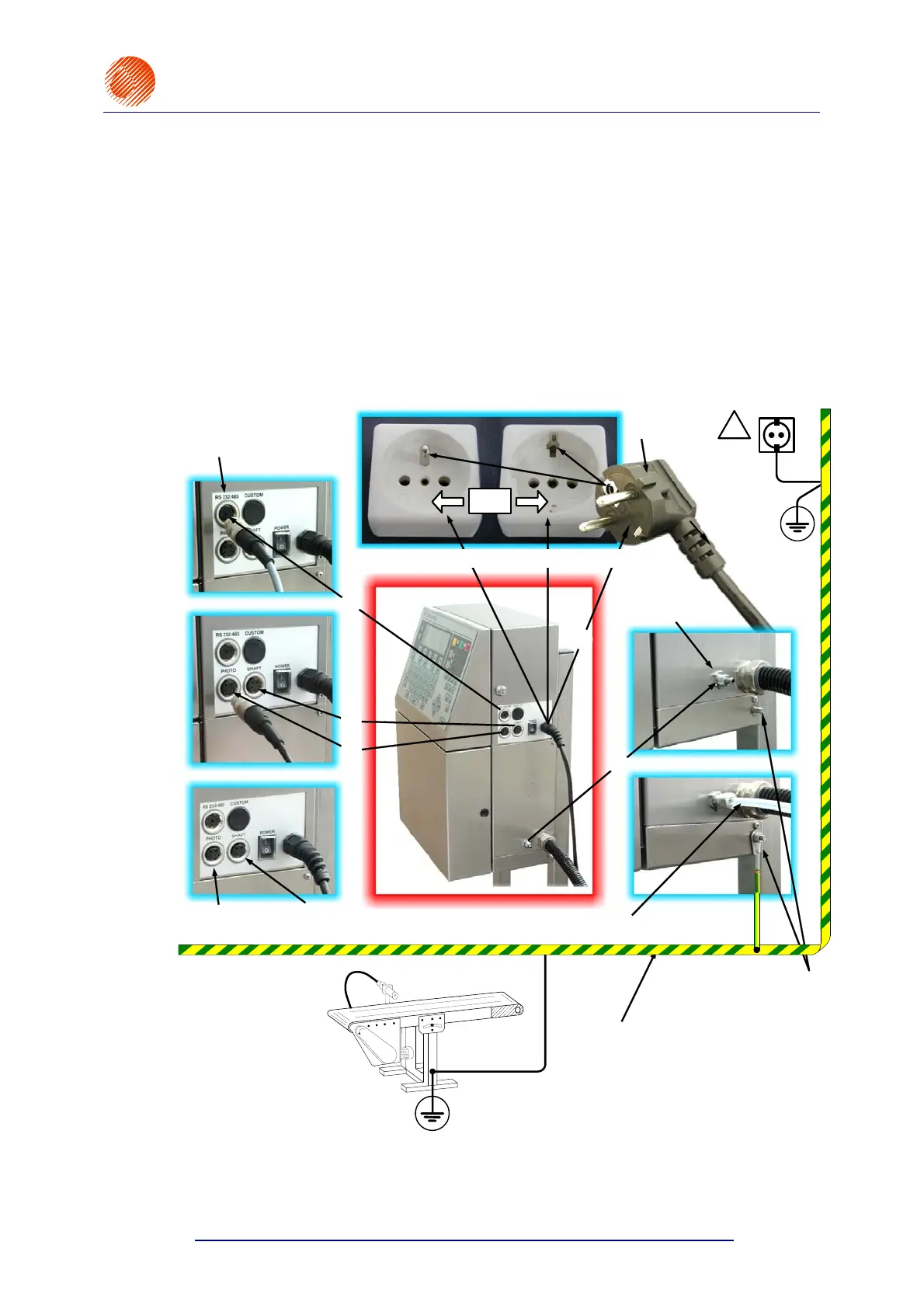
2.3.4. Connections
On putting the printer in place and removing transport protections make the connections
that are shown in the figure below, following the order indicated by the numbers
, , , ,
, .
!
Special-channel interface
connector (to connect a PC)
B
B
Mains plug
B
Mains electricity with an earthing contact
Waste-air pipe
connector
M5
A
A
Photo detector
socket
Shaft-encoder
socket
min. 4 mm hose to vent contaminated air
Head casing is electrically
connected with an earthed
conveyor
Earth bar
Earth terminal
the
maximum resistance
between points A and B and
between A and C should be
0.1 Ohm when the mains
plug is out of the mains
socket
C
or
Fig. 2.3.4.1. Major connections in the EBS-6100 printer



 To Next Page