EBS
Ink-Jet Systems
®
EBS-6100 Printer User's Manual
Paragraph 4 - Operating the Printe
20070529#20.5
37
PARAMETER DESCRIPTION AND SETTINGS DEFAULT
An indication, whether a bar code is to be printed in inverted
colours.
YES, NO
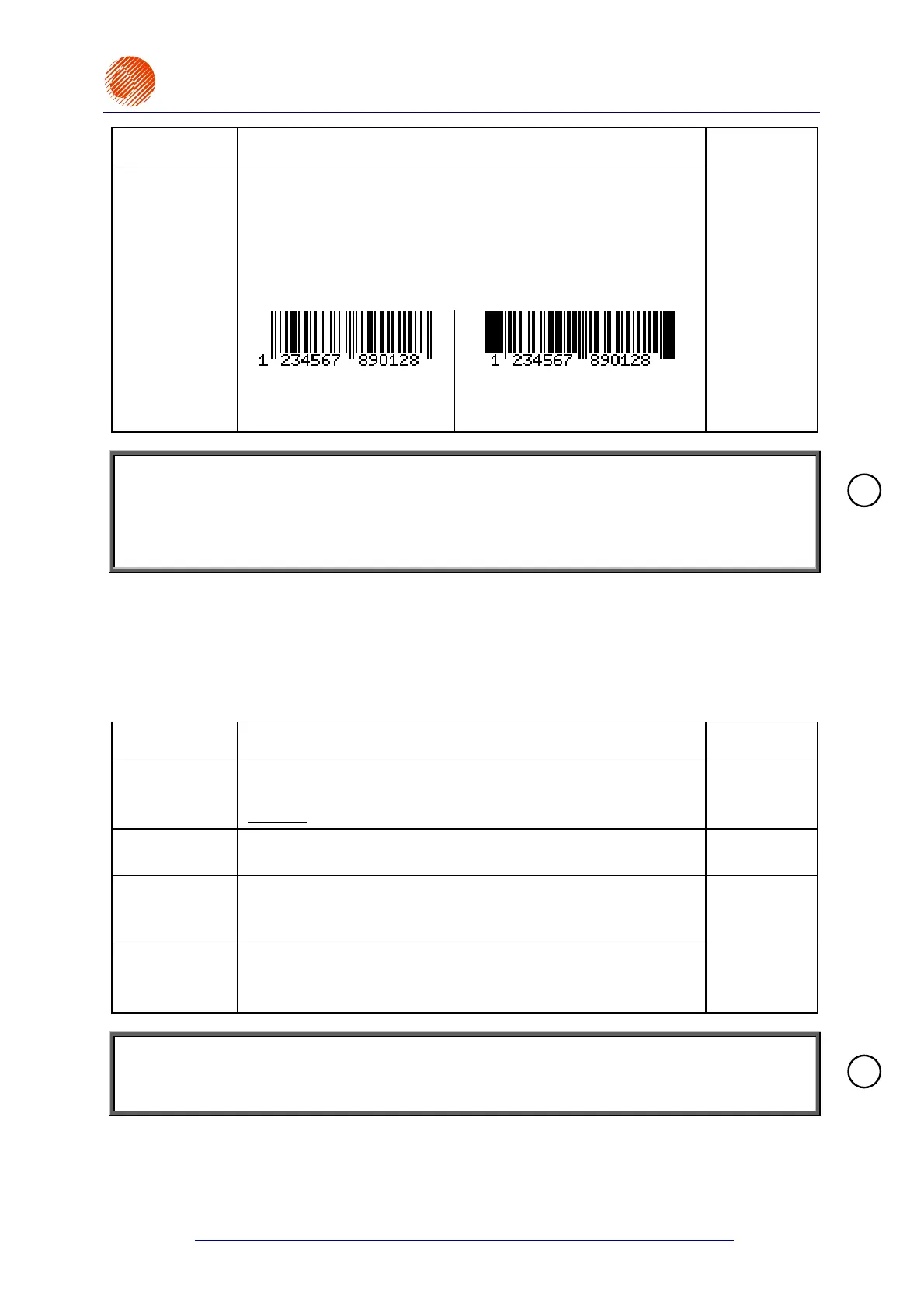
When a bar code is printed in inversion, no bars are printed but
only spaces are printed instead, and filled-in fields are added
before and after the bar code. The inversion is used to print bar
codes with white ink on a black background.
Inversion :
The EAN-13 car code not in
inversion, i.e.
Inversion=NO (32 pixels).
The EAN-13 bar code in
inversion, i.e. Inversion=YES
(32 pixels).
NO
NOTE:
• Subfile parameters can be changed at any time during the edition of a Barcode subfile (by
pressing the
§ key).
• In some cases the ranges of parameters may be reduced to ensure the bar-code standards
are met and editing rules are followed.
Subfile Type: TEXT NAME
Every file stored with a name in the library can be merged into another file as ‘a subfile
called by its name’. The
TEXT NAME subfile is a simple or complex subfile. It cannot be edited
inside the file it has been merged into. It can only be edited as a separate library file.
When the
§ key is pressed in the word processor, the parameter menu is displayed for
your subfile. The parameters have the following meaning:
PARAMETER DESCRIPTION AND SETTINGS DEFAULT
Type :
Subfile type. Any parameters shown below are typical of
a Ins. text subfile.
Ins. text
, subText, Graphic, Barcode
Text
Text name :
Specify a name of a library-stored file. The file name can also be
selected from the library by pressing the ¨ key.
No setting
Front dis :
A blank space (a number of vertical rows) before a subfile that is
called by its name.
0, 1, 2, 3, .... , 5000
0
Back dist :
A blank space (a number of vertical rows) after a subfile that is
called by its name.
0, 1, 2, 3, .... , 5000
0
NOTE:
Subfile parameters can be modified during the edition of an Ins. text subfile at any time (by
pressing the
§ key).
4.4.1.3. Editing an Existing Subfile
In the main MENU select the TEXT SERVICE item and then the TEXT EDITION item.
!
!



 To Next Page