EBS-6100 Printer User's Manual
Paragraph 7 - Storage and Transportation
EBS
Ink-Jet Systems
®
122
20070529#20.5
Step Message Description
1
- Prepare PL3 plug
and 5cm PL4 tube.
Head switch off procedure
in progress. Please wait ...
Prepare a plug for
connectors PL3 (Part
No. P580483 – see the
figure on the right) and
a PTFE tube PL4,
about 5 cm in length. In
the meantime, the head
rinsing and switching-
off procedure is
followed. Wait for
another message.
Fig. 7.1.1.
2
- Remove ink bottle
- Replace it with empty bottle
- Press ENTER...
Detach the bottle of ink and replace it with an
empty bottle for used-up solvent. After the
operation has been carried out, press the
V button.
3
- Disconnect ink tank tube
from manifold
- Plug released input of manifold
(look Service Manual)
- Press ENTER ...
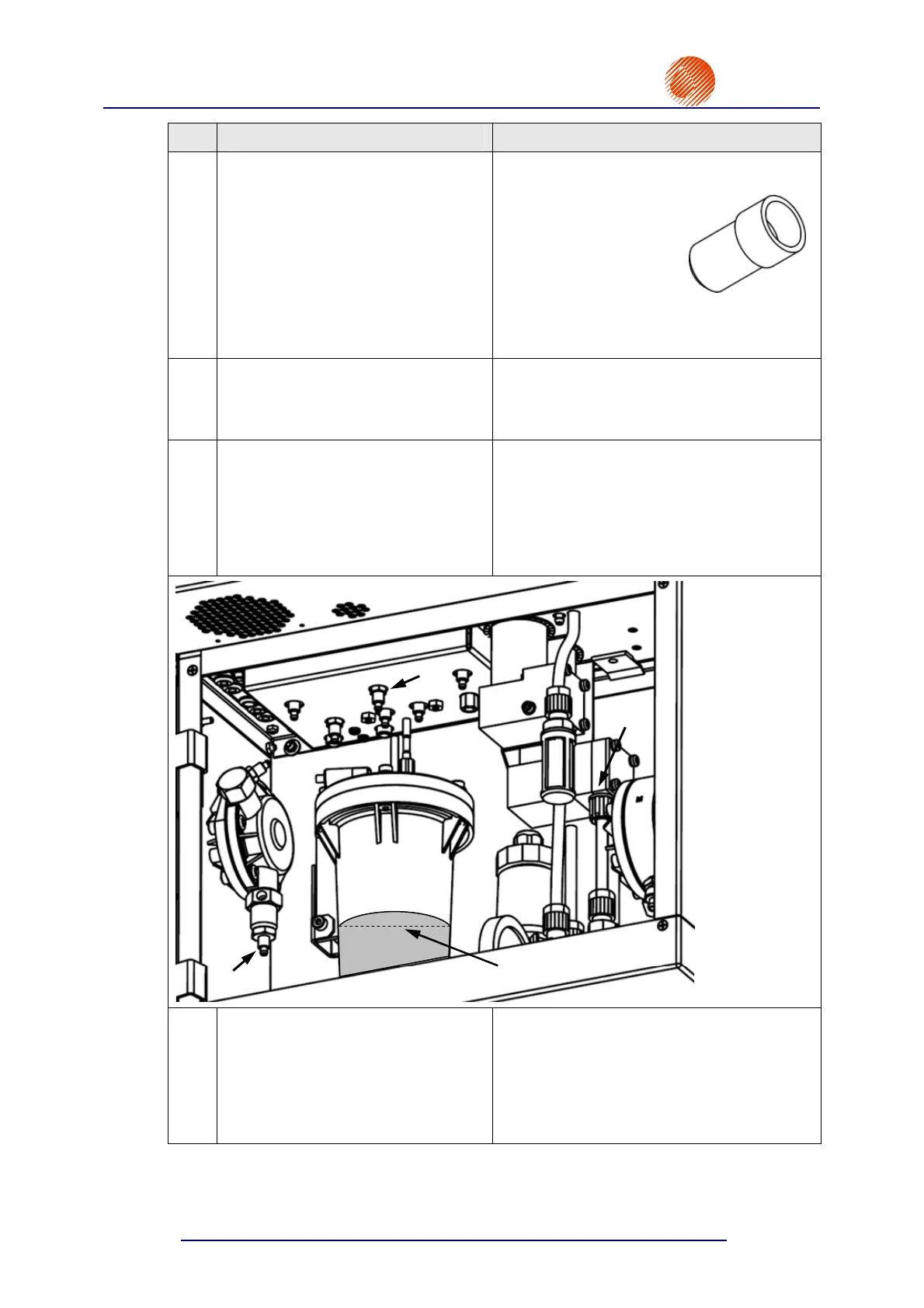
On undoing the nut from connector
(see
Fig. 7.1.2) of the valve manifold, detach the
tube that connects the block with the ink
tank, and then close the freed connector with
the plug shown in Fig. 7.1.1. and secure it
with a nut. After the operation has been
carried out, press the V button.
Ink level
R3
Fig. 7.1.2
4
- Disconnect tube from input
of ink pump
- Attach the output tube above
level of ink in the tank
- Press ENTER...
On undoing retaining nut
(see Fig. 7.1.2),
detach the ink-filter tube from the input
connector pipe of the ink pump. Fix the tube
in such a way that the tube outlet is above
the ink level in the tank R3. After the
operation has been carried out, press the
V button.



 To Next Page