EasyManua.ls Logo

Eclipse CD3200 - Detachable Front Panel Operation Instructions

Eclipse CD3200
177 pages
Print Icon
To Next Page IconTo Next Page
To Previous Page IconTo Previous Page
Loading...
Receiving
a
call
uSing
a
Bluetoolh@wlreless
technology
compallble
cellular
phone
{Recephon
d'un
appel
en
utilisanl
un
telephone
cellulalre
Bluetoolh@a
lechnologle
a
commande
sans
fil
compahble
{Reablr
una
lIamada
usando
un
telefono
movil
oompahble
con
tecnologla
Inalambnca
Bluetoolh®
o
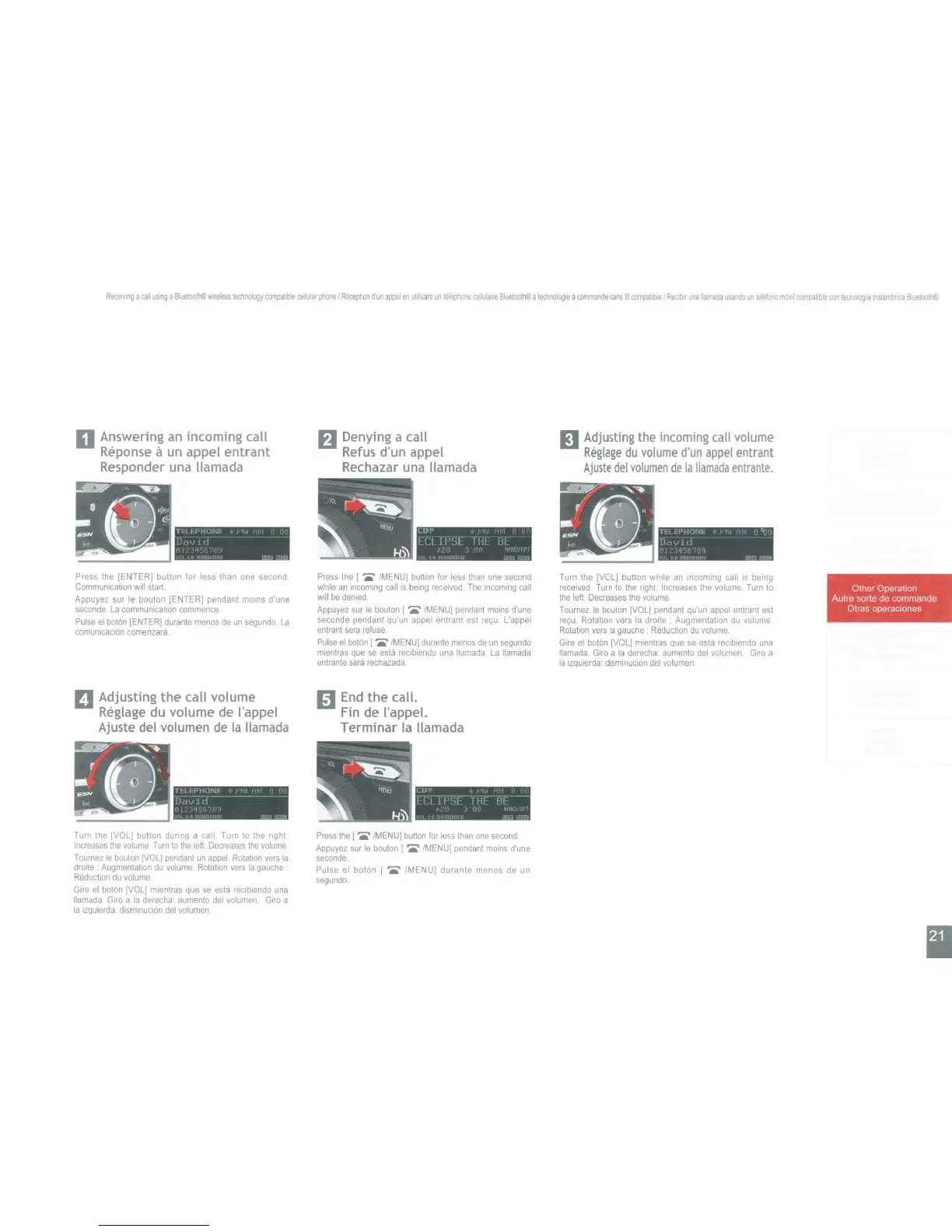
Answering
an
incoming
call
Reponse
11
un
appel
entrant
Responder una lIamada
Denying a
call
Refus
d'un
appel
Rechazar una lIamada
Adjusting the incoming call volume
Reglage
du
volume
d'un
appel
entrant
Ajuste
del
volumen
de
la
lIamada
entrante,
II:Lf-t'HUf\lt:-
t J
II'
I
I'
J),;IJl
d - -
11
"
, '
"'!"P
'"""'""
Lor
I:
t 1 ,
Ltl
I1':jL
fHI
II~
I."
i " -
'j
<
'"
,"
I"
'"111111111"
II<'
~~
.(~'''~''J(;
E£N
~J
w-'
,
-
I I::L!::I' HONI::
)',
ii,
,1'
D(lV
ld
"r1Lr-~
',"'"'11'''''''''''''
"",,",,1i'I'Rii
Press the [ENTER] button for less than
one
second
Communication
will
start.
Appuyez
sur
Ie
bouton [ENTER] pendant
moins
d'une
seconde.
La
communication
commence
Pulse
el
baton
[ENTER]
durante
menos
de
un
segundo
La
comunlcaClon
comenzara
D
Adjusting
the
call
volume
Reglage
du
volume
de
rappel
Ajuste del volumen de
la
lIamada
Press
the
I
{MENUj
button
for
less
than
one
second
while
an
Incommg
callis
being
receIved
The
mcommg
call
will
be
denied
Appuyez
sur
Ie
bouton
[
IMENUj
pendant
mOinS
d'une
seconde
pendant
qu'un
appel
entrant
est
relfu.
L'appel
entrant
sera
refuse
Pulse
el
boton
[
./MENU]
durante
menos
de
un
segundo
mlentras
que
se
esla
reclbiendo
una
Hamada
La
lIamada
enlrante
sera
rechazada
End
the
call.
Fin
de
rappel.
Terminar
la lIamada
Turn
the
[VOL] bulton while
an
incoming
call
IS
being
received
Turn
to
the
nght:
Increases
the
volume.
Turn
to
the
left
Decreases
the
volume
Tournez
Ie
bouton
[VOLl
pendant
Qu'un
appel
entrant
est
rec;:u
Rotallon
vers
la
droite
Augmentation
du
volume
Rotalton
vers
la
gauche
Reduction
du
volume
Glre
el
boton
[VOL]
mlentras
que
se
esta
reclblendo
una
Ilamada
Giro
a
la
derecha
aumento
del
volumen
Giro
a
la
Izqulerda
dismmuclon
del
volumen
".'\.:
~JT
.
("i~r
Other Operation ;
(I
-
\Autre sorte de commands·
t. 'Otras
oper~clones
:~~
•.
7
....
-
~_
T!:'I
t;-PHONF
+
1'1
1,1.
1
I'
DuvJ.d
- - -
l'
'"
L
~
~
,
,
TT'..-=
LUI'
,
II
II'SF
i
HI
ill
J ,
'I
I
IT
,-~,
Turn
the
[VOL]
button
dUring
a call
Turn
to
the
fight
Increases
the
volume
Turn
to
the
left
Decreases
the
volume
Tournez
Ie
bouton
[VOL]
pendant
un
appel.
Rotatton
vers
la
droite
Augmentation
du
volume.
Rotation
vers
la
gauche
Reduction
du
volume
Gire
el
baton
IVOL]
mientras
que
se
esla
reciblendo
una
lIamada
Giro
a
la
derecha'
aumento
del
volumen
Giro
a
la
izquierda,
dtsmmuclon
del
volumen
Press
the
[
IMENUl
button
for
less
than
one
second
Appuyez
sur
Ie
bouton
I./MENU}
pendant
mOlns
d'une
seconde.
Pulse
el
baton [ /MENU] durante menos
de
un
segundo

Table of Contents

Other manuals for Eclipse CD3200

Related product manuals