56
3.10 Using File Manger Function
You can manage files such as saved image files and video files.
You can also save files to a USB flash drive or read files from a USB flash drive.
◆
Startup
Tap the File Manager icon in the list of apps.
◆
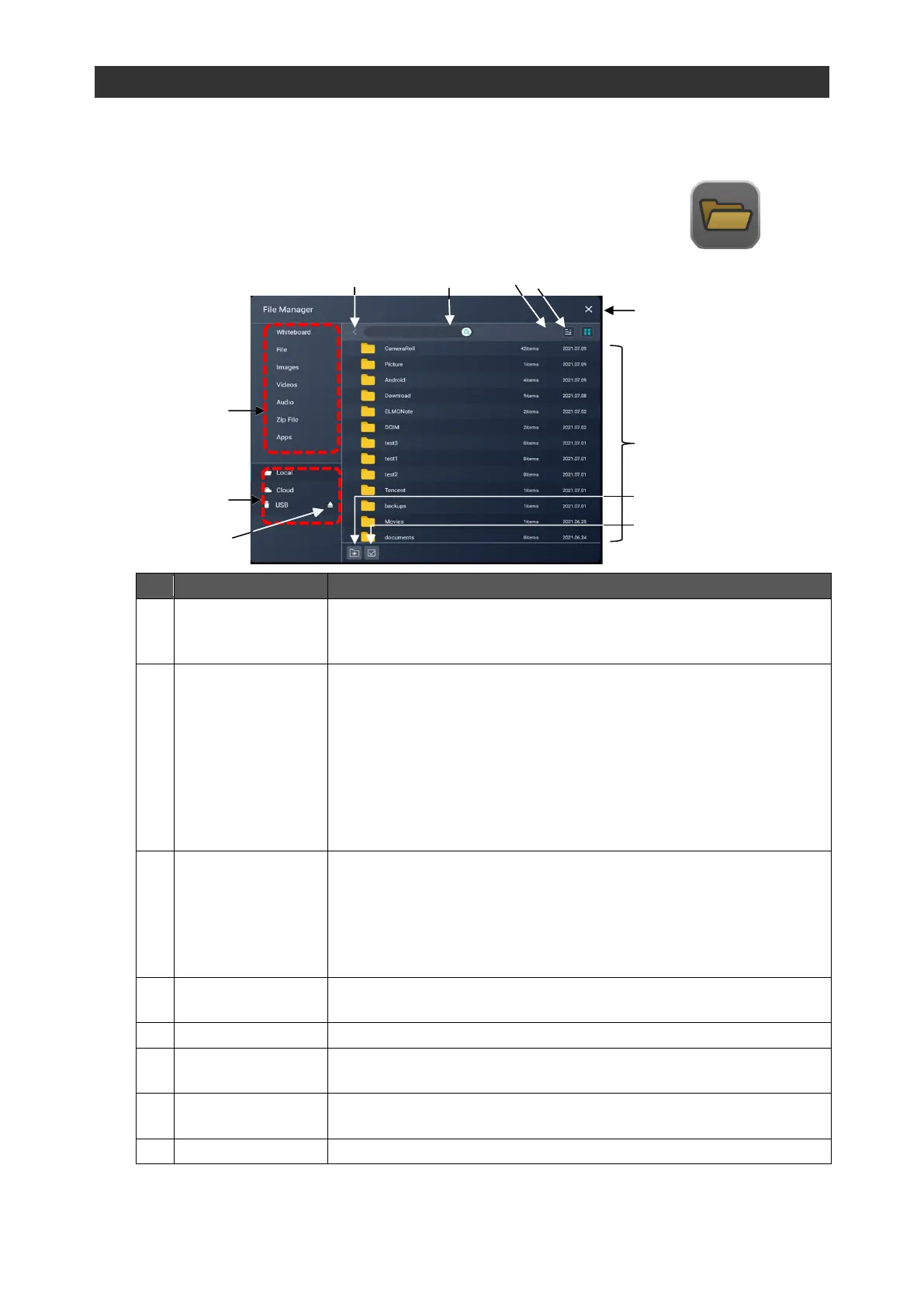
Screen Description
To select files or folders by tapping.
The File Manager app will enter the File edit mode (P. 57) when
the File icon is pressed long.
To display all file types of locally stored files by type.
⚫ Whiteboardiwb(S-Write)
⚫ Filetxtpptx(WPS file)pdf
⚫ Videomp4mov
⚫ Audiomp3
⚫ ZIP filezip
⚫ Appapl
The xod file (ELMO Note) will be displayed in the category of
"Whiteboard" in future version upgrades.
To select the location to read files from.
⚫ LocalFiles stored in the product will be displayed.
⚫ CloudYou can choose Google Drive or One Drive online. The
files saved in the selected Cloud will be displayed.
⚫ USBThe name of the USB flash drive will appear when a USB
flash drive is connected.
To return to the upper level.
Sort in ascending /
descending order
To sort files and folders in ascending / descending order of name,
date, and file size.
To switch the display style of folders and files between list display
and icon display.



 To Next Page