Emerson Process Management GmbH & Co. OHG 4-11
X-STREAM XE
Instruction Manual
HASXEE-IM-HS
10/2012
4
Installation
4.6.1 Installation - X-STREAM XEGP
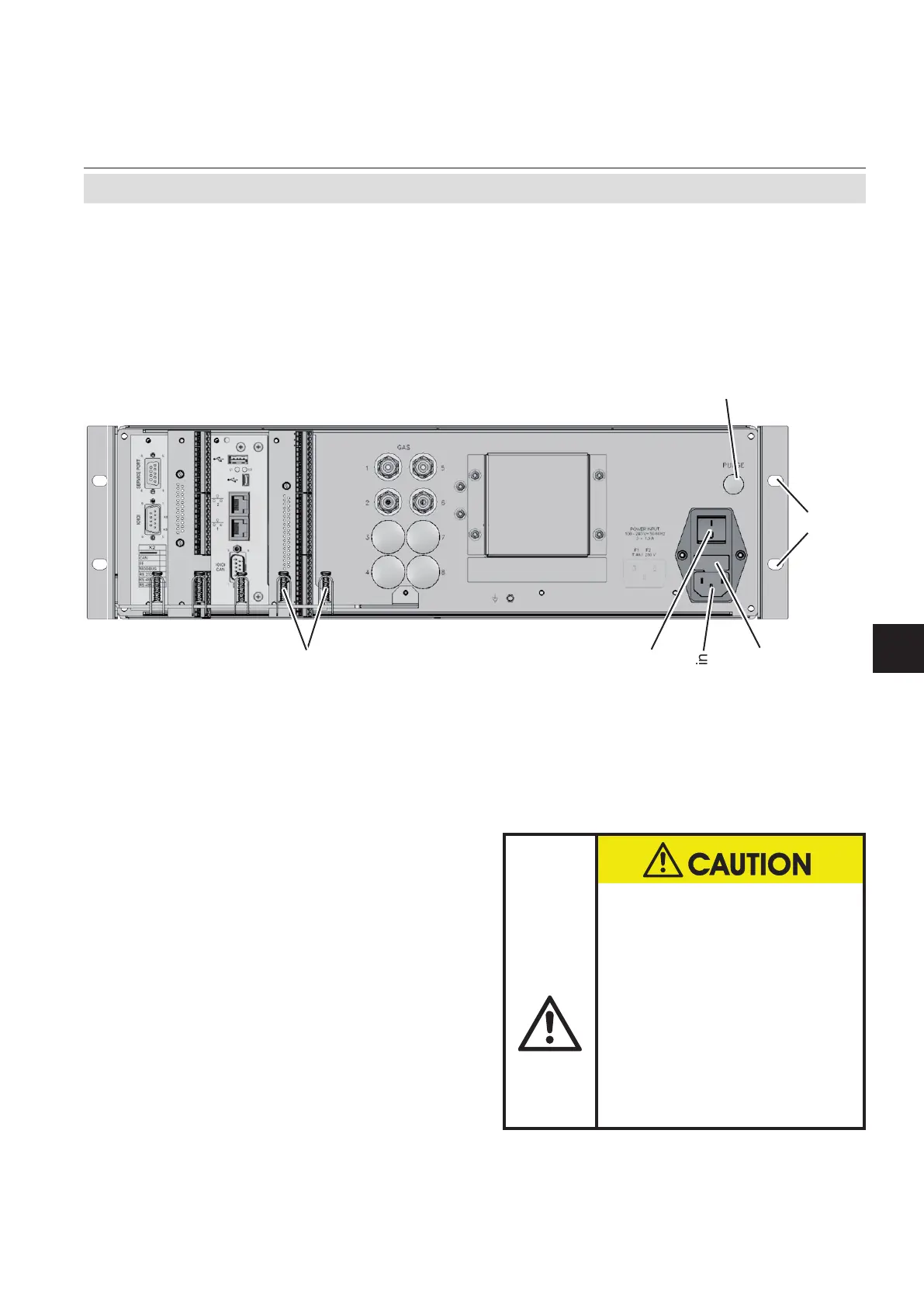
Fig. 4-6: X-STREAM XEGP - Rear Panel, Model With Terminal Adapters and
Front Side Brackets for Rack Mounting
Gas inlets
Gas outlets
Cover for
tO
2
sensor
Purge gas inlet
(optional)
Analog outputs / NA-
MUR status relays
Serial interface
( RS 232 /
Modbus 485)
Digital inputs /
outputs
Power in
Fuses
Power switch
Services interface
Strain reliefs and
shielding contacts
for signal cables
4 screw holes for rack mounting
(7.5 x 10.5 mm / 0.29" x 0.41")
USB connectors
RJ45 ethernet connectors
Serial CAN
interface
The brackets on either side of the front panel
enable to install the unit into a rack; this is
accomplished by means of four screws (Fig.
4-6).
HAZARD BY INSTALLATION
The brackets are not designed
to carry the weight of the
instrument!
Support the instrument, when
rack mounting!
Disregarding may cause per-
sonal injury and damaged
equipment.














 To Next Page