EnGenius EOC2611P Version 1.0
22
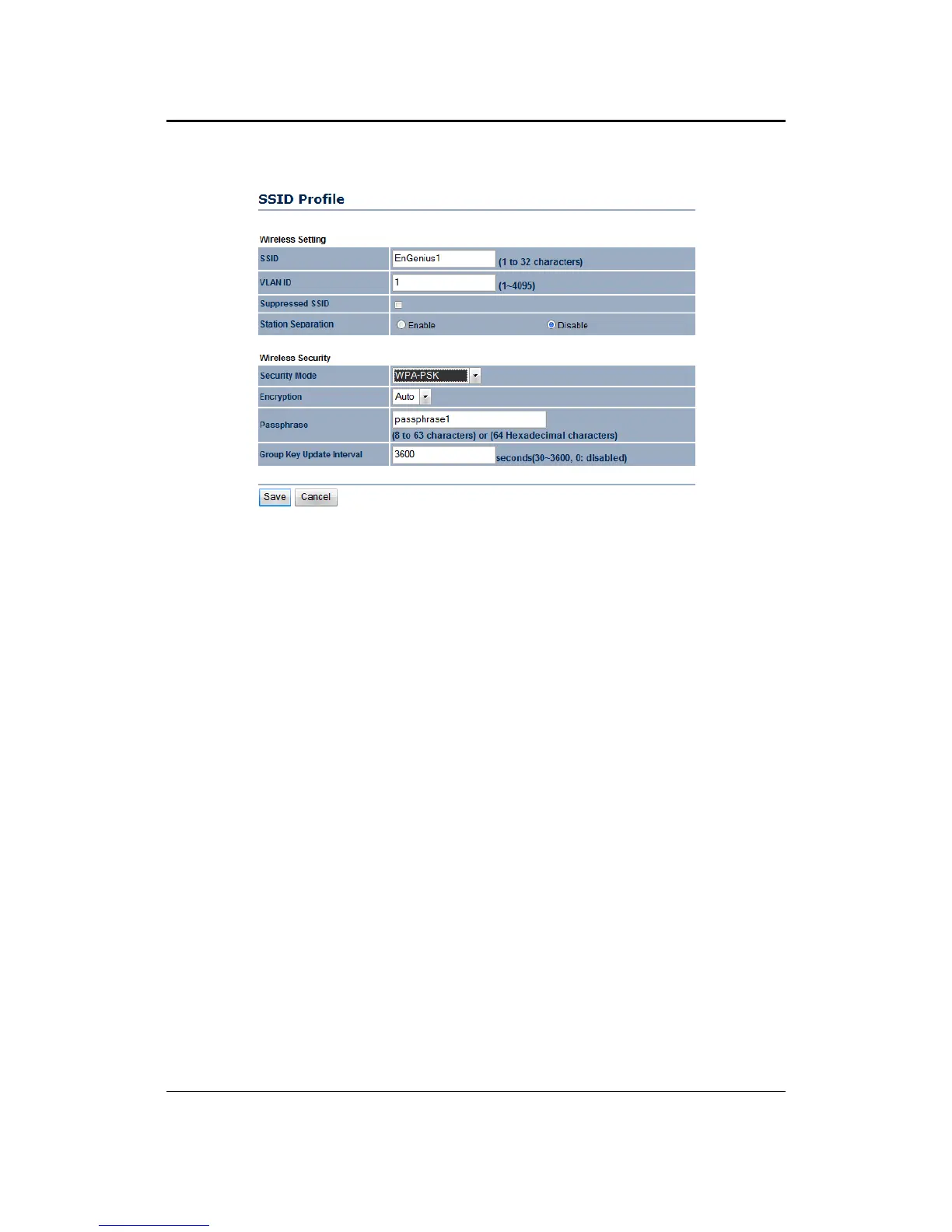
`WirelessSecurity–SecurityMode:WPA‐PSK,WPA2‐PSK,WPA‐PSKMixed
``SecurityMode:SelectWPA‐PSK,WPA2‐PSK,orWPA‐PSKMixedfromthedrop‐downlistif
yourwirelessnetworkusesWPApre‐sharedkey.
``Encryption:SelectTKIP,AESor Autofromthedrop‐downlistifyourwirelessnetworkuses
this encryption. WPA (Wi‐Fi Protected
Access) was designed to improve upon the security
features of WEP (Wired Equivalent Privacy). The technologyis designed to work with existing
Wi‐Fi products that have been enabled with WEP. WPA provides improved data encryption
through the Temporal Integrity Protocol (TKIP), which scrambles the keys using a hashing
algorithm
andbyaddinganintegritycheckingfeaturewhichmakessurethatkeyshaven’tbeen
tamperedwith.AESisanevenmoreadvancedmethodofencryptionwhichoffers thehig hest
levelofWPA/WPA2security.
``Passphrase:SpecifyapassphrasethatissharedamongsttheAccessPointsandclients.
``GroupKey
UpdateInterval:SpecifythenumberofsecondsafterwhichtheAccessPointwill
probetheclientforthepassphrase.
``ClickontheSavebuttontosavethechanges
.



 To Next Page