Model 5601MSC
Model 5601MSC Master SPG/Master Clock System
Page - 72 Revision 2.2 MASTER CLOCK
hh:mm:ss:ff
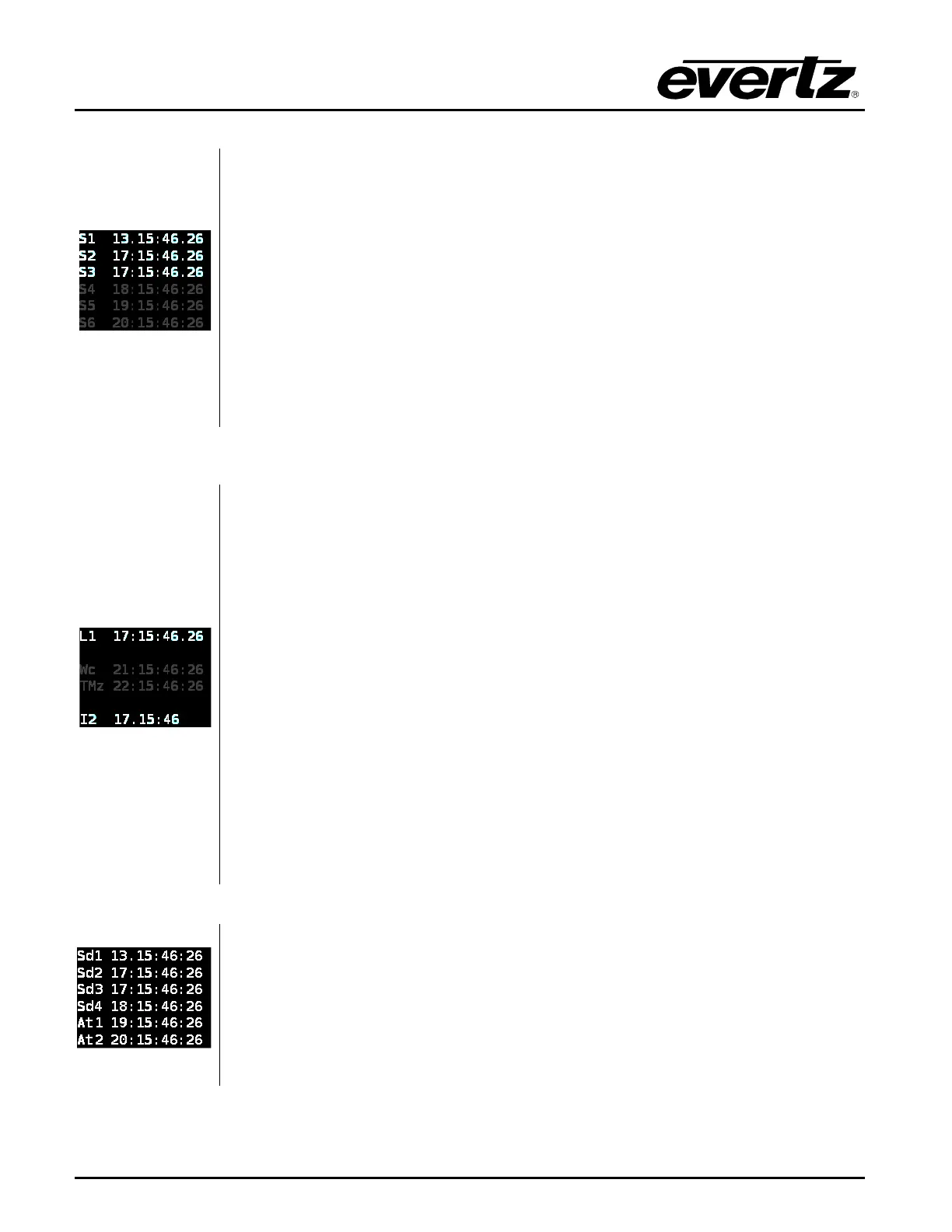
The Sync 1-6 status screen shows the VITC clocks for the sync outputs in
“hours:minutes:seconds:frames” format. The delimiter between the hours and
minutes indicates whether Daylight Saving Time is being applied to that output. It
will be a period “
.” when DST is enabled and a colon “:” otherwise. The delimiter
between the seconds and frames indicates whether dropframe counting is being
used on the VITC output. It will be a period “
.
” when dropframe counting is
enabled, and a colon “:” otherwise.
In the example to the
left, the VITC on sync output 1 has been set to Eastern
Standard Time (Time Zone to UTC –
5:00) and has DST enabled (1 hour
advanced). Sync outputs 1 to 3 are all in dropframe counting mode. The timecode
clocks for sync outputs 5, 6, and 7 are dimmed because they are set to an output
mode which doesn’t support VITC. Although VITC is not being inserted onto these
sync outputs, the timecode clocks continue running.
hh:mm:ss:ff
The LTC/Wc/Ten MHz status screen shows the LTC/IRIG output clocks and the
VITC output clocks for the wordclock and 10MHz outputs. If the LTC/IRIG outputs
have been configured to output LTC, the current output timecode will be shown on
lines 1 or 2 prefixed with “
L1” or “L2”. If they have been configured to output IRIG,
the current output timecode will be shown on lines 4 or 5 prefixed with “
I1” or “I2”.
If the Wordclock or 10MHz
outputs have been configured to output black burst
with VITC enabled, these clocks will be displayed on lines 3 and 4 as bright white.
In the example to the left, the Wordclock and 10MHz output have been left in their
default modes (cannot insert VITC onto a wordclock or 10MHz CW signal). The
VITC timecode clocks are dimmed to show that the timecode is not being inserted.
O
n all timecode lines, the delimiter between the hours and minutes indicates
whether Daylight Saving Time is being applied to the output. It will be a colon “:” if
DST is disabled, and a period “
.” If DST is enabled (see I2 in example to the left).
For
VITC/LTC timecodes, the delimiter between the seconds and frame counts
indicates whether dropframe counting is enabled. It will be a period “.
dropframe counting is being used, and a colon “:” otherwise (see L1 in example to
hh:mm:ss:ff
The SDI 1-6 ATG 1-2 status screen shows the clocks for each of the test
generator burn-in displays
in “hours:minutes:seconds:frames” format. The
delimiter between the hours and minutes indicates whether Daylight Saving Time
is being applied to that output. It will be a period “
.” when DST is enabled and a
colon “
:” otherwise. The delimiter between the
seconds and frames indicates
whether dropframe counting is being used on the time output. It will be a period “.”
when dropframe counting is enabled, and a colon “
:” otherwise.



 To Next Page