205
EVINRUDE ICON REMOTE CONTROL SYSTEM
ICON SYSTEM SETTINGS
10
ICON SYSTEM SETTINGS
Set Engine Identity (Instance)
In a multi-engine application, the transom position
of the outboard must be identified on the network.
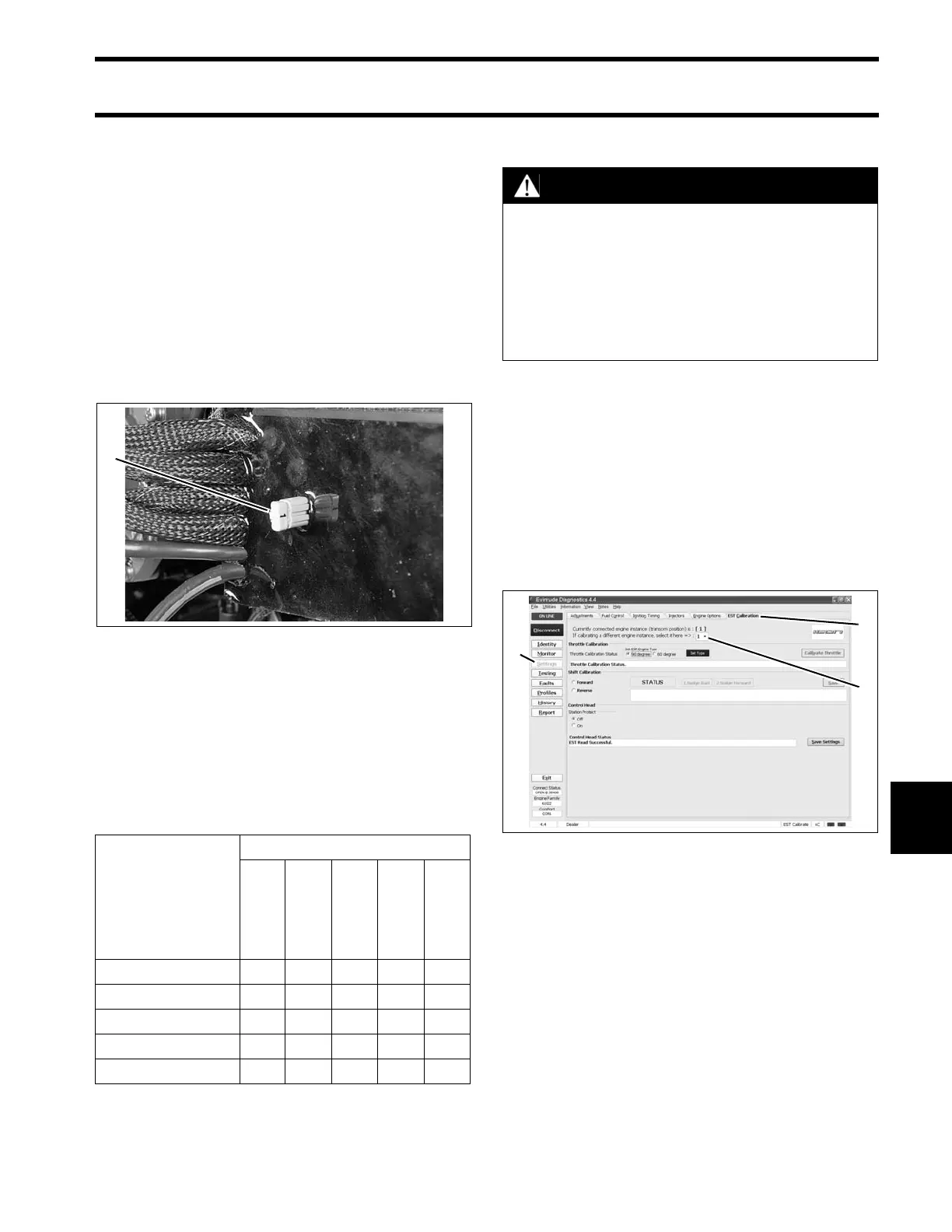
Engine identity is set by an Engine Identity Plug
installed in the ESM. Outboards are identified as
Instance 0 through 4, from port to starboard, up to
five engines.
Each identity plug is stamped with its instance
number.
If the outboard is a single engine or the port
engine in a multi-engine application, no changes
are required.
For all other outboards, engine identity must be
set by replacing the original plug (0) with the plug
that corresponds to the outboard’s position on the
transom.
IMPORTANT: The Engine Identity Plug over-
rides any previous EMM instance setting.
Calibrate Actuator Stroke
To calibrate the actuators, use the EST Calibra-
tion tab of the Evinrude Diagnostics Settings
screen.
In a multi-engine application, all outboards can be
calibrated through one connection by changing
the engine instance setting on the screen.
IMPORTANT: If the EST Calibration tab is not
available, make sure the engine management
software has been updated to the correct revision.
Throttle Actuator Stroke
To set throttle stroke, click the Calibrate Throttle
button. The actuator arm will move forward and
back to find the mechanical limits of the throttle
1. Engine Identity plug 007505
Number of Out-
boards
Identity Numbers
Port
Port
Center
Center
Starboard
Center
Starboard
10
20 1
3012
40123
5 01234
CAUTION
After installation, dealer MUST use
Evinrude Diagnostics software, version 4.0
or higher, to calibrate the actuators for cor-
rect throttle and shift stroke.
Failure to calibrate shift stroke will lead to
gearcase failure and possible loss of boat
control not covered by warranty.
1. Settings button
2. EST Calibration tab
3. Engine instance setting
008130





 To Next Page