User Manual GROUPING February 16, 2010
Xynergi Media Production Centre Page 216
Suspending a Track Link Group
Track Link groups can be temporarily suspended while you work on one of the member tracks.
Step 1 Hold down the BLUE button.
Step 2 Press a track button that is inside a Link Group.
The Link Group is suspended, and the track you pressed becomes the Current Path.
Reinstating a Suspended Link Group
Suspended groups can be reinstated at any time until the project is closed, or until one of the members
is used in another Link Group.
Step 1 Hold down the BLUE button.
Step 2 Press a track button that was inside a Link Group, before it was suspended.
The Link Group is reinstated, and becomes the Current Path.
Panning Link Groups
When a Link Group is the Current Path, the pan controls act on each Link Group member at the same
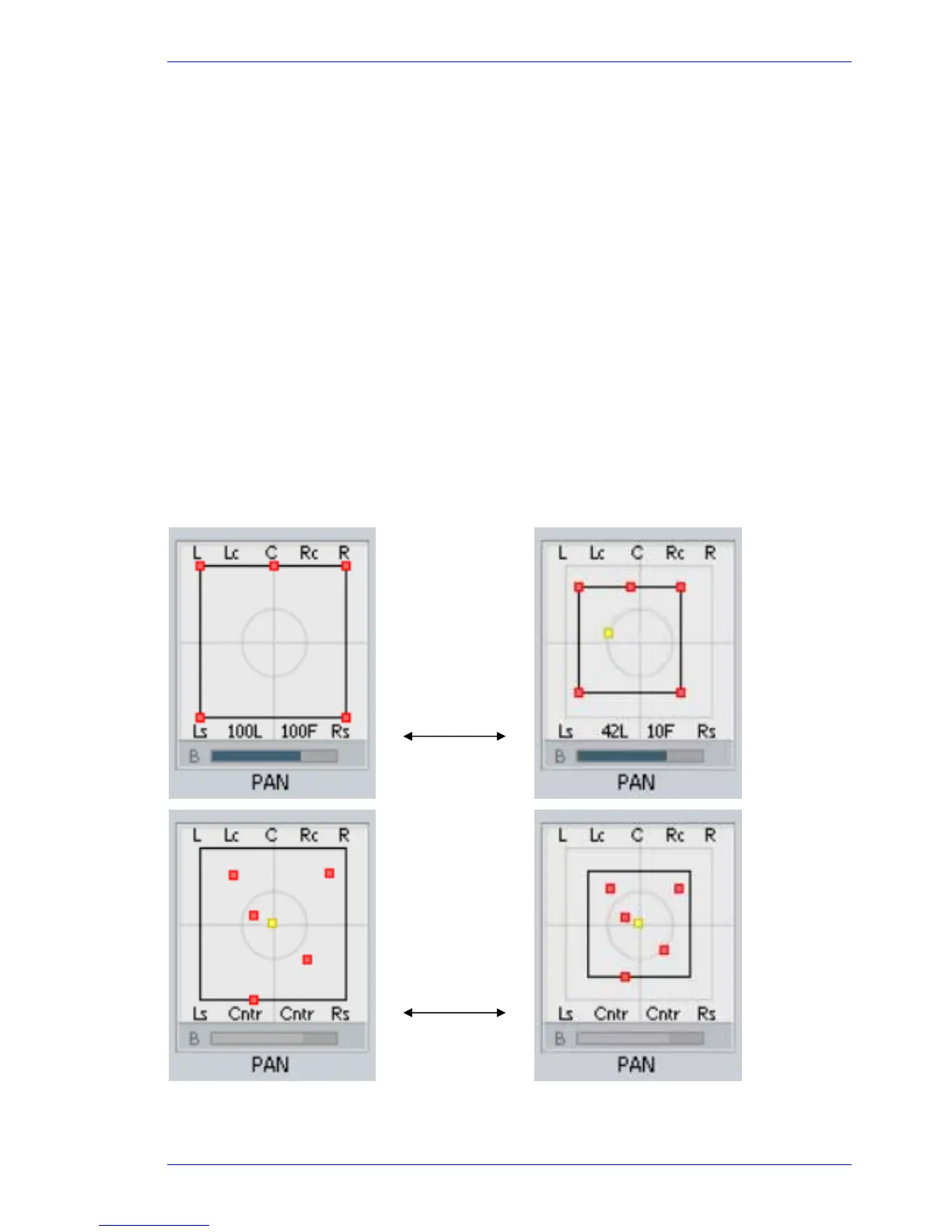
time. The system maintains a Spread Box for each Link Group, which affects panning behaviour.
Link Group with
default panning.
Spread box is set
to maximum size,
so Link Group
members are
panned as wide as
possible.
Spread box is set
to 70%, so
members are
brought inwards.
Now the whole
Spread box can be
moved LR and FB.
Link Group with
random panning.
Spread box is set
to maximum size,
so Link Group
members cannot
be panned any
wider, nor moved.
Spread box is set
to 70%, so
members are
brought inwards.
Now the whole
Spread box can be
moved LR and FB.



 To Next Page