2. Use of the vehicle
USE AND MAINTENANCE MANUAL CHAPTER 2
USE OF THE VEHICLE2-Strokes - Edition 01 / 2023
78
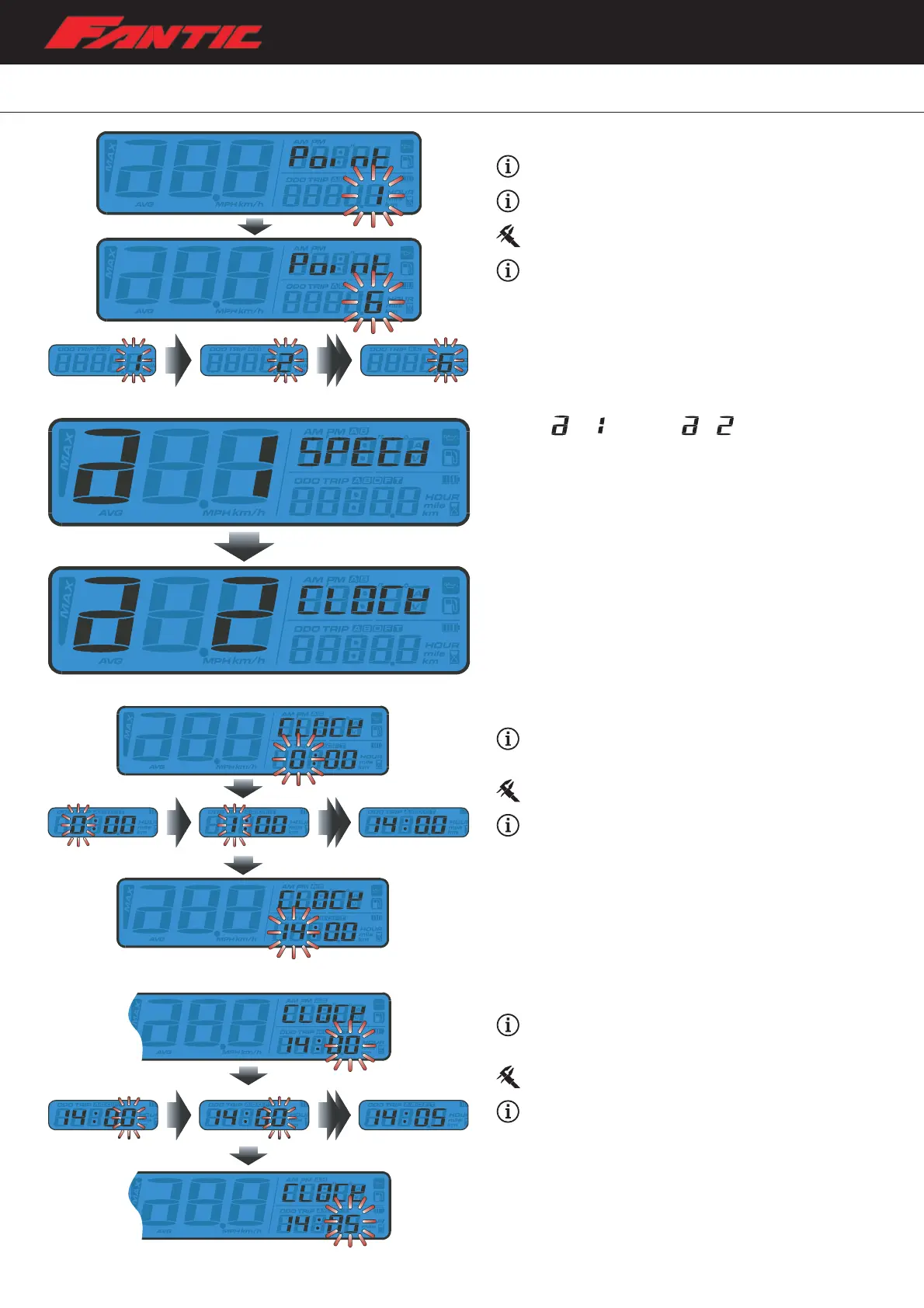
Sensing point setting
Example: to change the sensing point to 6.
The sensing point settings range from 1 to 6 points.
Default value: 1.
Example: the sensing point setting has been changed
from 1 to 6.
– Press the Select button to choose the hour you want to set.
– Press Adjust button to go back to tire circumferences value
and sensing point setting screen.
– From
switch to screen.
– Press the Select button to enter the clock (Hour) setting.
The clock (hour) setting
Example: the hours have to be set to 14.
– Press the Select button to choose the hour you want to set.
Setting range: 0~24 H.
Example: the hours have now been changed from
0:00 to 14:00.
– Press the Adjust button to enter the minute setting.
The clock (minute) setting
Example: to change the setting to 14:05.
– Press the Select button to choose the minute to be set.
Setting range: 0~59 minutes.
Example:the time is now changed to 14:05.
– Press Adjust button to go back to Clock setting screen.







 To Next Page