5 | Operation FISCHER Mess- und Regeltechnik GmbH
58/108 BA_EN_FT90
5.5.1.2.2 Measuring range C1 start
Path: \Configuration\Channel 1\Measurement C1\Measur. range C1 start
Level:4
Meas.range C1 start
1 2 3 4
OK CancelEdit
020.000
Pa
U
Fig.79: Measuring range C1 start
The start value of the measuring range is entered here. This input acts directly
on the output signal. The display is not directly affected.
The unit, value range, and value range limits are displayed automatically.
In the factory configuration, a basic measuring range is defined for each device.
This basic measuring range is defined by the order code and is stated as the
measuring range on the type plate.
The parameters 'Meas.range C1 start' and 'Meas.range C1 end'
are for configuring the input range of measuring channel C1.
Spread (turn down)
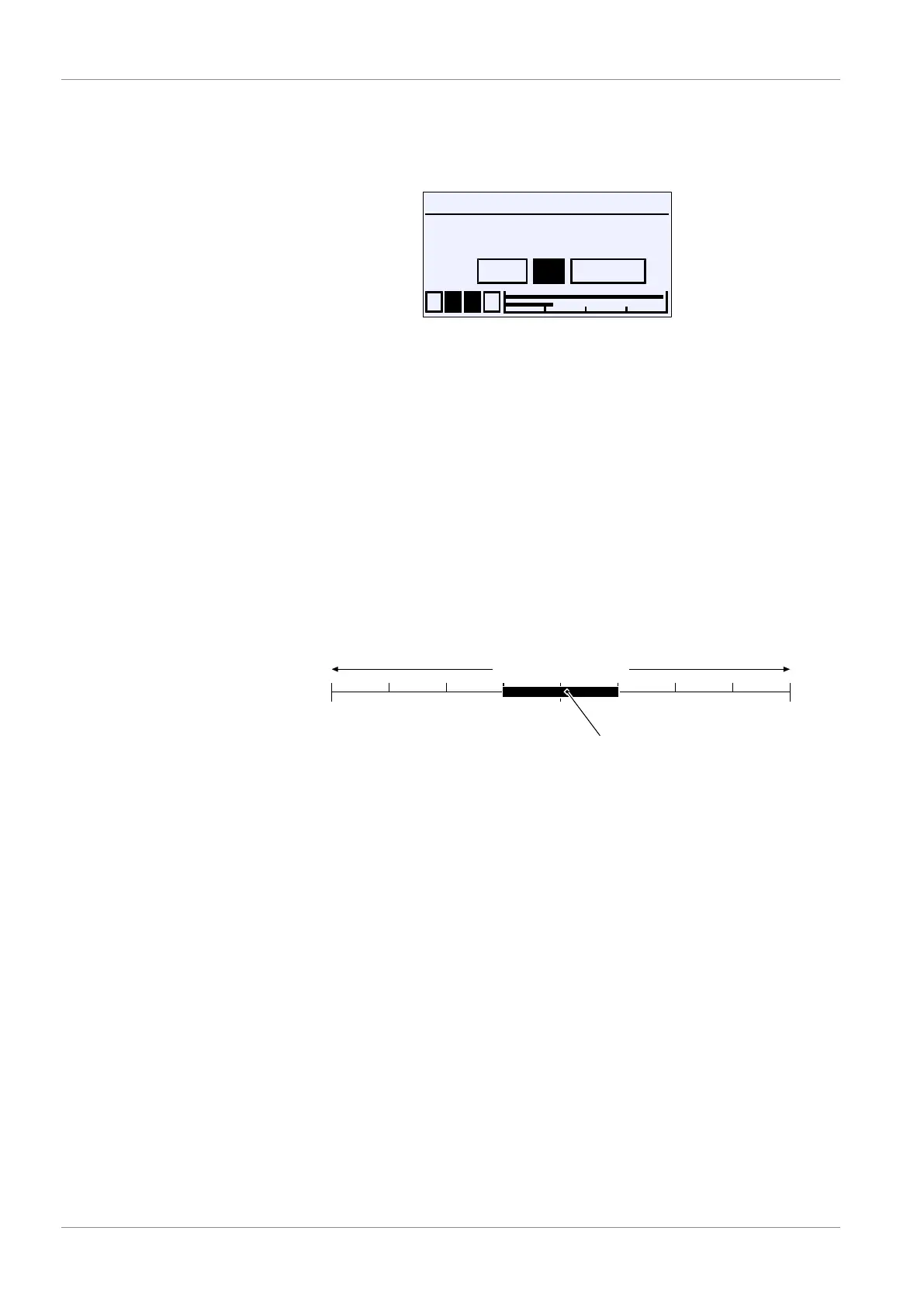
The characteristic can be spread within the basic measuring range. The spread
is the ratio between the basic measuring range and the set measuring range
and may be a maximum of 4:1. This means that the difference between the two
values 'Meas.range C1 start' and 'Meas.range C1 end' must be at
least 25% of the basic measuring range.
0-1 +1
-0.25 +0.25-0.50-0.75 +0.50 +0.75
set measuring range
Basic measuring range
Fig.80: Turn down
The spread of the characteristic only acts directly on the output signal. The ac-
tivation of the parameter 'Limit' limits the display area to the set measuring
range, too.
Characteristic slope
If 'Meas.range C1 start' < 'Meas.range C1 end' , this gives a rising
characteristic. The output signal increases with increasing pressure.
If 'Meas.range C1 start' > 'Meas.range C1 end' , this gives a falling
characteristic. The output signal drops with increasing pressure.













 To Next Page