39
Allows you to move between pages.
Clicking the button displays the dialog box to change and add Link
settings.
MFR-5000/8000/3000: Up to 4096 links
Other MFR main units: Up to 256 links
Clicking the Delete button deletes the setting.
Displays the current crosspoint link setting.
Enables/disables the link function when changing crosspoints from
devices other than RU units.
Link Settings
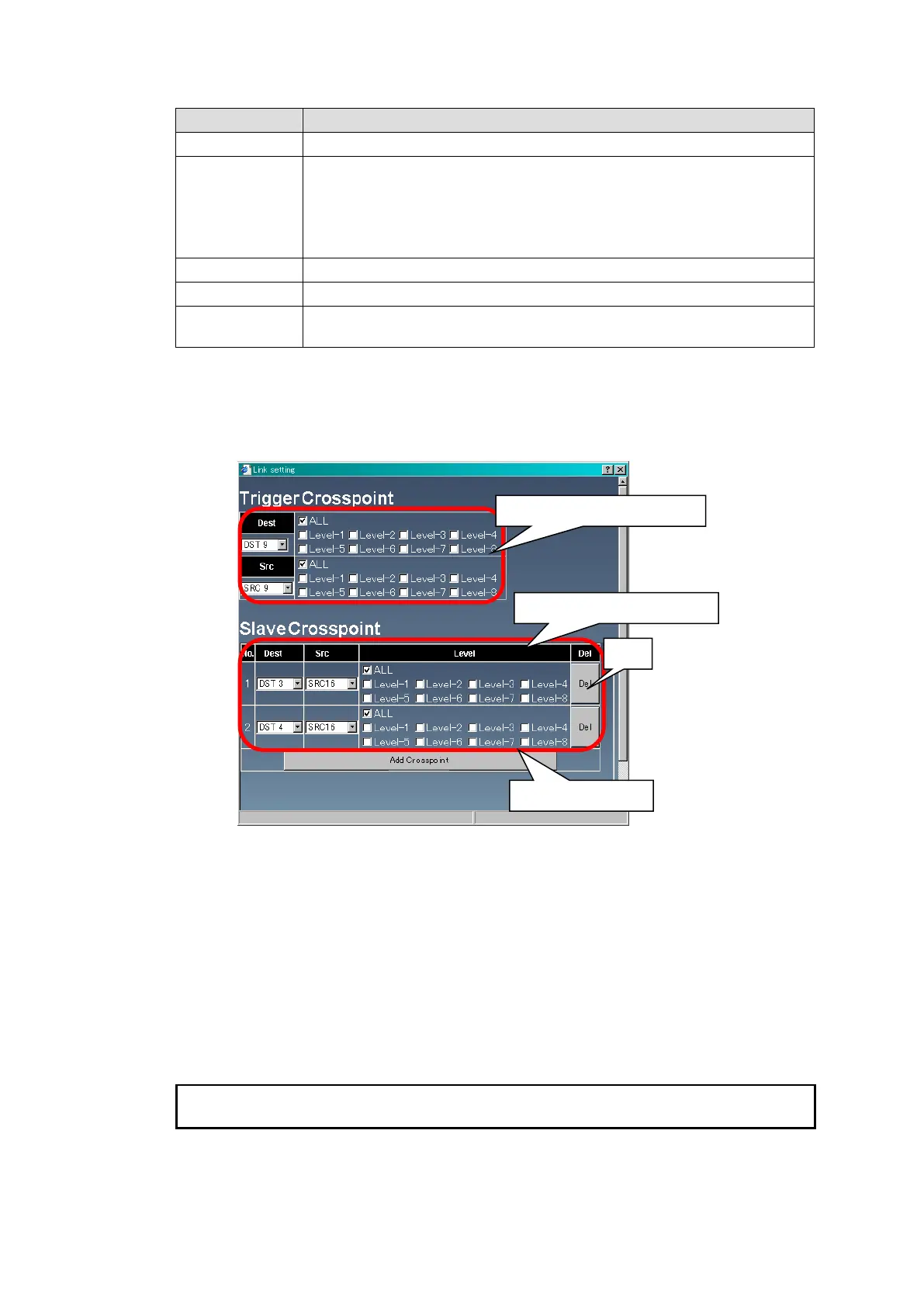
1. Click a button under the No. that you wish to change the settings of. To add a new setting,
click the button of the empty item. The dialog box as shown below appears.
2. In the dialog box, set the Destination, Source, and Level settings of the trigger
crosspoint and the crosspoint that is linked to that crosspoint (the Slave crosspoint). Up to
3 crosspoints that are linked to the trigger crosspoint can be added, and they can be
deleted by clicking the Del button.
3. After completing settings, click OK. The dialog box closes and the settings are applied
under the Crosspoint in the Link Settings page.
4. After all necessary settings, click the Send button to apply the settings.
If settings are necessary for multiple pages, click the Send button for each page
respectively.
Trigger crosspoint settings
Slave crosspoint settings



 To Next Page
 Loading...