TruVision DVR 40 User Manual 95
Table 15: Text insertion capturing options
Option Description
Network sniff The text insertion is actively sniffed through the network, such as credit card numbers.
To setup the TVR 40, you need to enter the following information:
IP address of ATM machine
Type of ATM machine
Start and end position, length and the content of the data message
Start and end position, and length of credit card number
Start and end position, and length of transaction type
Transaction type (for example, modify PIN, deposit, withdrawal) and code
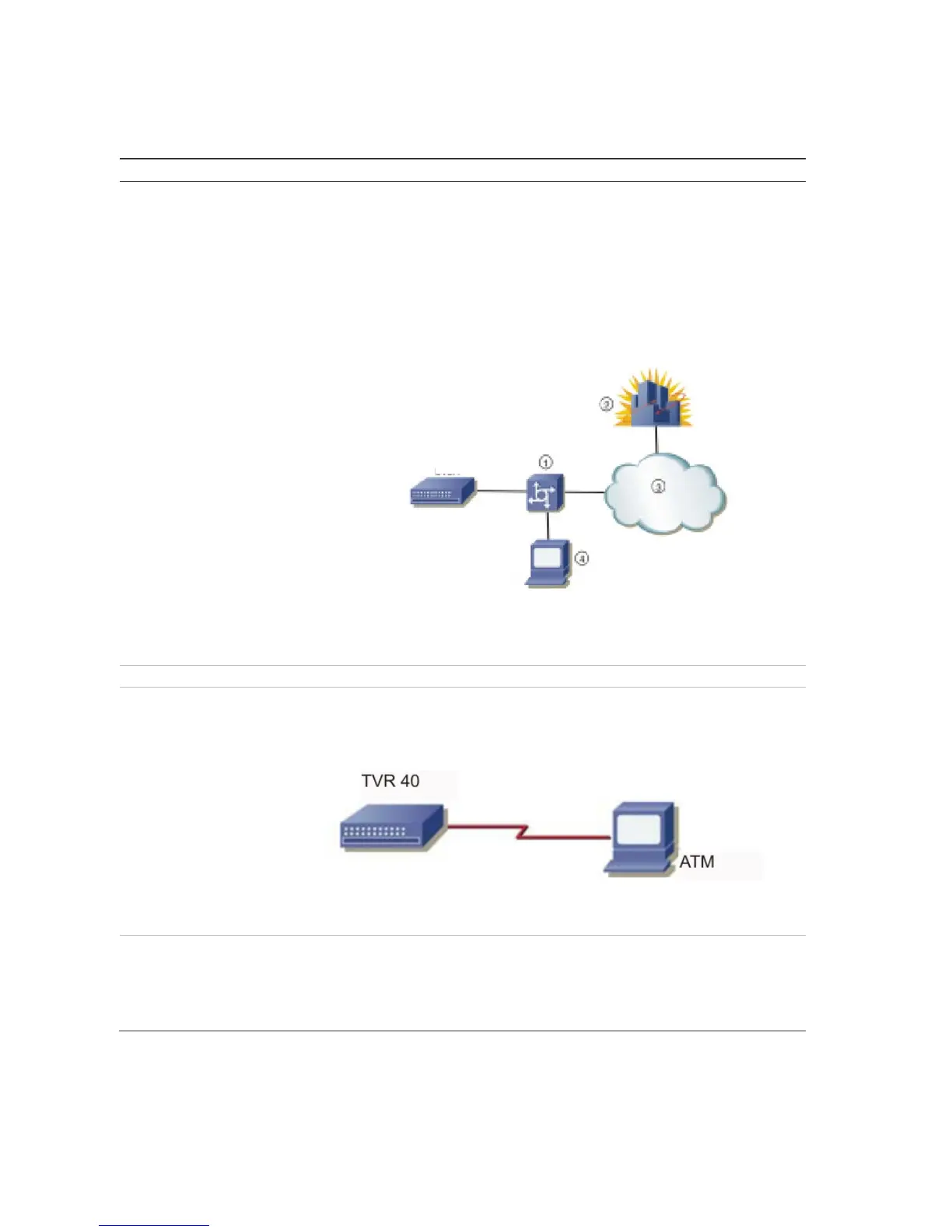
The network connection is as follows:
1. Switch; 2. Bank center; 3. Network; 4. ATM
When the ATM machine sends the text insertion to the bank center, the DVR captures
the data package through the network, and analyzes the data format. The TVR 40 will
then overlay the corresponding text onto the live video.
Network receive For future use.
Data received from ATM
through the serial port
To setup the TVR 40 you need to enter the following information:
Type of ATM machine
Transaction type and code
The network connection is as follows:
The TVR 40 RS-232 must be setup in transparent channel mode (see page 78). Software
must be run in the ATM to send the credit card number and transaction code to the
TVR 40 through the RS-232 port.
Command received from the
ATM through the serial port
To setup the TVR 40, you need to enter the following information:
Type of ATMS machine
Transaction type and code
Software must be run in the ATM to send the command to the TVR 40 through the RS-
232 port.
DVR



 To Next Page