14 TruVision DVR 40 User Manual
Menu option Description
Instant Replay Get an instant replay of the last five minutes recorded from all cameras in either full-screen
view or multiview. See section ““Playback recorded video” on page 25 for more information.
During the playback right-click the mouse to jump to the Playback menu.
Search Jump to the Playback menu. See “Searching and playing back recorded video” on page 21.
Select for recordings with specific criteria, such as particular camera, type of event, time,
and text.
Right-click the mouse to return to live mode.
Manual Record Manual Record menu screen appears. See “Manual recording” on page 20.
Status Bar Toggle the on-screen status bar on/off.
Swap Monitor Toggle between monitors A and B.
Using the Web browser
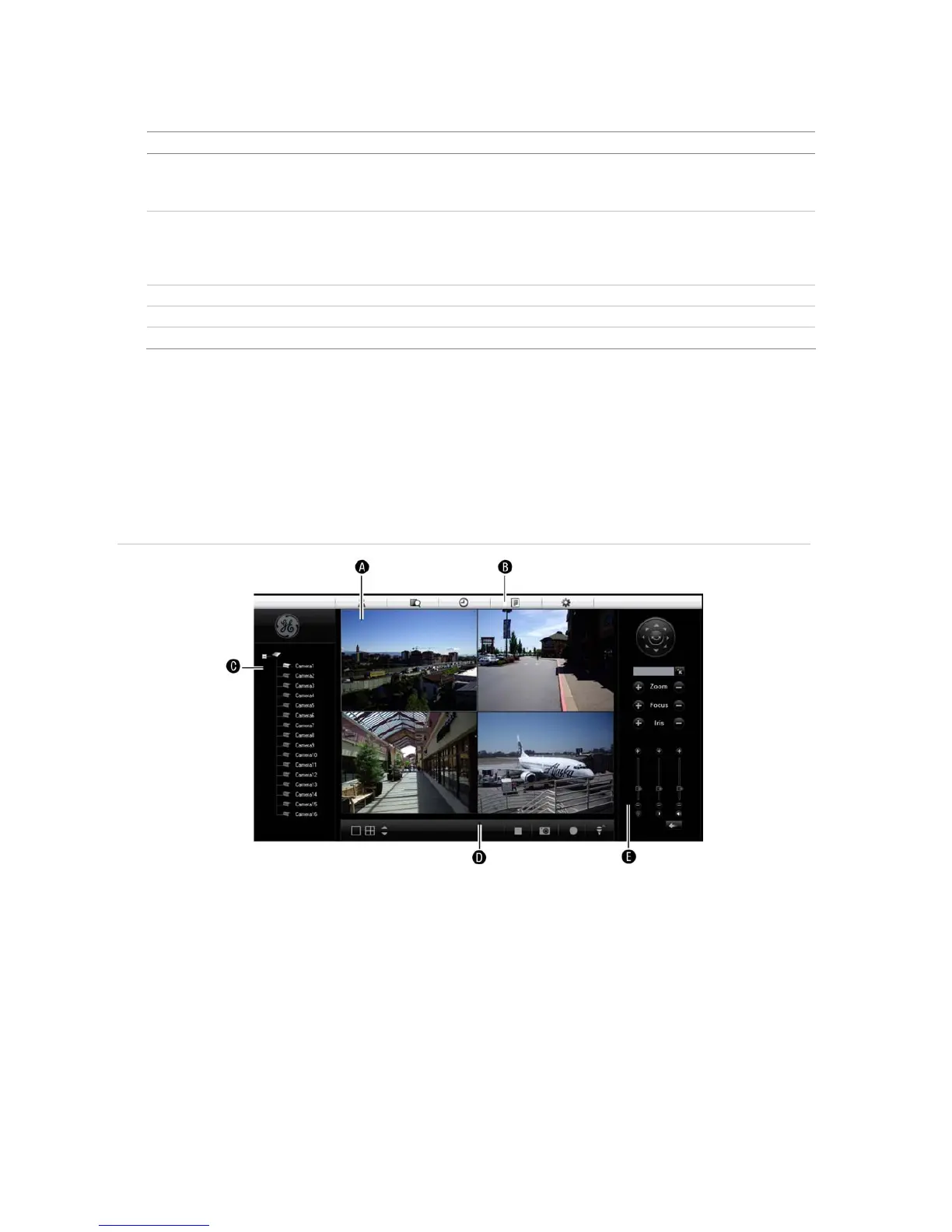
The TVR 40 Browser lets you easily view, record, and playback video as well as manage all aspects of the
system from any Internet location. It has easy-to-use controls that give you quick access to the functions you
require. See Figure 9 below for the layout.
Figure 9: TVR 40 Browser layout (Live mode shown)
A. Viewer: View live and recorded video.
B. Navigation bar: Access live and playback video. Explore the TVR 40 internal log, and carry out comprehensive
remote maintenance.
C. Navigator: Access all TVR 40 cameras.
D. Viewer controller: View or edit the properties of the currently selected objects in the Navigator.
E. Camera controller: Control PTZ cameras or edit properties of the currently selected cameras.



 To Next Page