TruVision DVR 40 User Manual 5
Setting up a PTZ dome camera
Use the USB mouse provided or the optional KTD-405 keypad for local telemetry control. If using the
TVR 40 over a network, use the web browser to control the PTZ dome cameras.
The supported protocols are: GE, Pelco-D, and Pelco-P
For information on setting up the PTZ protocols and presets, see “PTZ settings” on page 82.
Connect a TVR 40 to a PTZ dome camera
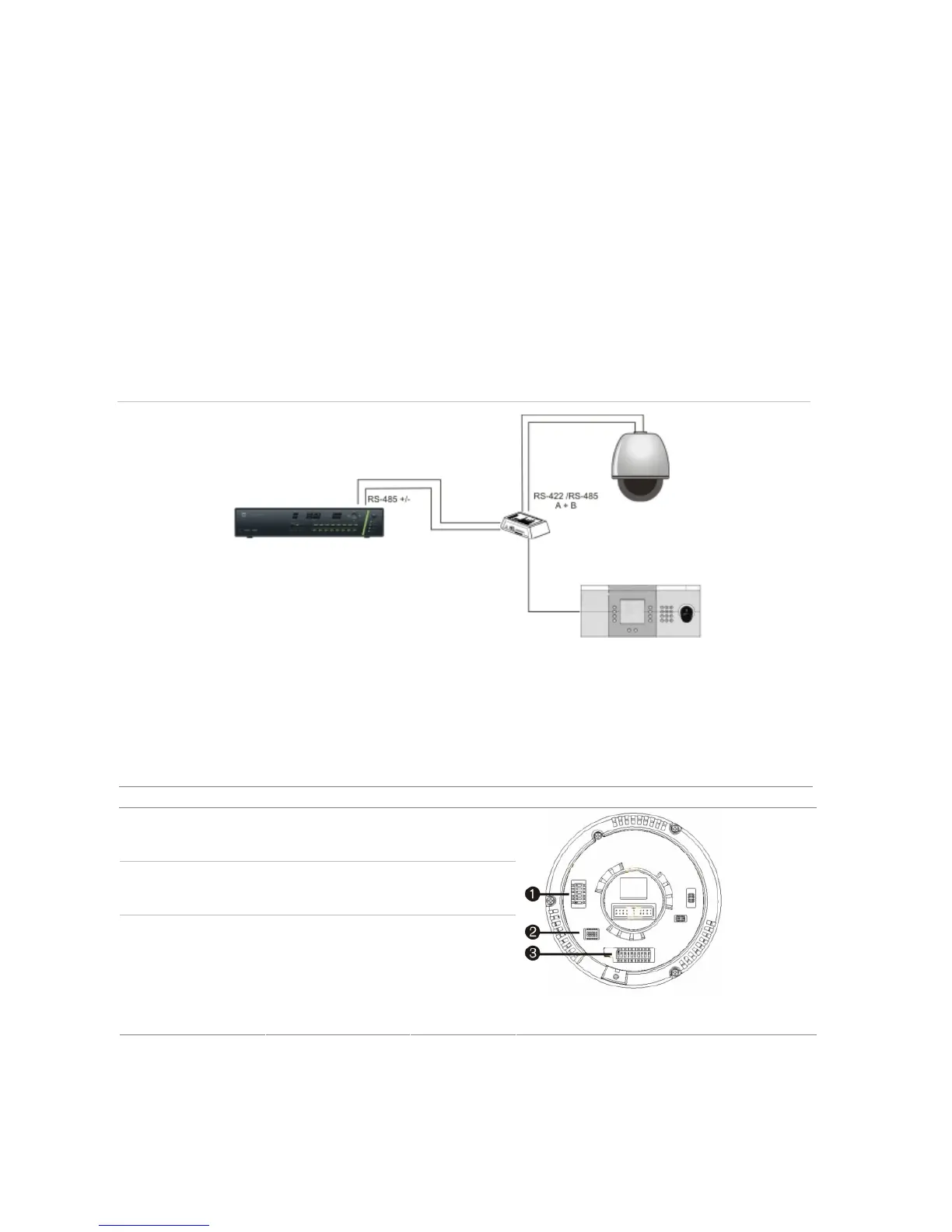
Use the input/output box that is supplied with the TVK-505U keypad to connect both a PTZ dome
camera and a keypad to the TVR 40. See Figure 5 below.
Figure 5: Connecting a TVR 40 to a PTZ dome camera
Configure the PTZ protocols for GE Security cameras
Before the PTZ cameras are assembled in their housings, set their protocol and address DIP switches
for the TVR 40. See Table 1 below for the different GE Security’s
PTZ camera configurations.
If you are using PTZ cameras from another company, please refer to their configuration instructions.
Table 1: Configuring GE Security PTZ cameras
Camera Switch setting
TruVision Dome
12X PTZ: Indoor
Dome
Protocol DIP
switches
000000
RS-485
communication DIP
switches
0000000000
Camera ID DIP
switches
0000
1. Protocol DIP switches; 2. RS-485 communication
DIP switches; 3. Camera site ID DIP switches



 To Next Page