12 TruVision DVR 40 User Manual
To silence the audible button feedback
At any time press and hold down the Menu button for at least
five seconds. The audible button
feedback will activate or deactivate depending on the current status. Press Menu to return to live
mode.
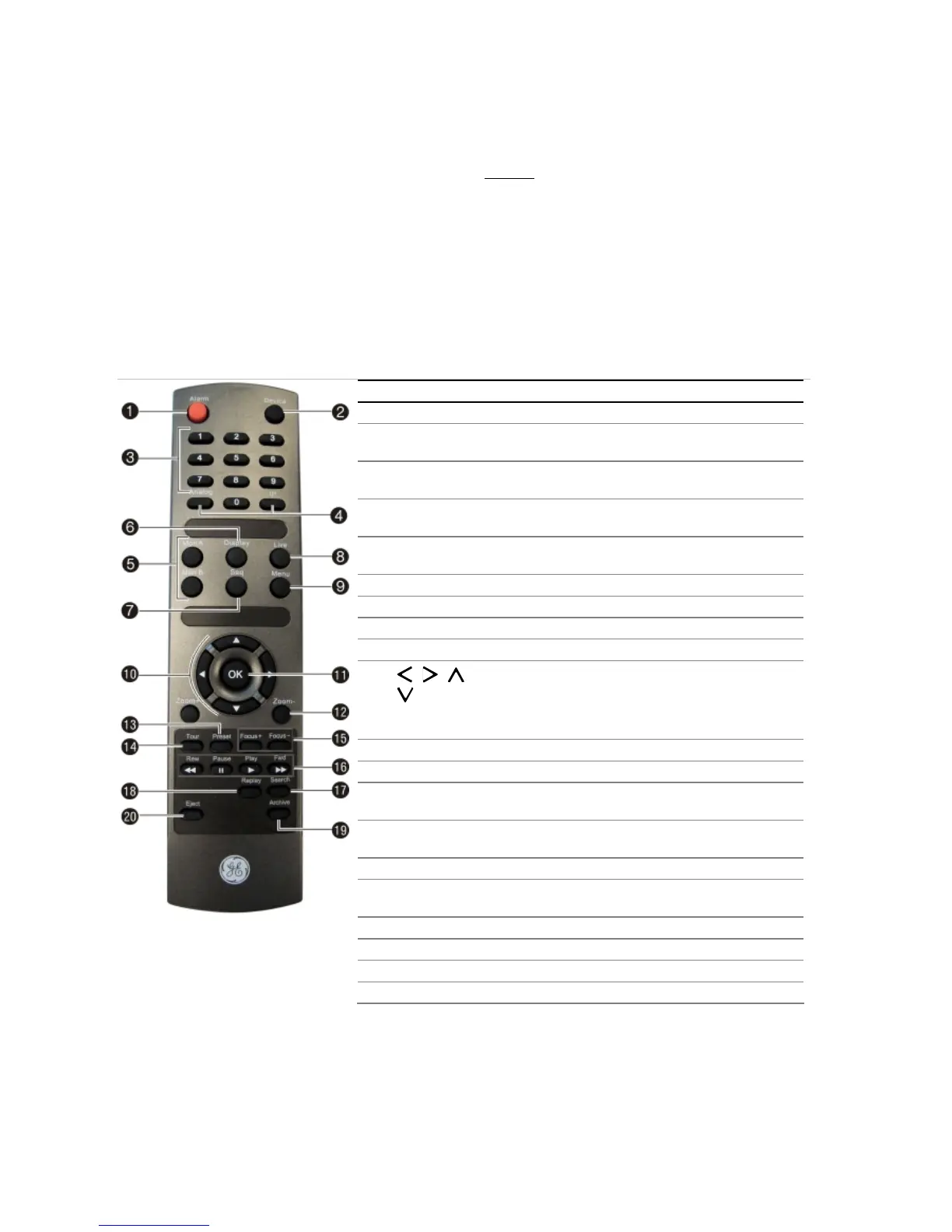
Using the IR remote control
The IR remote control operation is similar to the front panel operation.
Figure 8: Description of the IR remote control
Item Description
1. Alarm Acknowledge an alarm.
2. Device Enable/disable the IR remote control to control the
TVR 40.
3. Numeric
buttons
Select a camera, and enter a number in a menu
option.
4. Analog and IP Analog is equivalent to FI, and IP to F2, on the front
panel.
5. Mon A and
Mon B
Toggle between monitors A and B.
6. Display Toggle between the multiscreen views.
7. Seq Start /stop sequencing.
8. Live Return to live mode.
9. Menu Activate the main menu.
10. , , ,
In Menu mode: Use left or right arrow buttons to select
and up or down arrow buttons to edit entry.
In PTZ mode: Use to control PTZ.
In Playback mode: Use to control playback speed.
11. OK
Confirm selection.
12. Zoom + and - Use to control zoom of camera lens.
13. Preset Enter preprogrammed three-digit code to call up a
preset.
14. Tour Enter preprogrammed three-digit code to call up
shadow tour.
15. Focus + and - Use to control focus of camera lens.
16. Playback
control
Use to control playback (Rewind, Pause, Play, and Fast
Forward).
17. Search Open the Search menu.
18. Replay Replay the selected file from the beginning.
19. Archive Open the Quick Archive menu.
20. Eject Eject the CD or DVD disk.
To insert batteries into the IR remote control
1. Remove the battery cover on the IR remote control.
2. Insert the batteries. Observe the correct battery polarity (+ and -).
3. Replace the battery cover.



 To Next Page