TruVision DVR 40 User Manual 79
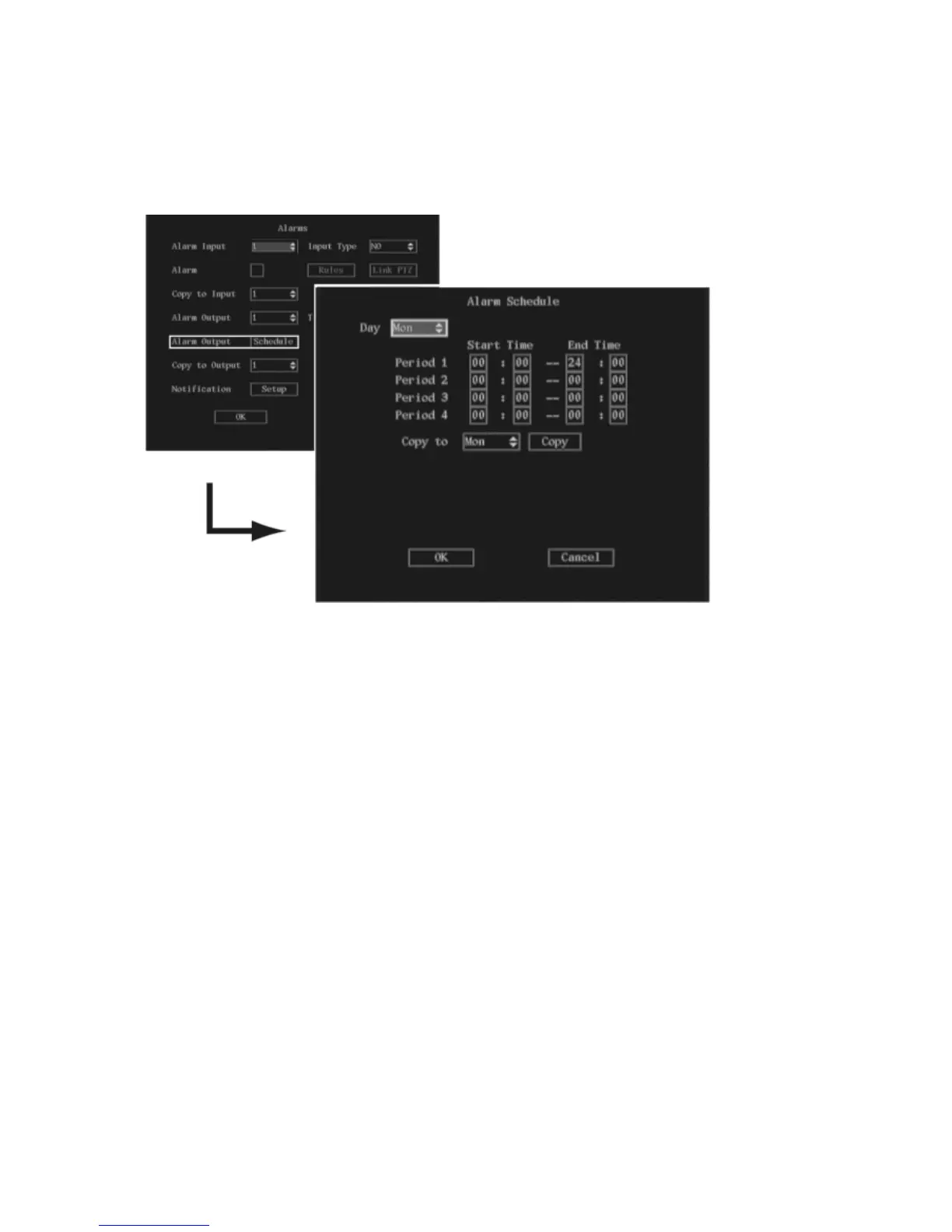
3. To select when during a day an alarm output can respond
a. Go to the Alarm Output schedule button and press Enter or left-click the mouse. The Alarm
Output Schedule submenu appears.
b. In the Day list box select the day of the week. Using the numeric buttons on the front panel, or
the on-screen numeric keyboard, enter the start and end time periods for the selected day for
Period 1. Each day can have up to four time periods.
Note: The time format is 24-hour.
c. Repeat step b for each day of the week.
If the desired times for this alarm output are identical to those of other days, select Copy to
and select the day of the week to which you want to copy this schedule. Select All if the same
schedule is used all week. Select Copy and press Enter twice.
d. Select OK and press the joystick for Enter, or left-click the mouse, to return to the Alarms
menu.
4. To copy the settings to another external alarm input, select Copy to Output in the Alarms menu.
Select one of the outputs listed and press the joystick for Enter, or left-click the mouse. Go to Copy
and press the joystick for Enter, or left-click the mouse. A message appears about copying the
parameters. Select OK to accept.
5. When you have made all the changes required in the Alarms menu, go to OK and press Enter or
left-click the mouse to save all changes and return to the main menu.



 To Next Page