Operation GEDA
®
SUSPENDED WORKING PLATFORM AB 450 / 650
Assembly and Operating Manual
66 / 96 BL061 GB Edition 04/2016
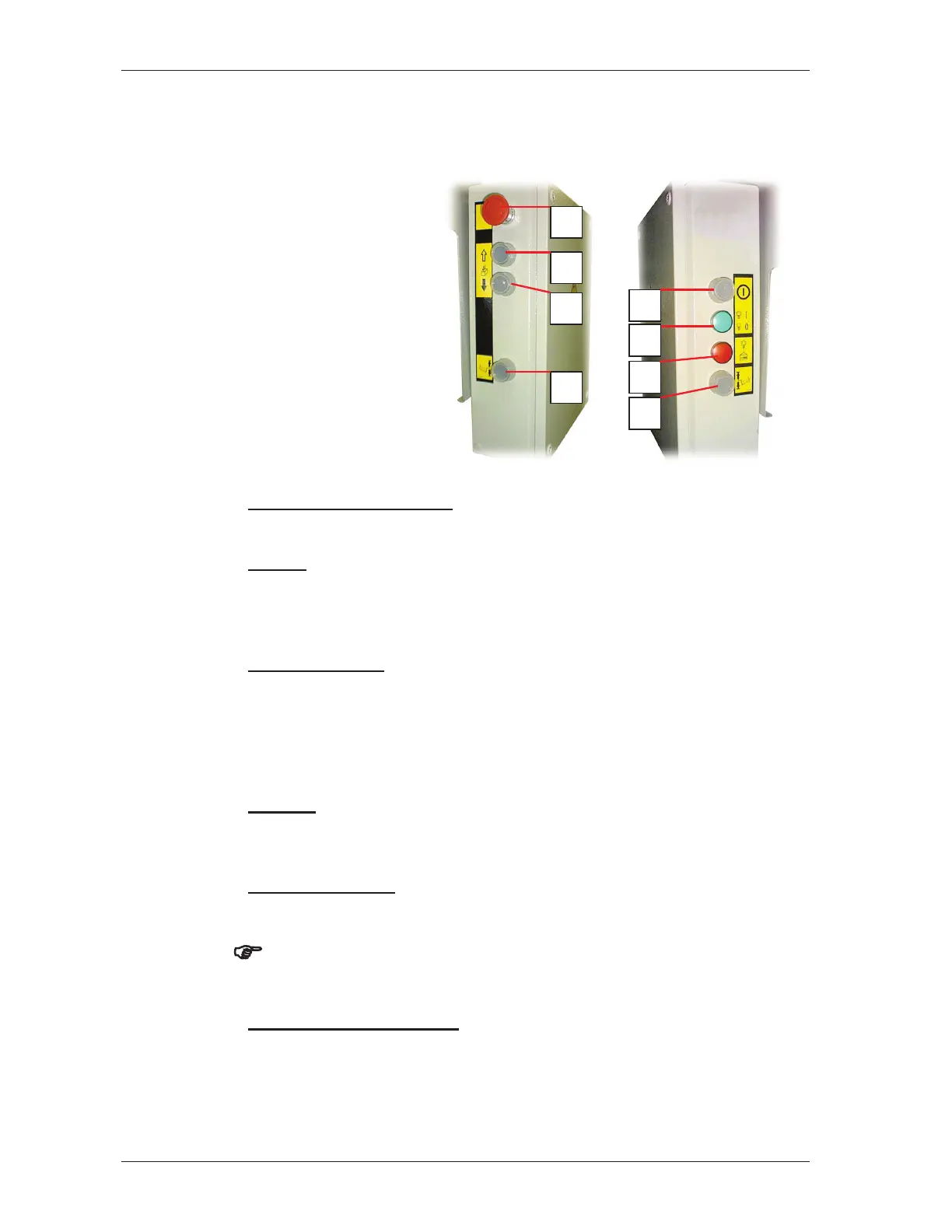
6.3.2 Central control box
button
2 = UP button
3 = DOWN button
4 = Button for tilt
compensation
5 = ON button
6 = Operation control light
7 = Overload control light
8 = Button for tilt
compensation
Switching on the control
¾ Momentarily press the ON button
Ascent
¾ Press and hold the UP button (2).
The working platform only moves while you keep pressing the UP
button (2).
Stopping ascent
¾ Release the UP button (2).
The platform reaches the limit switch approach plate and stops
automatically (the EMERGENCY limit switch on the winch bracket/C-
clamp switches off).
Descent
¾ Press the DOWN button (3) and keep it pressed.
The platform only moves while you keep pressing the DOWN button (3).
Stopping descent
¾ Release the DOWN button (3).
)
Make sure that the working platform descends uniformly. Avoid
inclined position of the platform!
Manual tilt compensation
¾ Press and hold button (4) or button (8).
Press the UP button (2) or DOWN button (3) simultaneously to
perform manual tilt compensation.



 To Next Page