Reference Manual Preliminary
Prox–DU & Prox–SU
www.gemalto.com Release for first samples Do not use for final design
DOC118569A Public Use Page 113/134
Boot-loader version request command
This command enables the user to determine the Boot-loader version.
It is the same than firmware version request for the reader. Then the response can be
checked to confirm if the boot-loader is running or the device firmware is running.
Reset reader command
This command is used to reset the Prox–DU or Prox–SU device.
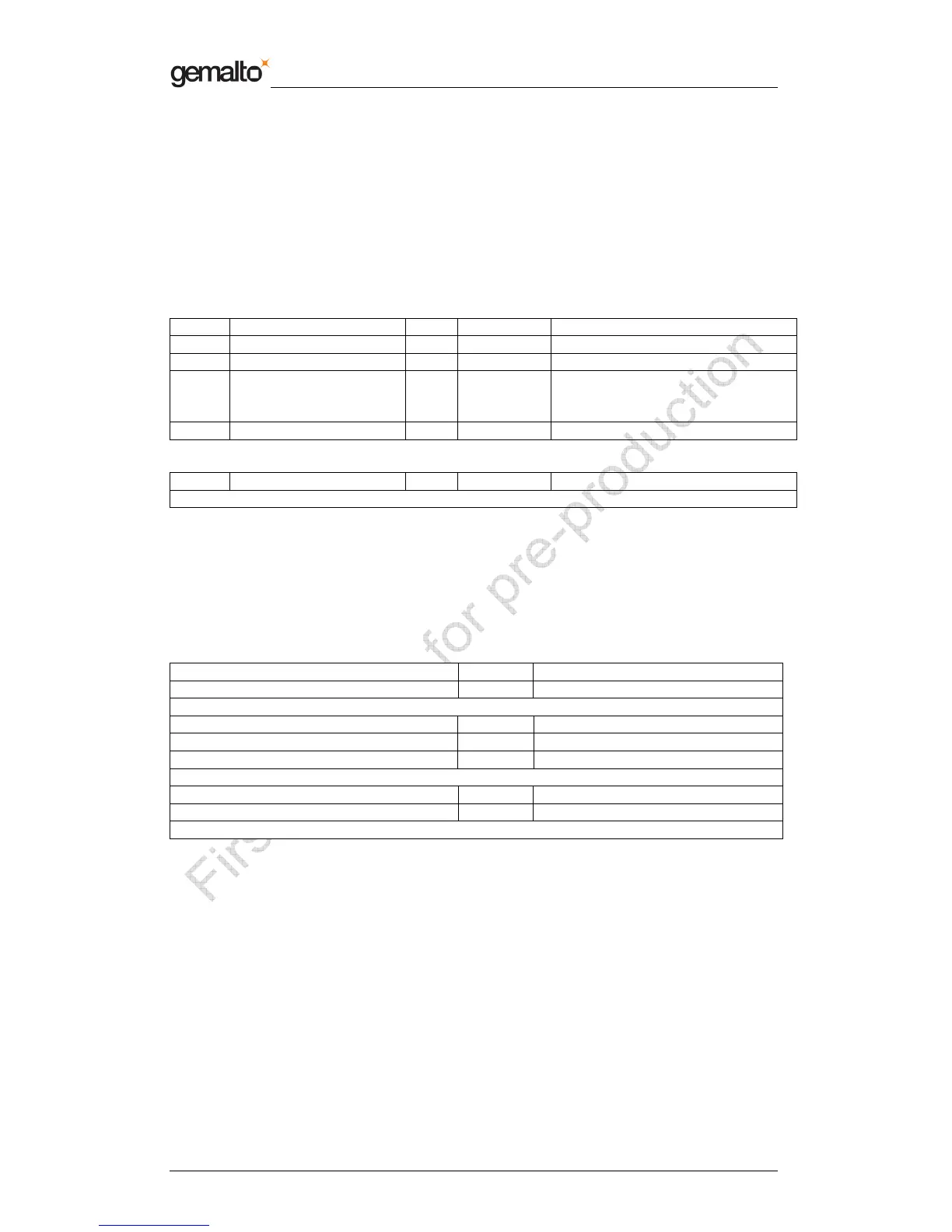
The command format is the following:
Offset Field Size Value Description
0 bCommandFamily 1 52h Reader command
1 bCommandType 1 F8h Management
2 bCommand 1 05h 03h = Read current interface
switch state
04h = Switch interface
3, 4 wLength 2 0000h Size of the Data field
The response format is the following:
Offset Field Size Value Description
No answer for this command
Boot-loader error codes
In the following table:
• The MSB byte correspond to the first byte reported in the abStatus field of the HID
response
• The LSB byte correspond to the second byte reported in the abStatus field of the
HID response
Error label Value Meaning
ERR_OK 0000h Execution OK
Wrong command or wrong data parameters (command rejected)
NOT_READY_TO_UPDATE FB40h Wrong command bytes
BAD_FIRMWARE_SIGNATURE_ERROR FB41h Wrong data parameters
CRC_ERROR FB9Bh Wrong checksum
Error during EEPROM operations
ERR_EEPROM_READ FFA9h Read EEPROM error
ERR_EEPROM_WRITE FF9Ah Write EEPROM error
Other codes FFxxh not listed are RFU
Table 52 - Boot-loader HID error codes
Typical Download Operations
The following steps give the list of the commands to be used for a standard download
operation:
• The “Start download” command is used to initiate the download operation
• The “Reset reader” command is used to activate the boot-loader.
• The “Download firmware file” command is used several times to send the
successive firmware binary packets to the device
• The “End download” command is used to complete the download operation
• The “Reset reader” command is used to activate the new firmware.



 To Next Page