Sony DSC-RX1 Digital Camera
Main Parts
Please, carefully read Camera Operating Instructions
https:// www.sony.ru/ electronics/ support/ res/ manuals/ 4469/ 44695786M.pdf ,
to get full information about functions and control parts before change settings.
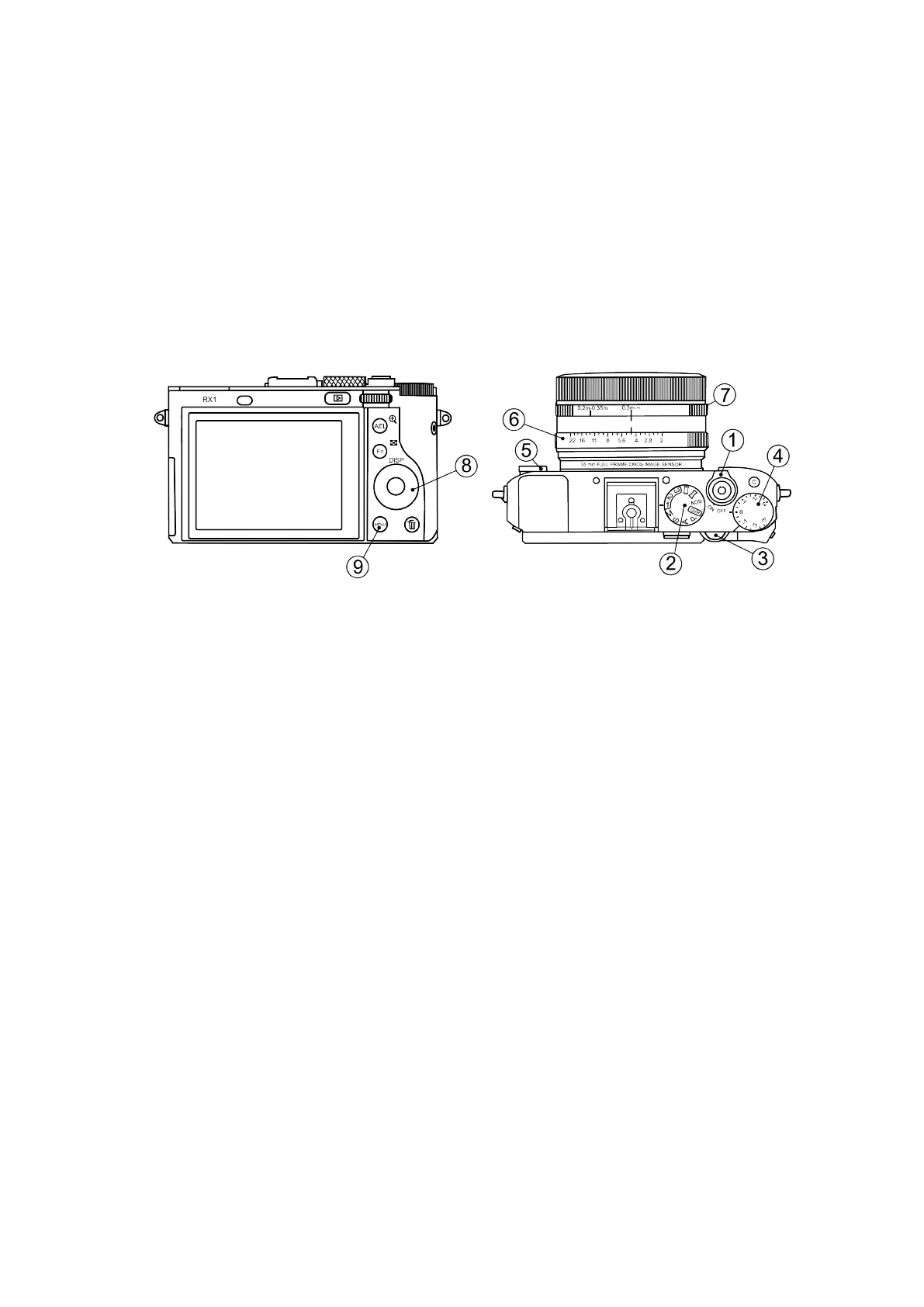
Basic camera control elements are shown on the picture:
1. ON\OFF Switcher 5. Focus Mode Dial
2. Mode Dial 6. Aperture ring
3. Control Dial 7. Macro switching ring
4. Exposure compensation dial 8. Control Wheel
9. Menu Button
Camera Settings
• Mode Dial in «1» position;
• Focus Mode Dial in MF position;
• Exposure Compensation Dial in 0 position;
• Macro Switching Ring in 0,3m-∞ position;
• Aperture Ring in 4,5 (rst mark after 4).
• For normal daylight conditions switch Mode Dial in M (Manual aperture control)
position and Aperture Ring in 4,5 (rst mark after 4) position.
• For cloudy weather switch Mode dial in S (Shutter priority) position. The aper-
ture value is not taken into account in this mode.
49



 To Next Page