GSI Audera Pro User Manual
D-0129360 Rev A Page 91 of 231
SP/AP Ratio
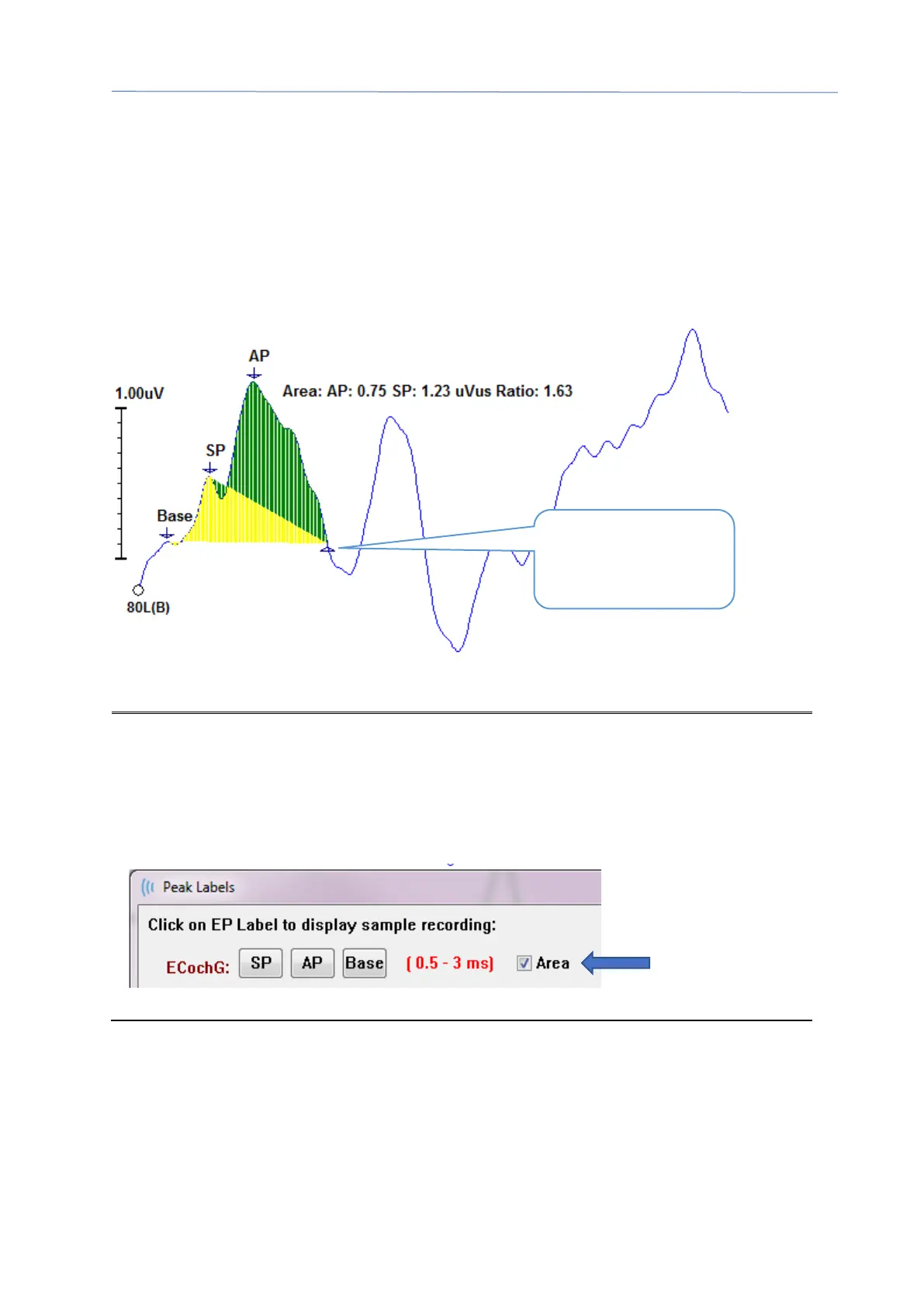
The ECochG modality test type has an option to calculate the SP/AP ratio. To calculate
the SP/AP ratio the Base (baseline), SP and AP points need to be marked. The bottom
marker of the Base is moved to the other side of the AP and placed at the same
amplitude as the top Base marker giving a 0 baseline amplitude. Then move the
bottom marks for both the SP and AP to the same location as the bottom Base marker.
The area for the SP and AP will be filled in with colors for the SP and AP area and the
calculations displayed next to the AP label.
NOTE: The SP/AP ratio and the area calculations may be turned On or Off. If the
calculation is not displayed, turn it On by right clicking on the waveform which
displays the Waveform Options menu and choose Mark Other Peak.
Activate/Deactivate the area calculations by checking/unchecking the check box next
to the ECochG labels. The status of this check box is saved with settings files.
.
Bottom marker for
Base, SP and AP



 To Next Page