GSI Audera Pro User Manual
D-0129360 Rev A Page 80 of 231
REMOTE IMPEDANCE DISPLAY BOX
The Remote Impedance Display box may be used to initiate an impedance test and
display the results of the impedance test as a colored LED. This is useful when the PC
and the patient are not in the same area. The box has two connectors that attach to the
mating connectors on the Digital I/O cable. Attach the Digital I/O cable to the back of
the Audera Pro. Connect the 3.5 mm jack and plug of the Digital I/O cable to the
corresponding 3.5 mm connectors on the Remote Impedance Display box. In order to
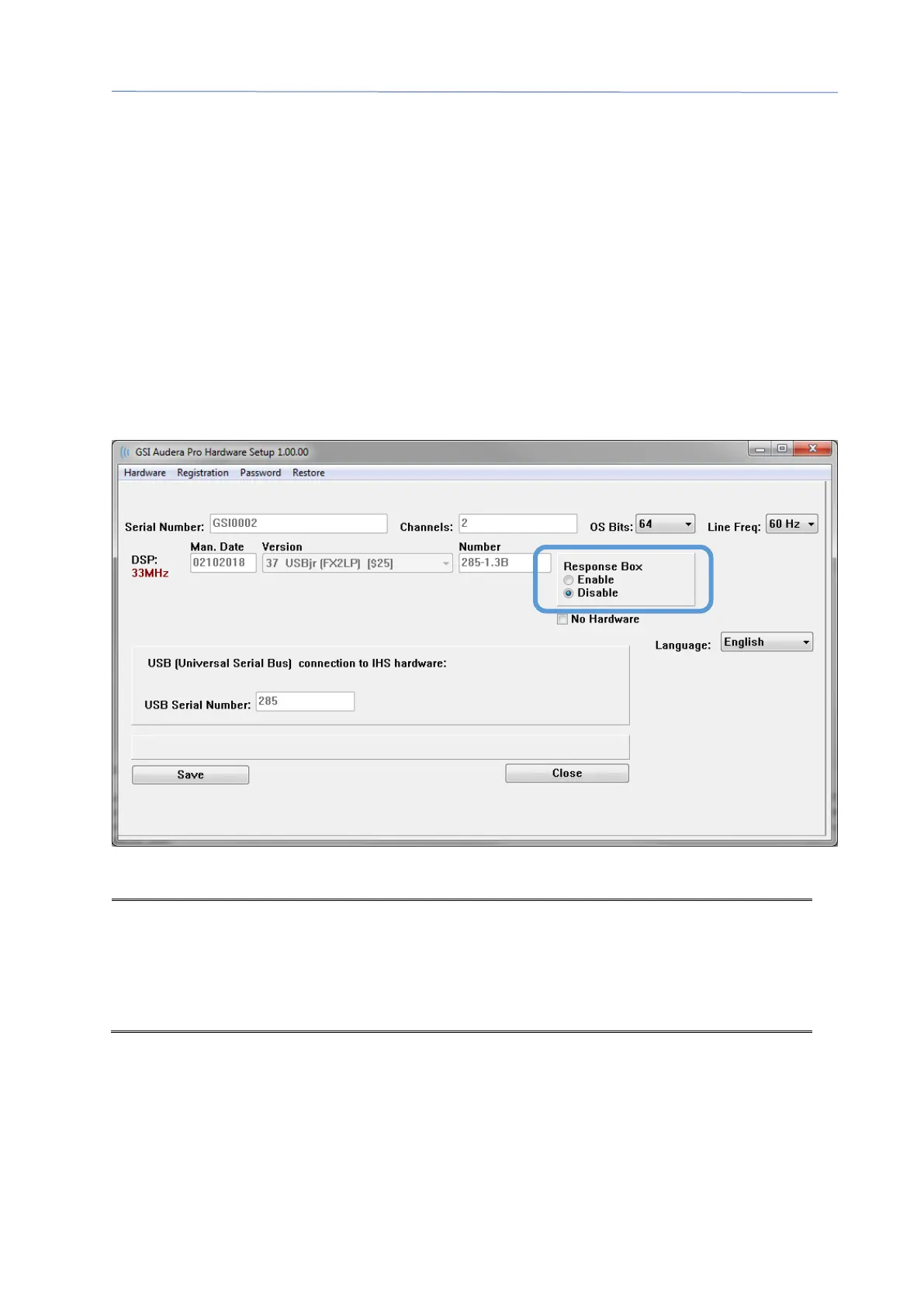
use the Remote Impedance Display box, you must enable the device in the
configuration. From the Opening Window, Select the Settings menu item and the
Configuration sub-menu item. And enter the administrative password when prompted
On the Hardware tab, select the Enable option of the Response Box section. Save the
change and restart the program.
NOTE: Make sure that if the Remote Impedance Display box is not connected to the
Audera Pro, the setting for the Response Box is set to Disable. If the Response Box is
set to Enable and no Remote Impedance Display box is connected, the system will
continuously run the impedance test when not acquiring data.
The Remote Impedance Display box has 5 LEDs at the top that correspond to the
electrode positions of the patient cable.



 To Next Page