SECURITY
Version 4.2.7.2, 05/2014. Copyright 2012 Hitron Technologies
105
Version 4.2.7.2, 05/2014. Copyright 2014 Hitron Technologies
105
Hitron CGNV User’s Guide
7.5 The Keyword Filter Screen
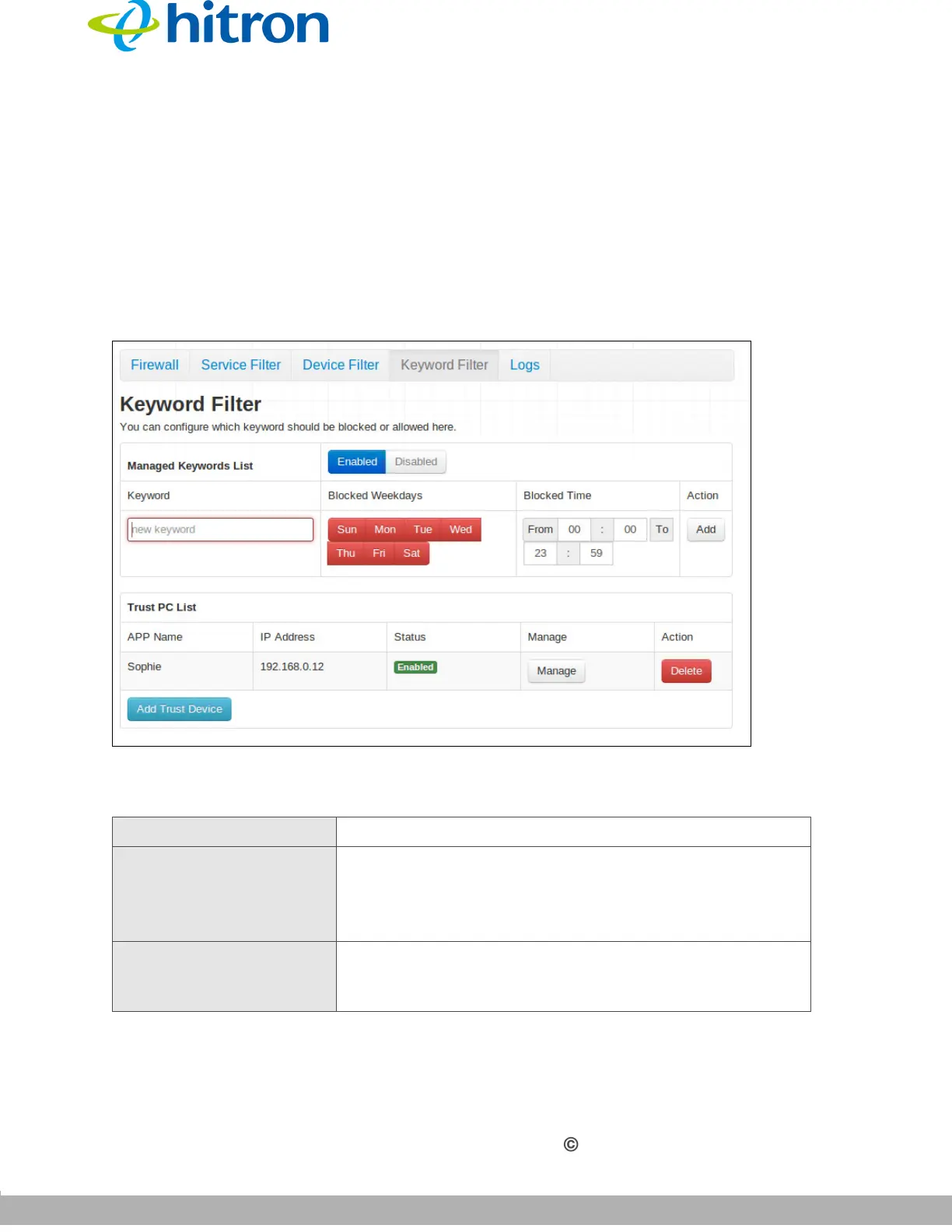
Use this screen to block access from the LAN to websites whose URLs (Web
addresses) and page content (text) contain certain keywords. You can create multiple
keyword blocking rules, and set them to apply on certain days and at certain times.
Click Security > Keyword Filter. The following screen displays.
Figure 44: The Security: Keyword Filter Screen
The following table describes the labels in this screen.
Table 40: The Security: Keyword Filter Screen
Managed Keywords List
Managed Keywords
List
Use this field to turn keyword filtering on or off.
Select Enabled to turn keyword filtering on.
Select Disabled to turn keyword filtering off.
Keyword Enter the keyword that you want to block. The CGNV
examines both the page’s URL (Internet address) and
its page content (text).



 To Next Page