SECURITY
Version 4.2.7.2, 05/2014. Copyright 2012 Hitron Technologies
103
Version 4.2.7.2, 05/2014. Copyright 2014 Hitron Technologies
103
Hitron CGNV User’s Guide
7.4.1 Adding or Editing a Managed Device
To add a new managed device, click Add Managed Device in the Security >
Device Filter screen.
To edit an existing managed device, locate the device in the Security > Device
Filter screen and click its Manage button.
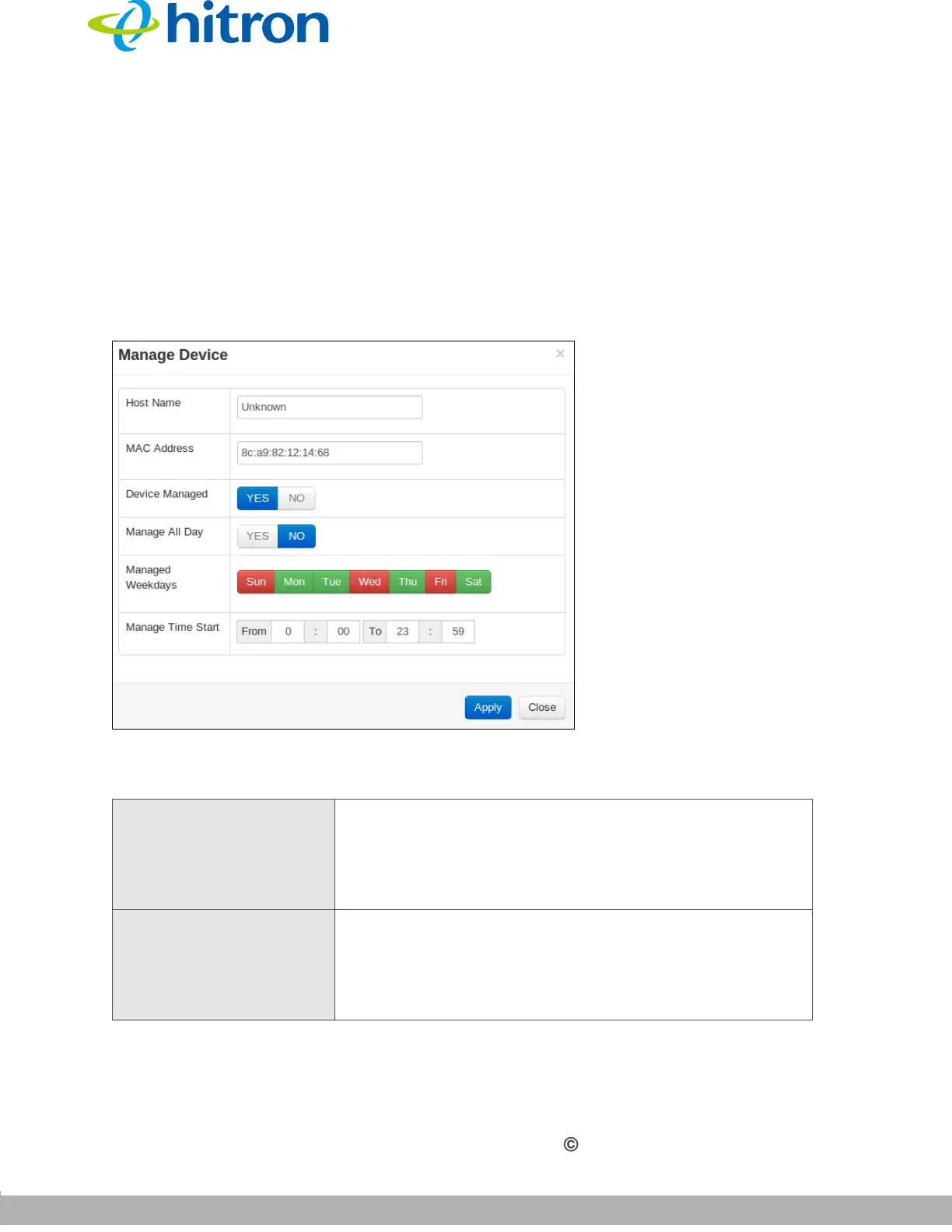
The following screen displays.
Figure 42: The Security: Device Filter Add/Edit Screen
The following table describes the labels in this screen.
Table 39: The Security: Device Filter Add/Edit Screen
Host Name If you are managing a device that already connected via
the LAN, this field displays the device’s name.
Alternatively, if you are managing a device that is not
connected via the LAN, you can enter its name here if
you know it.
MAC Address If you are managing a device that already connected via
the LAN, this field displays the device’s MAC (Media
Access Control) address. Alternatively, if you are
managing a device that is not connected via the LAN,
you can enter its MAC address here if you know it.



 To Next Page