SECURITY
Version 4.2.7.2, 05/2014. Copyright 2012 Hitron Technologies
101
Version 4.2.7.2, 05/2014. Copyright 2014 Hitron Technologies
101
Hitron CGNV User’s Guide
You can set the CGNV to allow only certain devices to access the CGNV and the
network, or to deny certain devices access.
You can turn filtering on or off, and configure new and existing filtering rules.
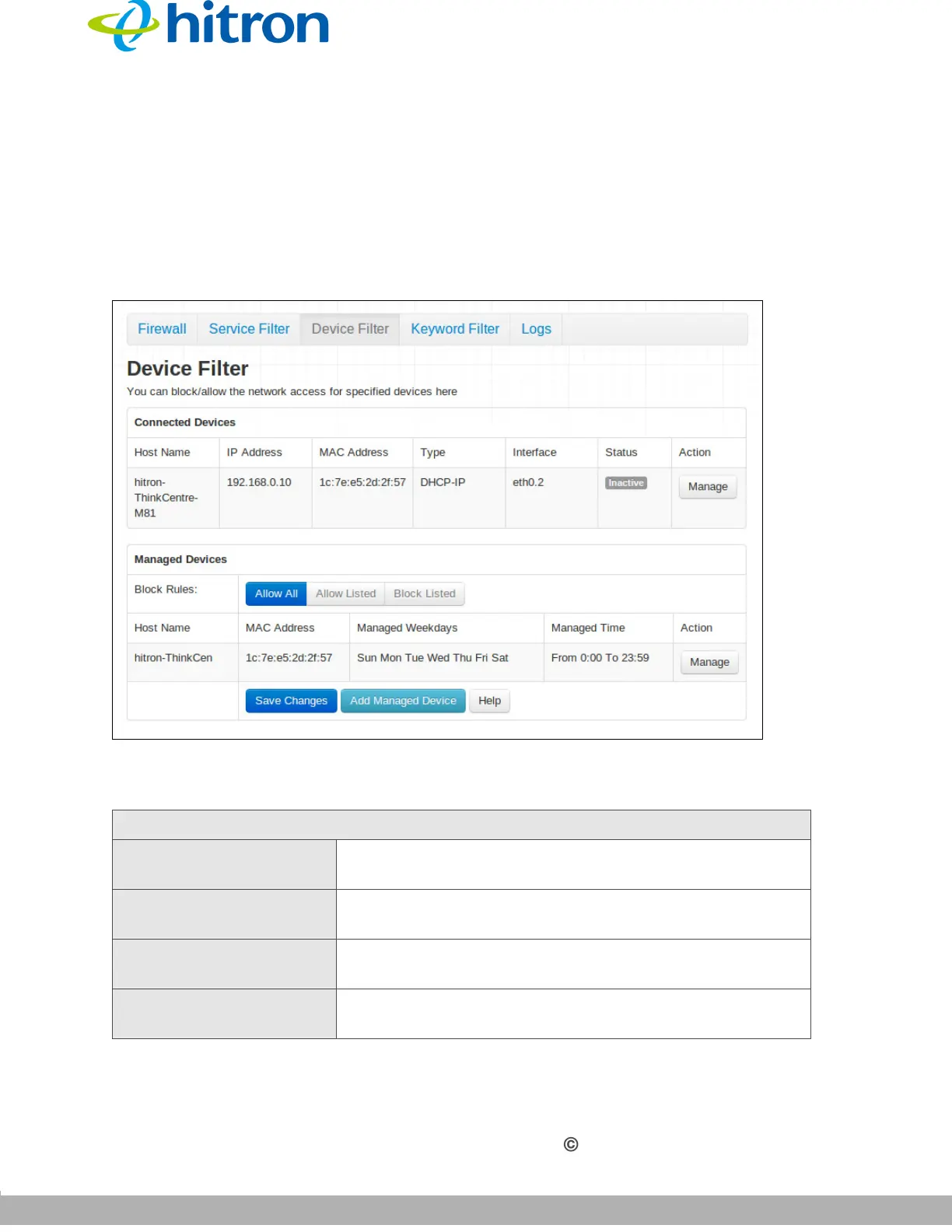
Click Security > Device Filter. The following screen displays.
Figure 41: The Security: Device Filter Screen
The following table describes the labels in this screen.
Table 38: The Security: Device Filter Screen
Connected Devices
Host Name This displays the name of each network device
connected on the LAN.
IP Address This displays the IP address of each network device
connected on the LAN.
MAC Address This displays the Media Access Control (MAC) address
of each network device connected on the LAN.
Type This displays whether the device’s IP address was
assigned by DHCP (DHCP-IP), or self-assigned.



 To Next Page