STATUS
Version 4.2.7.2, 05/2014. Copyright 2012 Hitron Technologies
40
Version 4.2.7.2, 05/2014. Copyright 2014 Hitron Technologies
40
Hitron CGNV User’s Guide
SCDMA allows multiple users to share the same frequency channel by assigning
a unique orthogonal code to each user.
3.2 The System Information Screen
Use this screen to see general information about your CGNV’s hardware, its
software, and its connection to the Internet.
NOTE: Most of the information that displays in this screen is for troubleshooting
purposes only. However, you may need to use the MAC Address information
when setting up your network.
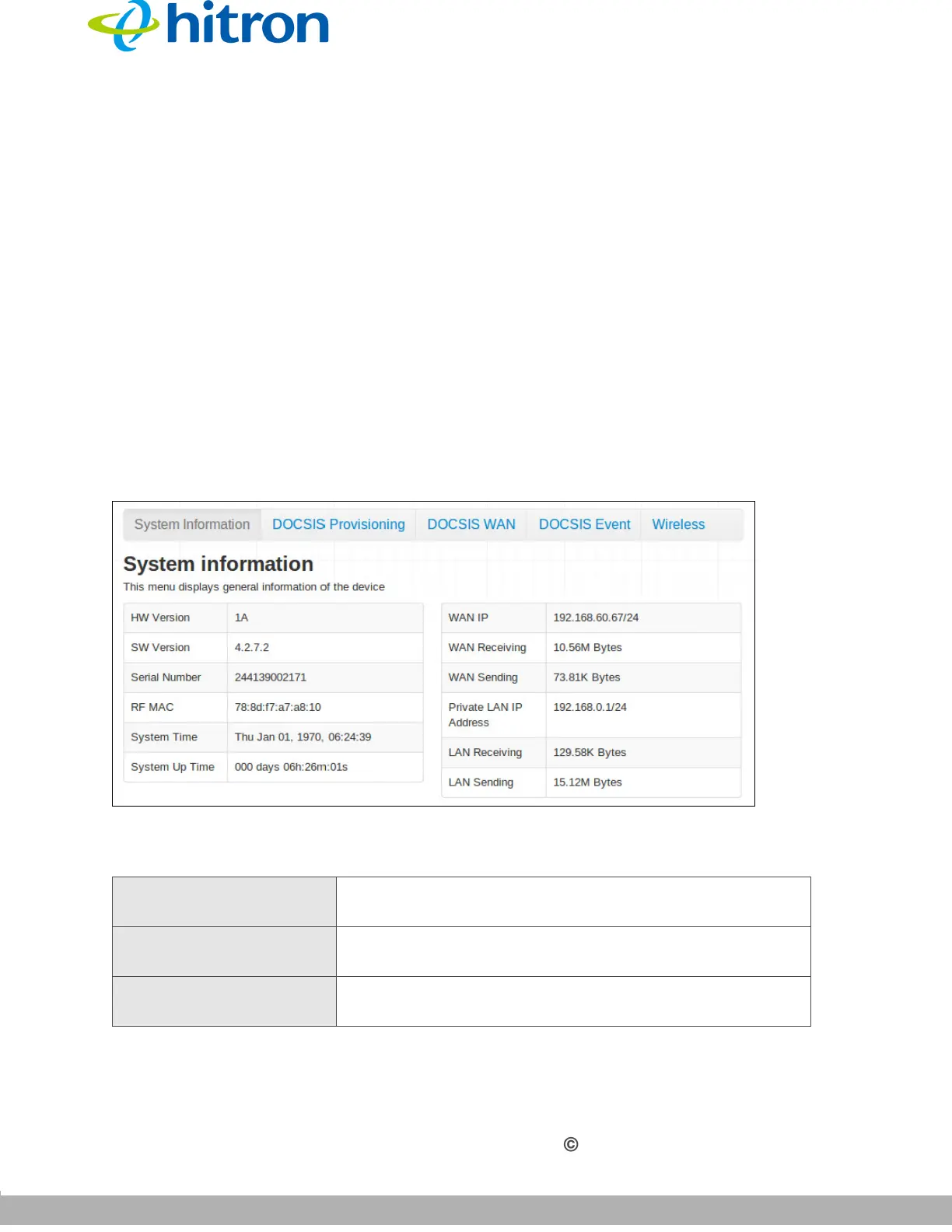
Click Status > System Information. The following screen displays.
Figure 12: The Status: System Information Screen
The following table describes the labels in this screen.
Table 11: The Status: System Information Screen
HW Version This displays the version number of the CGNV’s
physical hardware.
SW Version This displays the version number of the software that
controls the CGNV.
Serial Number This displays a number that uniquely identifies the
device.



 To Next Page