BASIC
Version 4.2.7.2, 05/2014. Copyright 2012 Hitron Technologies
62
Version 4.2.7.2, 05/2014. Copyright 2014 Hitron Technologies
62
Hitron CGNV User’s Guide
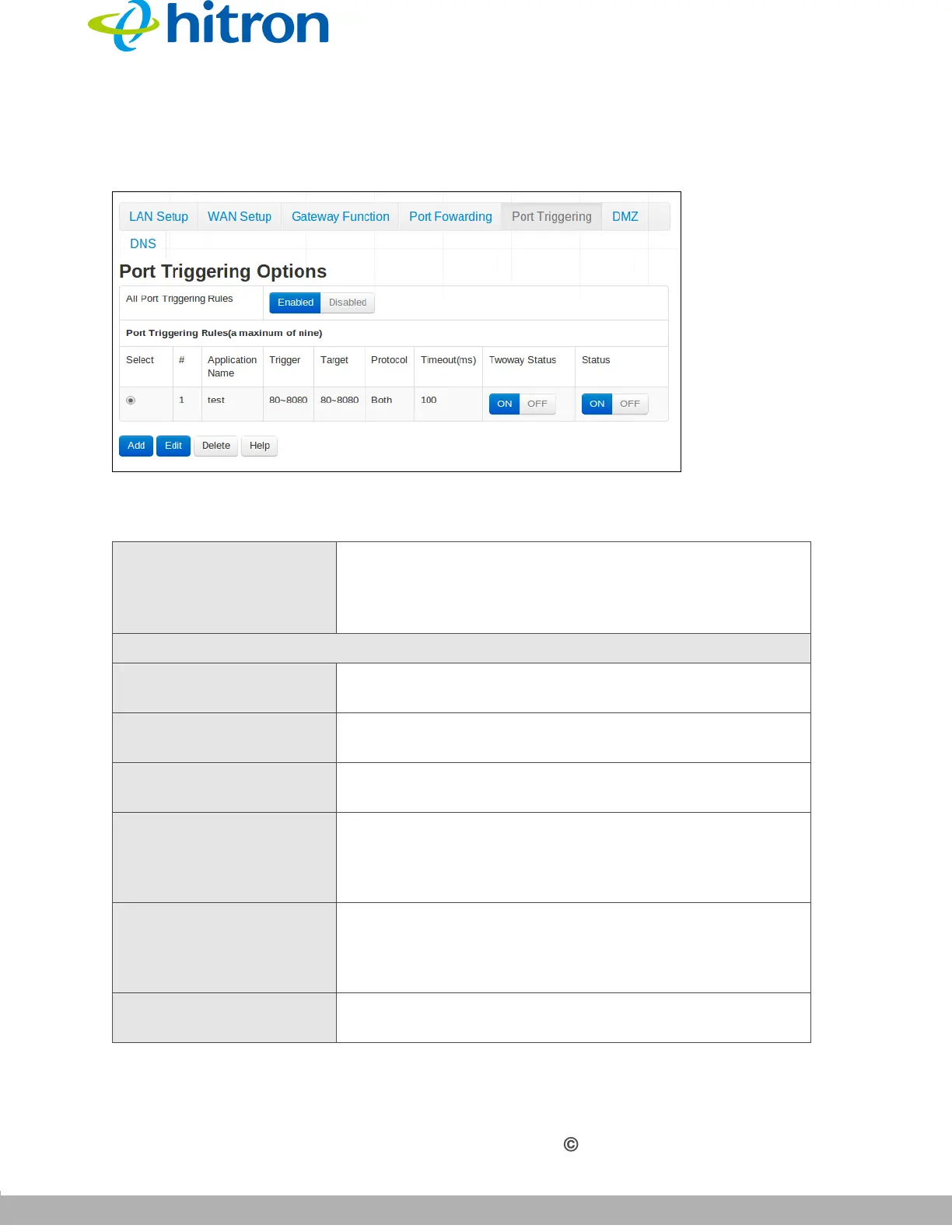
Click Basic > Port Triggering. The following screen displays.
Figure 22: The Basic: Port Triggering Screen
The following table describes the labels in this screen.
Table 20: The Basic: Port Triggering Screen
All Port Triggering Rules Use this field to turn port triggering on or off.
Select Enabled to turn port triggering on.
Select Enabled to turn port triggering off.
Port Triggering Rules
Select Select a port triggering rule’s radio button before clicking
Edit or Delete.
# This displays the arbitrary identification number
assigned to the port triggering rule.
Application Name This displays the arbitrary name you assigned to the
rule when you created it.
Trigger This displays the range of outgoing ports. When the
CGNV detects activity (outgoing traffic) on these ports
from computers on the LAN, it automatically opens the
Target ports.
Target This displays the range of triggered ports. These ports
are opened automatically when the CGNV detects
activity on the Trigger ports from computers on the
LAN.
Protocol This displays the protocol of the port triggering rule
(TCP, UDP or Both).



 To Next Page