EOS
|
HD OPERATION
21
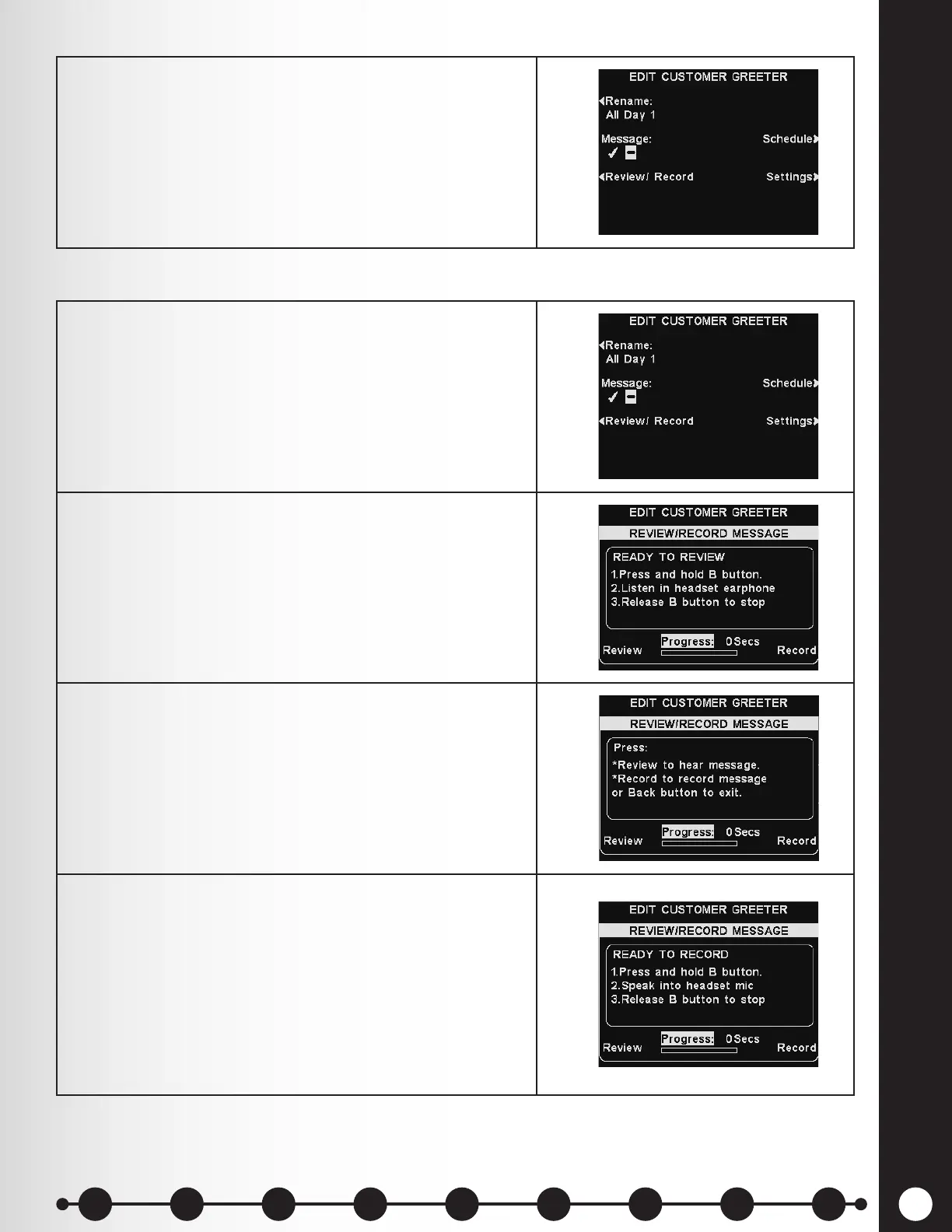
6. Enable or disable the selected message by pressing
the Message button on the EDIT CUSTOMER
GREETER display and highlight ✔ (on) or − (off).
Press the Back button to save the setting.
1. Review the existing selected message, or record a new
message by pressing the Review/Record button on
the EDIT CUSTOMER GREETER display.
Note: Reviewed messages are played to a specic
headset to avoid interfering with lane operations.
2. To listen to the existing message, press the Review
button on the REVIEW/RECORD MESSAGE display.
Follow instructions listed under READY TO REVIEW.
Press and hold the headset B button to play the
message.
3. To record a new message, press the Record button on
the REVIEW/RECORD MESSAGE display.
4. Follow the instructions listed under READY TO
RECORD. Message can be recorded up 10 seconds
long. The Progress indicator will display time
remaining.
When you nish recording, release the headset B
button and press the Review button.
Follow the instructions listed under READY TO
REVIEW to conrm a successful recording.
Review or Record Message
1 2 3 4 5 6 7 8 9
Introduction
EOS|HD
Equipment
EOS|HD
Operation
Audio Processing
Functions
Equipment Care
and Cleaning
Troubleshooting
Equipment
Specications
EOS|HD Message
Center Guide
Important
Notices



 To Next Page