EOS
|
HD OPERATION
31
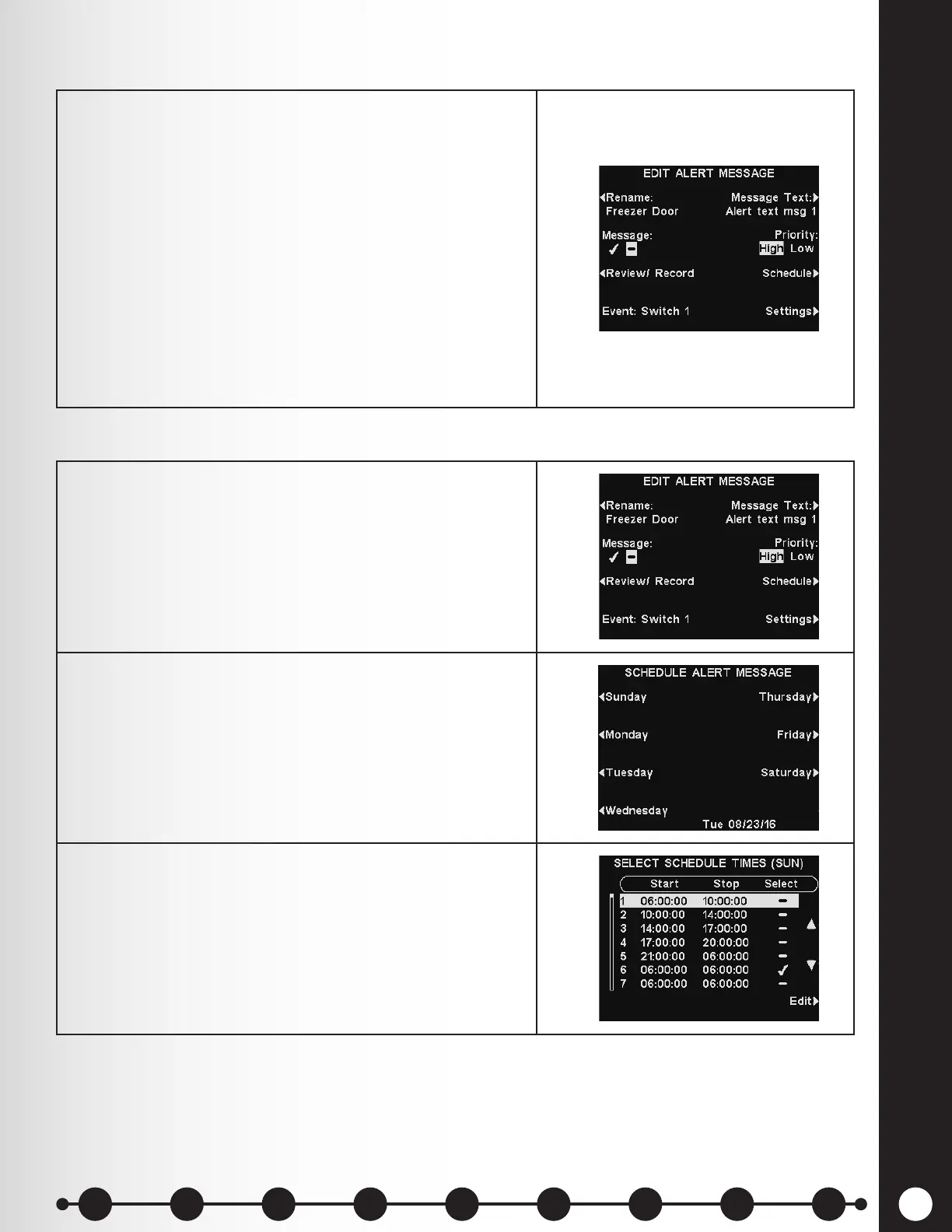
Alert messages can be assigned a high or low priority. To
set message priority, press the Priority button on the
EDIT ALERT MESSAGE display to highlight either High
or Low.
Press the Back button to save this setting.
Note: If the priority is set Low, the message may play to
completion or be terminated by either an A or B button
being pressed on any headset, or by a car arrival on a
given lane.
If the priority is set High, the message will play to
completion. If a high priority message is interrupted
by an A or B button being pressed on any headset
for a given lane, it will retry until it is able to play to
completion.
1. To choose the schedule for the selected message,
press the Schedule button on the EDIT ALERT
MESSAGE display.
2. On the SCHEDULE ALERT MESSAGE display, press
the button for the day you want the selected message
to be played.
3. On the SELECT SCHEDULE TIMES display, select the
time period when you want the selected message to
play by pressing the ▲(up) and ▼(down) buttons to
scroll through the 12 available time periods.
When the desired time period is highlighted, press the
Edit button.
Message Schedule
Message Priority
1 2 3 4 5 6 7 8 9
Introduction
EOS|HD
Equipment
EOS|HD
Operation
Audio Processing
Functions
Equipment Care
and Cleaning
Troubleshooting
Equipment
Specications
EOS|HD Message
Center Guide
Important
Notices



 To Next Page