EOS
|
HD OPERATION
34
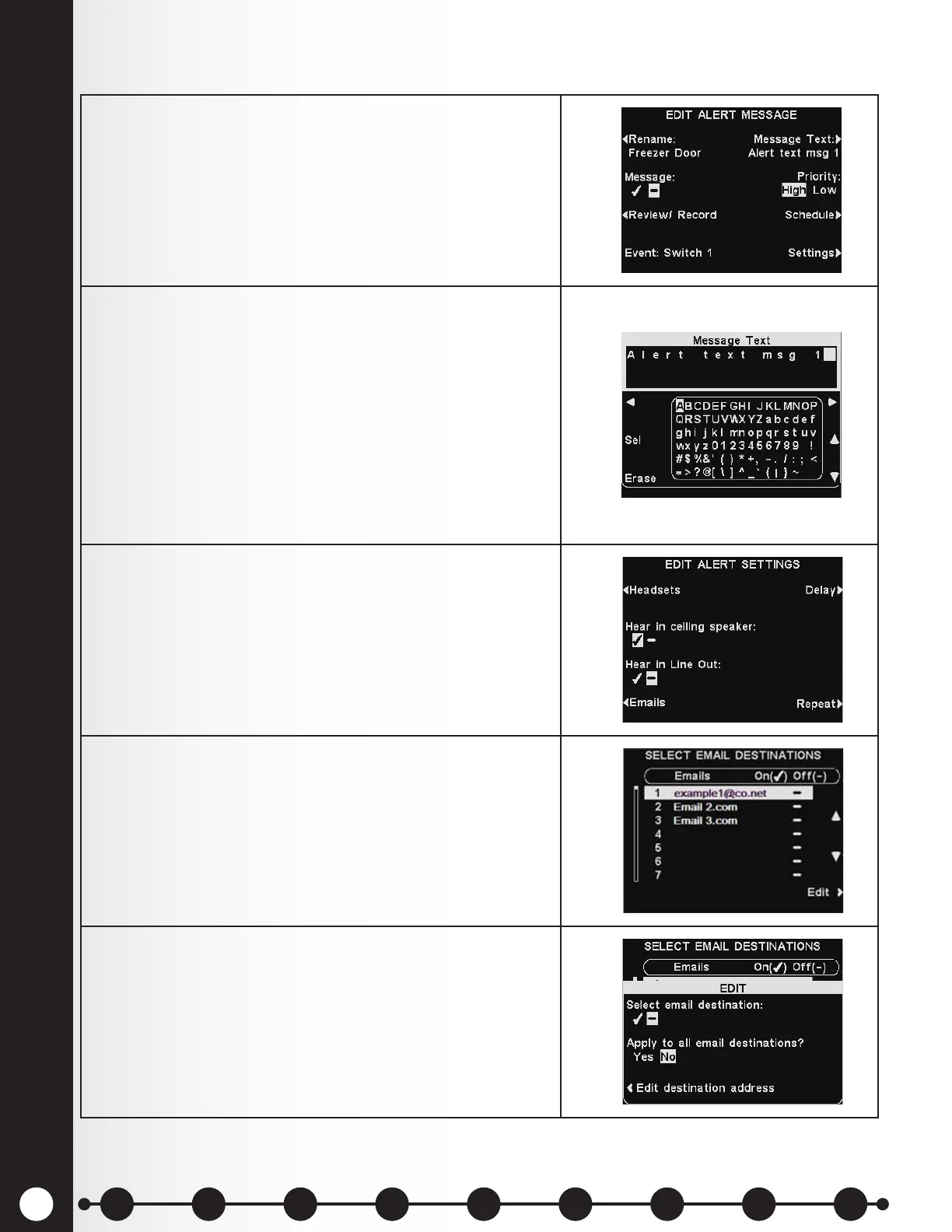
1. To compose an email message to be sent to designated
recipients when the selected Alert is triggered, select
Message Text on the EDIT ALERT MESSAGE display.
2. To edit the email text, on the Message Text display,
use the Erase button to clear characters if there is a
current email you want to change.
Use the ◄, ►, ▲ and ▼ buttons to move the highlight
to a character you would like to use in the new email
text.
Use the Sel (select) button to enter the highlighted
character in the message.
Press the Back button to save the email text.
3. To have the selected Alert message sent to desired
email addresses, press the Emails button on the
EDIT ALERT SETTINGS display.
4. On the SELECT EMAIL DESTINATIONS display, use
the ▲ (up) and ▼(down) buttons to select an email
address for which you would like to turn the selected
Alert message on/off, and then press the Edit button.
5. To select/deselect the email destination that will
receive the email message, press the Select email
destination button on the EDIT display to highlight
✔ (on) or − (off).
To select/deselect all email destinations, press the
Apply to all email destinations? button to highlight
Yes or No and then press the Back button.
Alert Message Email
1 2 3 4 5 6 7 8 9
Introduction
EOS|HD
Equipment
EOS|HD
Operation
Audio Processing
Functions
Equipment Care
and Cleaning
Troubleshooting
Equipment
Specications
EOS|HD Message
Center Guide
Important
Notices



 To Next Page