EOS
|
HD OPERATION
50
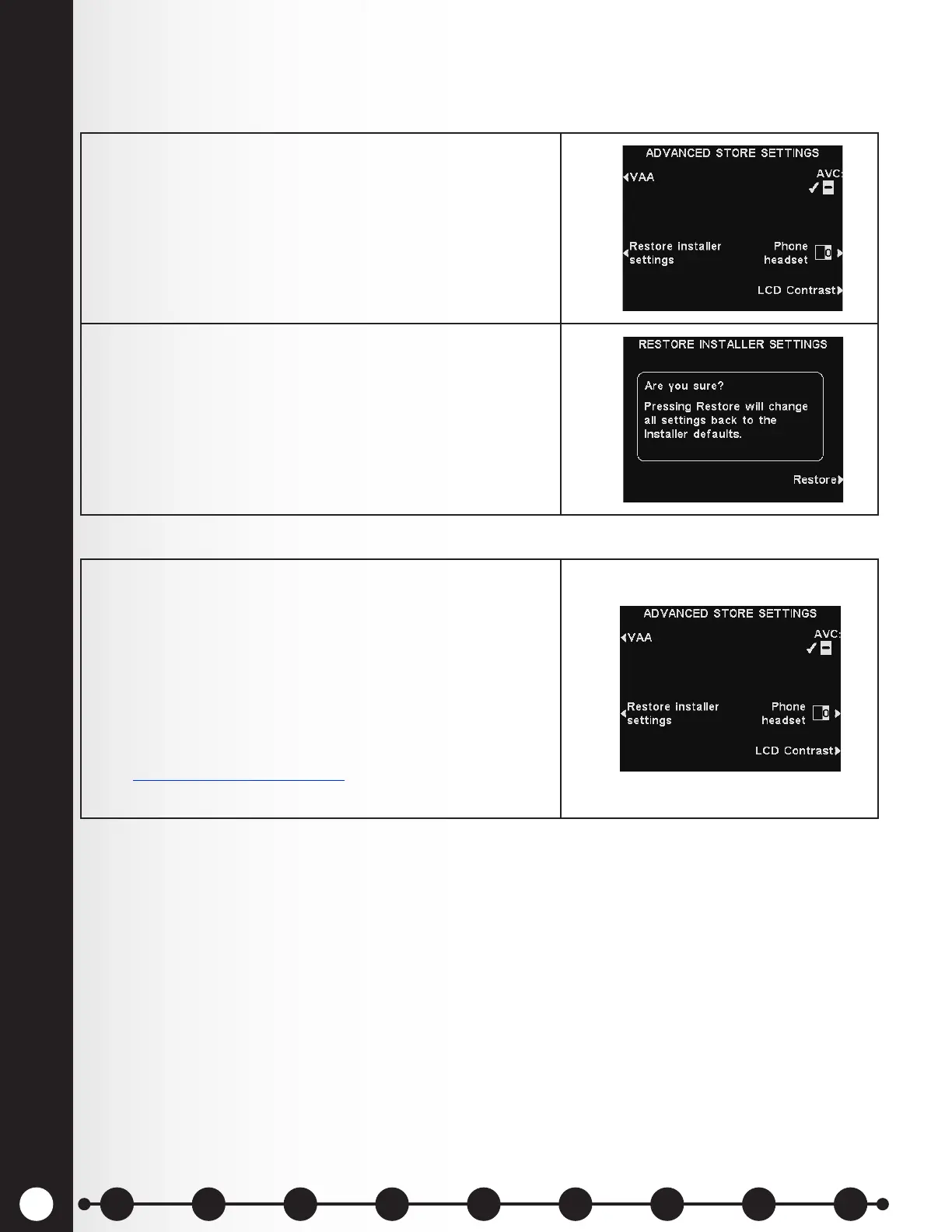
Restore Installer Settings
After the initial installer settings have been made, store personnel can customize adjustments to
settings. After doing so, they can always return the base station to its original installer settings.
AVC Setting
1. Press the Restore installer settings button on the
ADVANCED STORE SETTINGS display.
2. Press the Restore button on the RESTORE
INSTALLER SETTINGS display.
Press the AVC button to select ✔ (on) or − (off) for AVC
(Automatic Volume Control). When there is excessive
outside noise, the volume level of the order taker’s voice
will increase. When it is quiet in the drive-thru area, the
volume level will be decreased.
Note: In multiple-lane congurations, AVC settings will
appear for Lanes 1 and 2. Settings will be similar for
both lanes.
See Audio Processing Functions, pg. 60, for more
information on AVC.
1 2 3 4 5 6 7 8 9
Introduction
EOS|HD
Equipment
EOS|HD
Operation
Audio Processing
Functions
Equipment Care
and Cleaning
Troubleshooting
Equipment
Specications
EOS|HD Message
Center Guide
Important
Notices



 To Next Page