If the bae plates cannot be rotated manually, loosen the screws that secure the bae plates
using a Phillips screwdriver until they can be rotated open manually.
Step 3 Take out the desiccant bag.
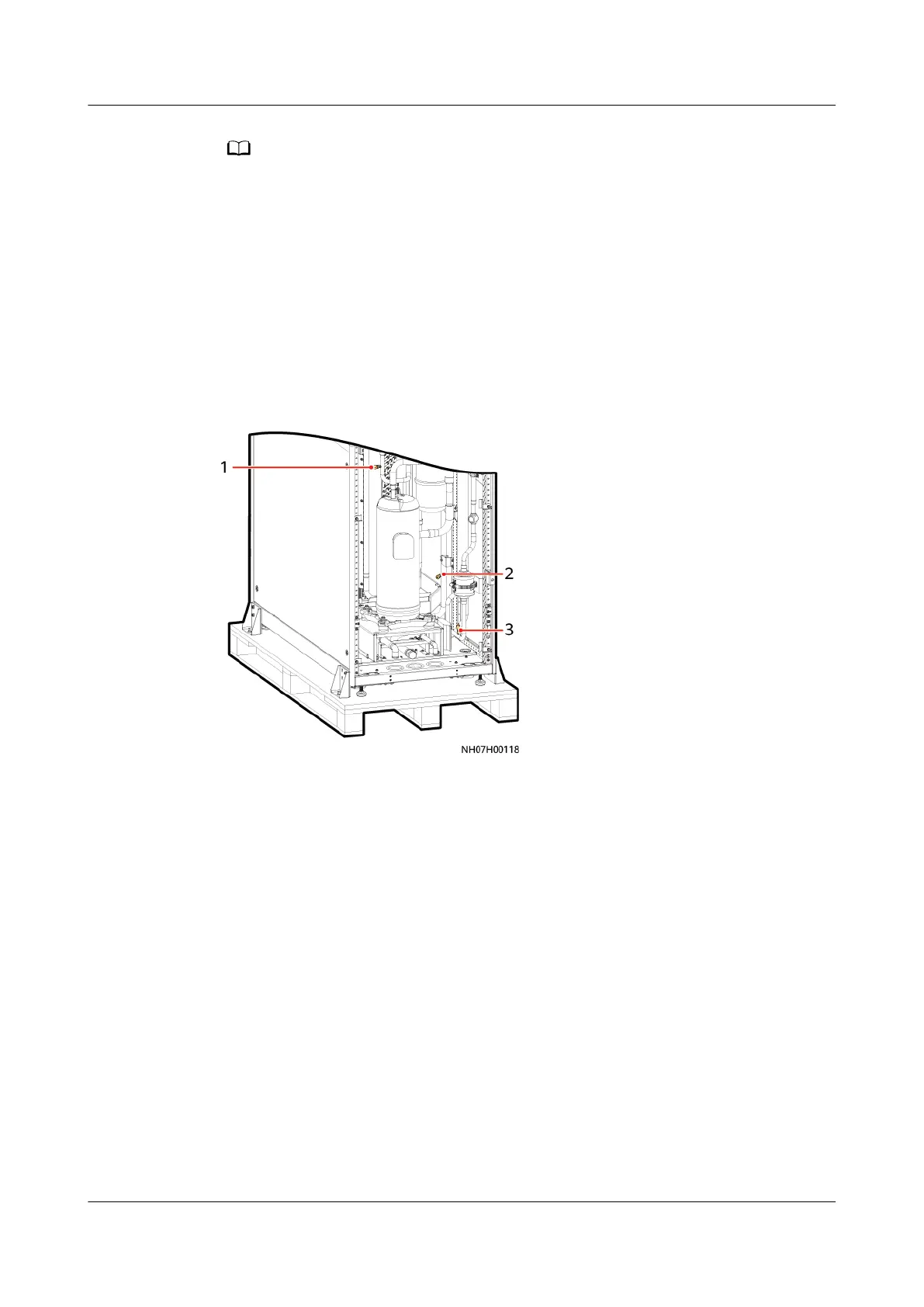
Step 4 Check whether any of the needle valve bonnets shown in Figure 4-28 is missing
by turns.
1. If they do not exist, contact Huawei technical support.
2. If they exist, remove each valve bonnet and use it to press the valve plugs in
turn. If nitrogen is exhausted, the system is working properly. If no nitrogen is
exhausted, contact Huawei technical support.
Figure 4-28 Positions of the needle valves
(1) Low-pressure needle valve
(2) Exhaust pipe needle valve (3) Liquid pipe needle valve
----End
4.4.2 Removing the Pallet
Procedure
Step 1 Use a 10# socket wrench to remove the eight M6x16 screws securing the fasteners
to the cabinet, and use an 18# socket wrench to remove the four M12x35 screws
securing the fasteners to the pallet, as shown in Figure 4-29.
NetCol5000-A050 In-row Air Cooled Smart Cooling
Product
User Manual 4 Installation
Issue 08 (2021-09-17) Copyright © Huawei Technologies Co., Ltd. 60



 To Next Page