91
HDK-99 1803 VER1 (E)
5
CAMERA SETTINGS and ADJUSTMENT
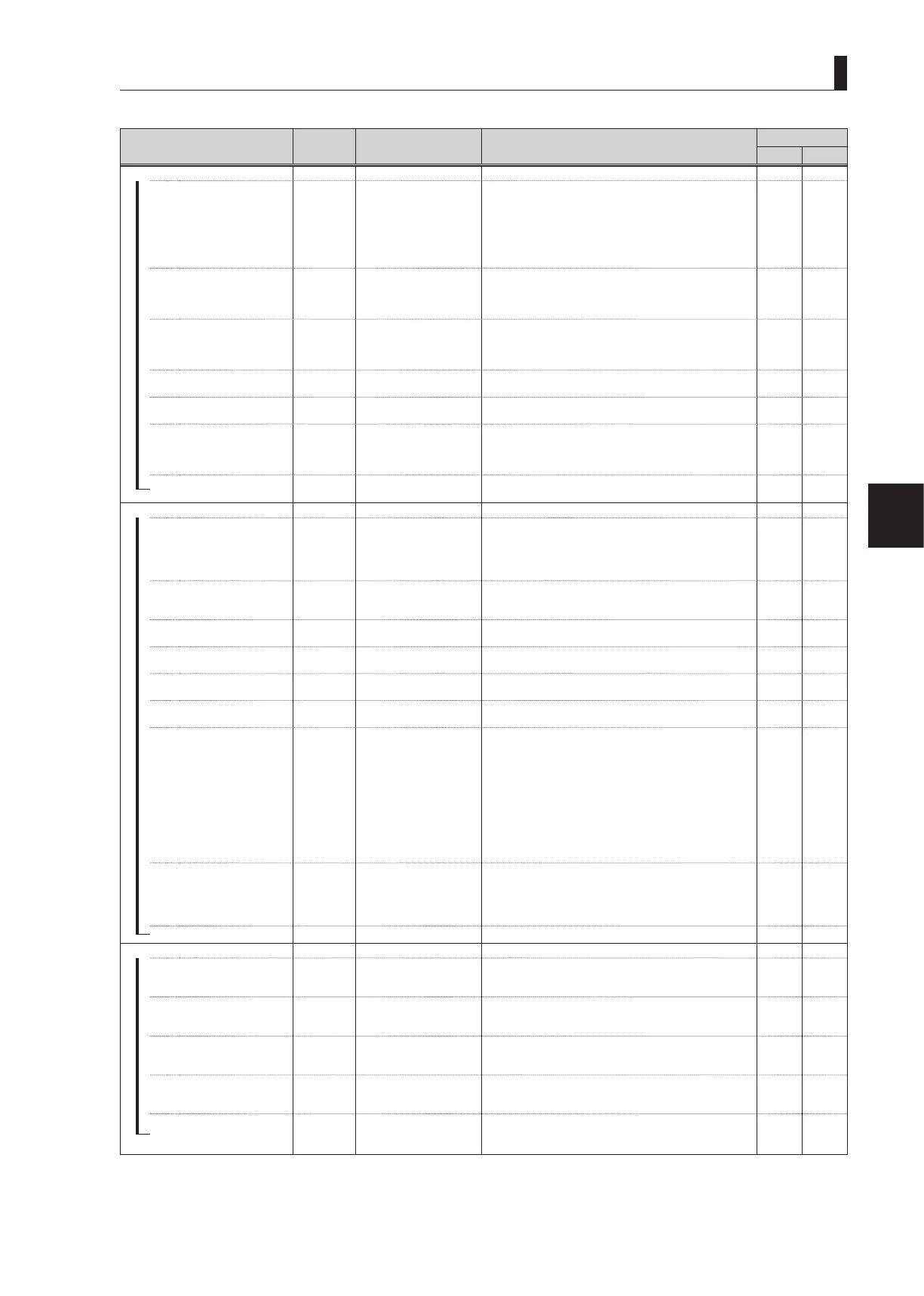
5.2 Settings from the Menu
Menu Item
Initial
Setting
Setting Value Description, Remarks
MENU DATA
ALL VF
AUTO SETUP MODE
―
AUTO SETUP
LEVEL
LEVEL, FULL, QUICK,
F.QUICK
FULL : It executes all the automatic setup items and
initializes the camera. It is mainly executed
during maintenance and inspection.
LEVEL : It is a setup of the video level and is executed
during the daily operation.
F.QUICK : It executes FULL QUICK auto setup.
QUICK : It executes QUICK auto setup.
‐ ‐
―
FULL AUTO REF
EXT INT, EXT
INT : It sets the target of FULL AUTO SETUP to
INTERNAL REF.
EXT : It sets the target of FULL AUTO SETUP to EXT
REF.
✔ ‐
―
AWB WITH A.IRIS
OFF OFF, ON
It selects whether or not A.IRIS is automatically turned on
during AWB operation.
This menu becomes valid only during the self operation.
It is always at OFF during CCU/BS operation.
✔ ‐
―
SMOOTH AWB
ON-0.5s
OFF, ON-0.3s, 0.5s, 0.7s,
1.0s, 1.5s, 2.0s
It smoothly switches Ach/Bch of AWB. It can set the
transition time for switching.
✔ ‐
―
AWB REFERENCE
ON ON, OFF
ON : It sets the target of AWB to EXT AWB REF.
OFF : It adjusts Rch/Bch to Gch.(no target offset)
✔ ‐
―
CHART SEARCH
ENABLE ENABLE, DISABLE
ENABLE : Mode that automatically adjusts the chart field
of view during FULL AUTO SETUP operation.
DISABLE : Mode that manually adjusts the chart field of
view during FULL AUTO SETUP operation.
✔ ‐
REFERENCE SET
ABB ABB, AWB, FULL
It creates the target value (EXT REF FILE) of AWB and
ABB.
*2
✔ ‐
LENS SELECT
―
NUMBER
OFF OFF, NO.1 to NO.8
Select the lens file number.
-If the lens code is obtained from the lens, (CODE SEL) is
displayed on the back of the lens number display.
-If AUTO SEL is ON, "AUTO SEL" is displayed on the back
of the lens number display.
✔ ‐
―
NAME
(---------) 12 characters
Set the file name for each lens file.
Attaching the lens model name, etc. will make it easier to
know the correspondence between the lens number and lens.
‐ ‐
―
( )
(---------)
AUTO SEL name display
section
Displays the lens name obtained from the serial lens.
‐ ‐
―
EXTENDER
OFF
OFF, ON-1, ON-2, ON-3,
x0.8 CONV
Displays the extender state.
‐ ‐
―
AUTO SEL
ON OFF, ON
The lens file number is switched automatically according to
the model name obtained from the lens.
✔ ‐
―
FILE SET
OFF OFF, MANUAL, AUTO
See
"5.2 Settings from the Menu : FILE SET" (P99)
for the FILE SET usage method.
‐ ‐
―
LENS TYPE
OFF
OFF, C.PORTABLE,C.
STUDIO,C.FIELD,F.
PORTABLE, F.STUDIO,
F.FIELD
To match the zoom tracking DTL operation characteristics
with the lens zoom characteristics, set the time of the lens
used in the camera.
OFF : Game tracking DTL is OFF.
C.PORTABLE : Canon portable lens
C.STUDIO : Canon studio lens
C.FIELD : Canon field lens
F.PORTABLE : Fujinon portable lens
F.STUDIO : Fujinon studio lens
F.FIELD : Fujinon field lens
Set by lens file (NO.1-8).
✔ ‐
―
AUTO x0.8 CONV
OFF OFF, ON
Set automatic switching of the aspect ratio converter (X0.8)
internal lens.
If set to ON, it operates in linked motion with the output
aspect ratio of the down converter to carry out automatic
switching.
✔ ‐
LENS SERIAL I/F
ON OFF, ON
Set whether to respond to the serial interface of the lens or not.
✔ ‐
LEVEL ADJUST
―
MASTER GAMMA
0.0 -100 to +100
Sets the master gamma value.
The gamma value decreases in the direction of " -100" and
increases in the direction of "+100".
‐ ‐
―
MASTER PED
0.0 -100 to +100
Sets the master pedestal value.
The pedestal value decreases in the direction of "-100" and
increases in the direction of "+100".
‐ ‐
―
MASTER FLARE
0.0 -100 to +100
Sets the master flare value.
The flare value decreases in the direction of "-100" and
increases in the direction of "+100".
‐ ‐
―
DTL GAIN
0.0 -100 to +100
Sets the detail amount.
The detail amount decreases in the direction of "-100" and
increases in the direction of "+100".
‐ ‐
ADJ CLR
READY
READY,
PUSH SET→CLR,
CANCEL
Returns the settings changed with LEVEL ADJUST to the
state prior to change as a group.
‐ ‐



 To Next Page