Need help?
Do you have a question about the Innotech Omni C20 and is the answer not in the manual?
 General
| Brand | Innotech |
|---|---|
| Model | Omni C20 |
| Category | Controller |
| Language | English |
Provides an overview of the manual's purpose, systems covered, and scope.
Details technical specifications for various Omni controllers and modules.
Covers safety precautions, installation plans, and required tools.
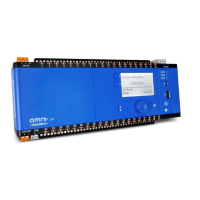
Describes the physical attributes, dimensions, and ports of Omni controllers.
Details dimensions and identification for Omni C40, C20, C14, and U10 controllers.
Covers expansion bay, cards, battery replacement, and HMI installation.
Provides guidelines for general mounting, DIN rail installation, and cable management.
Covers general electrical installation practices, safety precautions, and cabling guidelines.
Details the capabilities and specifications of programmable input/output points.
Provides wiring details for various Omni controllers and general wiring diagrams.
Introduces networking concepts, products, terminology, and basic setup.
Details Ethernet connection, TCP/IP, BACnet IP, and Modbus TCP configurations.
Covers RS-485 topology, Innotech Net, Global, BACnet MS/TP, and Modbus RTU configurations.
Specifies Ethernet and RS-485 cable requirements and connection examples.
Procedures for inspecting installation and checking wiring and connections.
Guides for installing Focus software and configuring controllers and REM modules.
Outlines initial system tests, web server usage, and final system verification.


 To Next Page