Chapter 2: Physical installation
TruVision DVR 12HD User Manual 11
Items shipped with the product include:
• IR (infrared) remote control
• Two AAA batteries for the remote control
• AC power cords
• USB mouse
• Recorder
• CD with software and manuals
• TruVision DVR 12HD Quick Start Guide
• TruVision DVR 12HD User Manual (on CD)
• TruVision Recorder Operator Guide (on CD)
Back panel
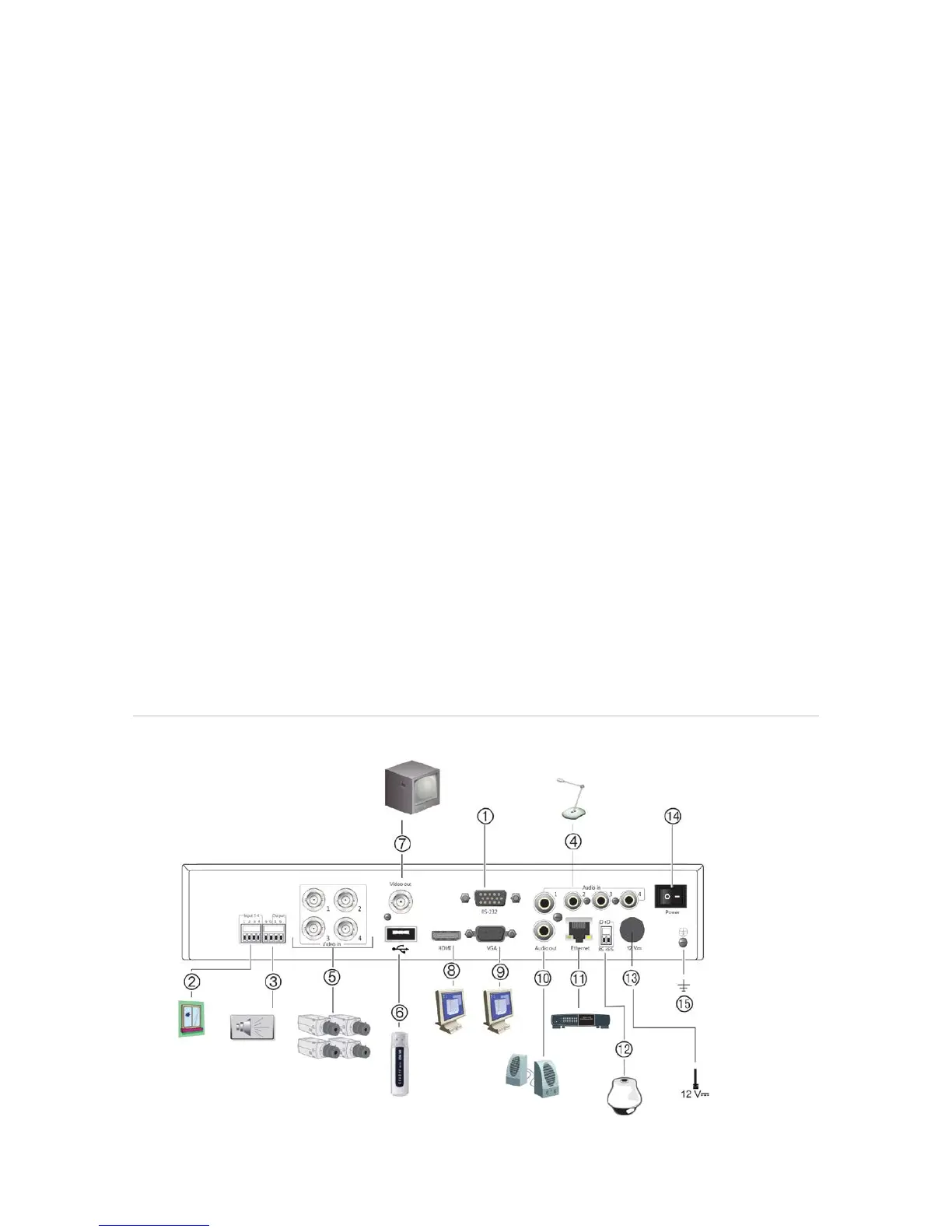
The figures below show the back panel connections and describe each connector on a
typical TVR 12HD digital video recorder. Details may vary for specific models.
Before powering up the recorder, connect the cameras and a main monitor for basic
operation. Once all required connections are done, enter the relevant data in the setup
wizard (see page 16).
Note: For every hardwired alarm input, connect one wire to the input connection with
the alarm number label and one wire to a Ground connection (labeled G).
Figure 1: TVR 12HD back panel connections (16-channel model shown)
Four-channel model:







 To Next Page