67
Intermec EasyCoder 201 II – Technical Manual
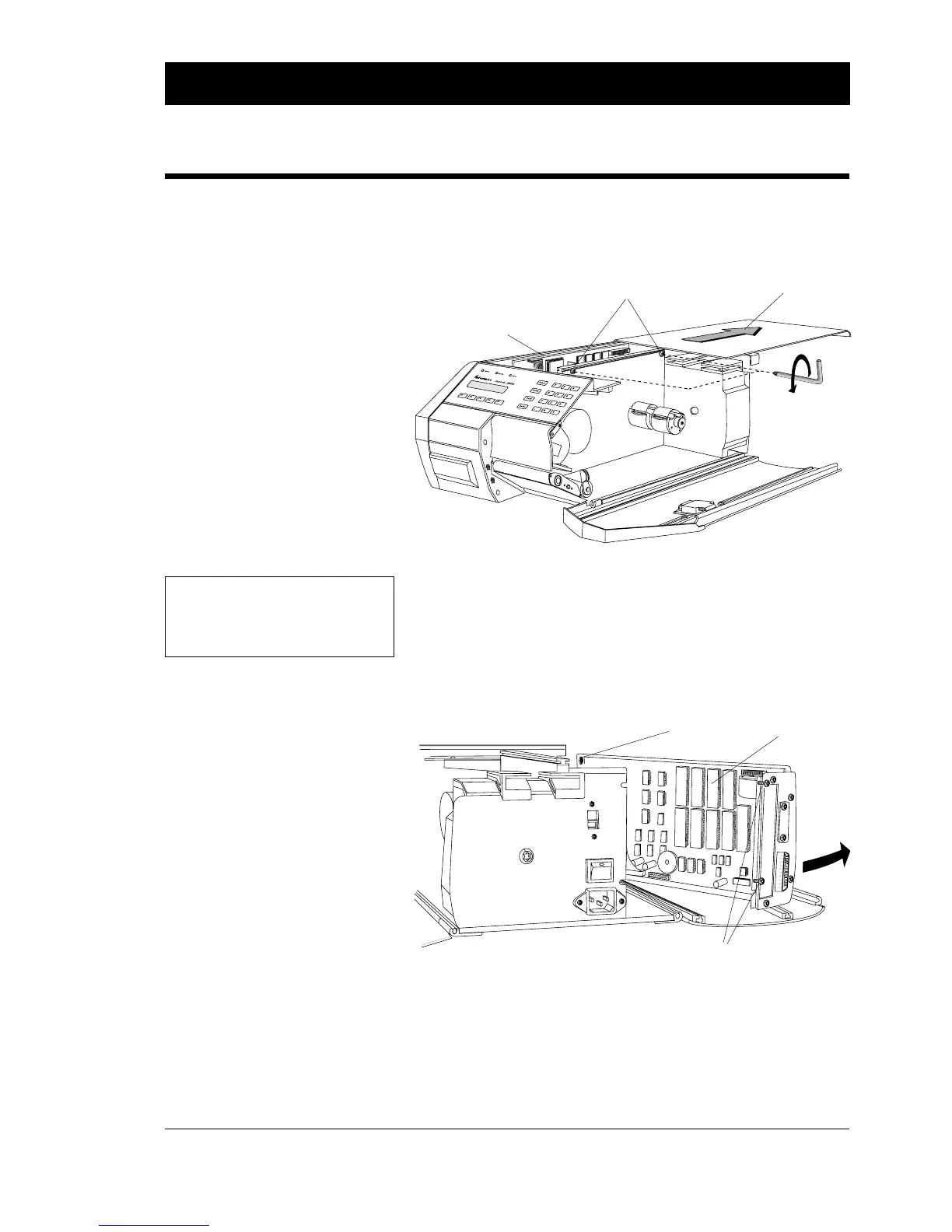
The CPU board is situated in the electronics compartment on the left
side of the printer's centre-line wall. To gain access to the electronics
compartment, proceed as follows:
❑ Disconnect the power cord from the printer.
❑ Open the right-hand door.
❑ Loosen the two #T20 Torx screws, that lock the cover to the
printer's centre-line wall.
❑ Pull the cover straight back and remove it completely.
❑ Open the left-hand door.
❑ Loosen the two #T10 Torx screws, that hold the CPU board assy.
to the rear plate. Also remove the screw that holds the forward/
upper corner of the CPU board, then swing the unit outward.
❑ Reassemble in reverse order, making sure that the top cover is
positively secured by the two locking screws.
Accessing the CPU Board
ELECTRONICS
2
30
V
1 Screw
CPU Board
2 Screws
CPU Board
Cover
2 Screws
WARNING!
Disconnect the power cord
before removing the cover plate.
Dangerous voltage!















 To Next Page