76
Intermec EasyCoder 201 II – Technical Manual
Cable configuration:
The following ready-made RS 232C connection cables can be
ordered from Intermec. Cables procured from other sources should
follow the same wiring principles.
Note:
Be careful not to connect the external +5V unintentionally, which
may harm your computer or terminal.
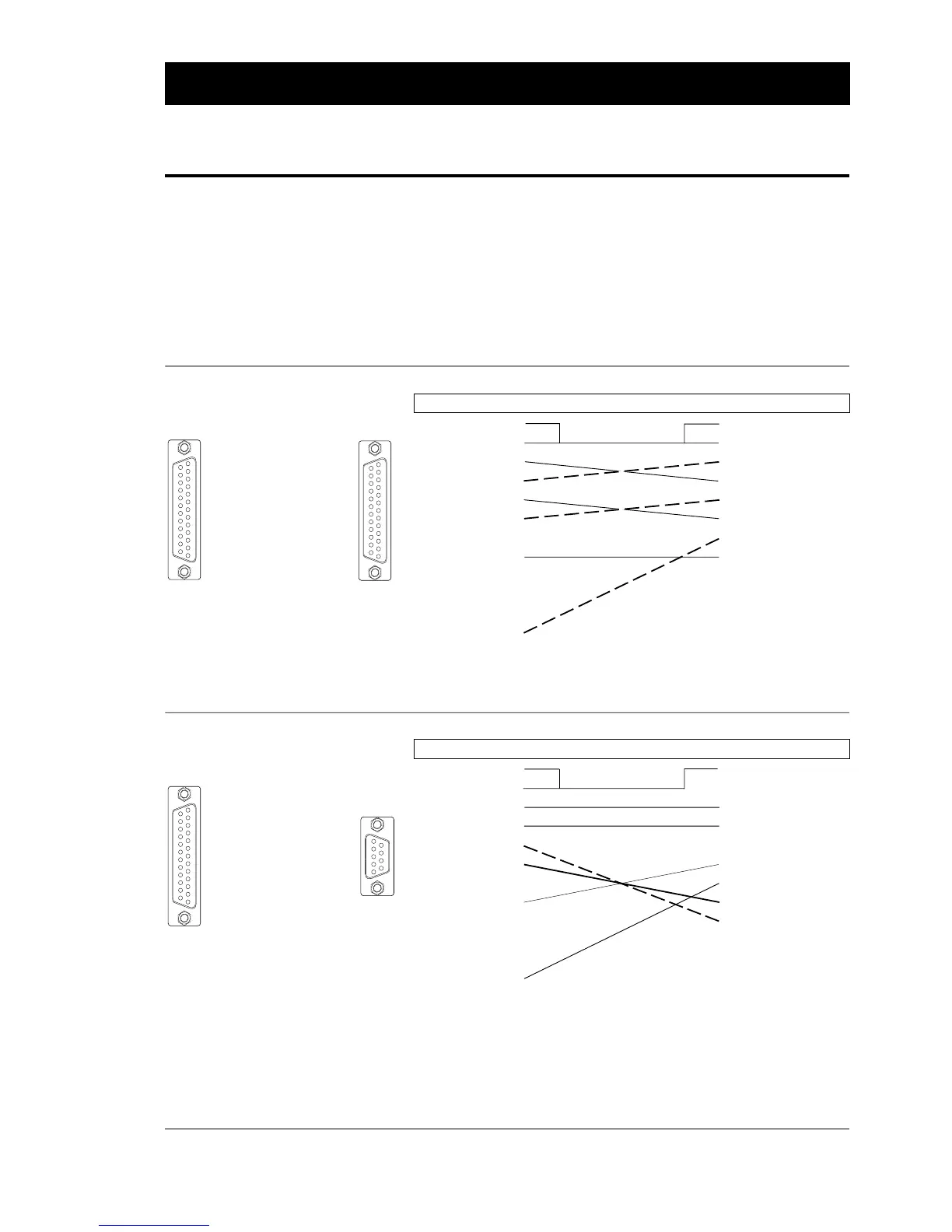
To Printer ("uart1:") To IBM-XT & PS/2
DB25 female connector ⇐ cable ⇒ DB25 female connector
Housing • • Housing
Cable shield 1 • • 1 Cable shield
TXD out 2 • • 2 TXD out
RXD in 3 • • 3 RXD in
RTS out 4 • • 4 RTS out
CTS in
1
5 • • 5 CTS in
not used 6 • • 6 DSR in
Signal GND 7 • • 7 Signal GND
not used 8-15 • • 8-25 not used
(+5V) 16 •
not used 17-19 •
DTR out 20 •
not used 21-25 •
To Printer ("uart1:") To IBM-AT
DB25 female connector ⇐ cable ⇒ DB9 female connector
Housing • • Housing
Cable shield 1 • • 1 not used
TXD out 2 • • 2 RXD in
RXD in 3 • • 3 TXD out
RTS out 4 • • 4 not used
CTS in
1
5 • • 5 Signal GND
not used 6 • • 6 DSR in
Signal GND 7 • • 7 RTS out
not used 8-15 • • 8 CTS in
(+5V) 16 • • 9 not used
not used 17-19 •
DTR out 20 •
not used 21-25 •
INTERFACES, cont'd.
RS 232C (V24) on "uart1:",
cont'd.
Printer ⇒ IBM-XT/IBM-PS2
Part No. 1-975580-05
Length: 3 metres (9.8 ft.)
Printer ⇒ IBM-AT
Part No. 1-975581-05
Length: 3 metres (9.8 ft.)
12345678910111213
141516171819202122232425
12345678910111213
141516171819202122232425
➠
12345678910111213
141516171819202122232425
➠
12345
6789
1
/. Make sure that the host sets CTS (in
printer) high. If not, disconnect the cable
and leave CTS open (pulled up in the
printer).
1
/. Make sure that the host sets CTS (in
printer) high. If not, disconnect the cable
and leave CTS open (pulled up in the
printer).















 To Next Page