EasyManua.ls Logo

Juice ULTRA - Unpacking

Juice ULTRA
72 pages
Print Icon
To Next Page IconTo Next Page
To Previous Page IconTo Previous Page
Loading...
JUICE ULTRA - Operation Instructions and Installation Guide
Version 1-3A
3 Transport, storage, unpacking and handling
Page 31 of 72
All rights reserved. The reproduction of this document, also partially, is allowed only with authorization by alpitronic s.r.l.
3.3. Unpacking
It is recommended to transport the JUICE ULTRA to its final destination in its original
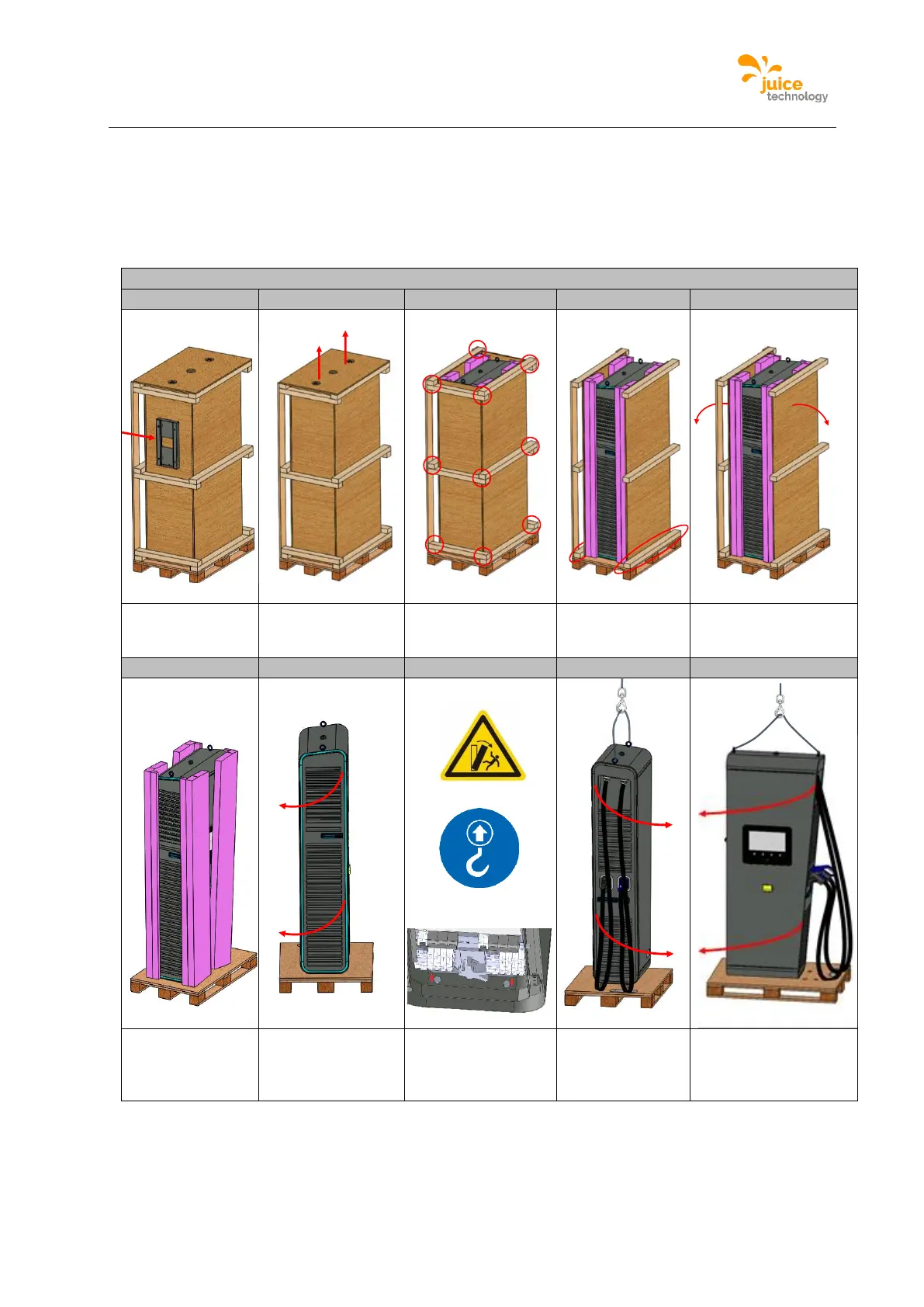
packaging and unpack it there. The following illustrations show the sequence how to unpack
the JUICE ULTRA:
Unpacking the JUICE ULTRA
1
2
3
4
5
Remove the
JUICE ULTRA-
base
Remove screws
on top cover and
lift top cover
Remove screws on
all edges and
remove side panels
Remove screws
on front and rear
panel
Remove front and
rear panel
6
7
8
9
10
Remove the
packaging
materials
Open service door
*Remove screws
on the base plate
of the JUICE
ULTRA
Open charging
cable door
Open display door

Table of Contents

Related product manuals