All rights reserved. The reproduction of this document, also partially, is allowed only with authorization by alpitronic s.r.l.
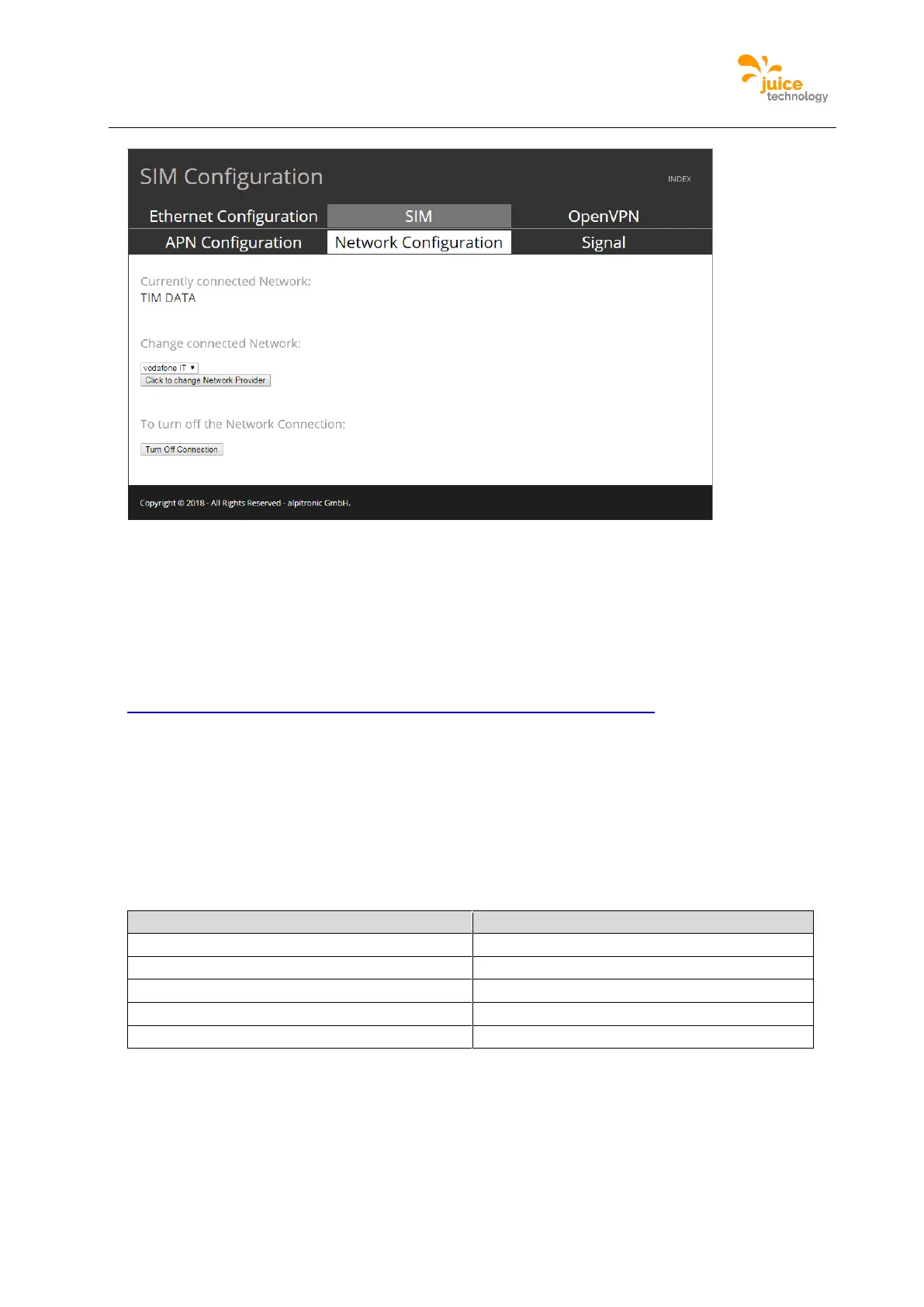
Figure 46: Example of the Sim Network Configuration webpage
OpenVPN Configuration
Used to edit the VPN settings to connect to backend servers, using OpenVPN. This is a
configuration interface, it does not control the OpenVPN client behaviour (cannot test the
connection). The configuration files are required to comply to the OpenVPN configuration
rules, which can be found here:
https://openvpn.net/index.php/open-source/documentation/howto.html
Location:
Click on ‘NETWORK’ from the main menu and following the top menu click on ‘OpenVPN’.
Figure 47 is an example of the webpage showing the OpenVPN configuration, there is an
option to enable and disable the VPN, also the ability to write the IP address the client will
receive from the OpenVPN server, so to configure it in the OCPP configuration. With
‘Update’ button one can upload the configuration files to the charging station, please make
sure the files follow the naming schema presented in the table.


 To Next Page