EasyManua.ls Logo

Juice ULTRA - Replacing a JUICE ULTRA Power-Stack

Juice ULTRA
72 pages
Print Icon
To Next Page IconTo Next Page
To Previous Page IconTo Previous Page
Loading...
JUICE ULTRA - Operation Instructions and Installation Guide
Version 1-3A
7 Maintenance
Page 67 of 72
All rights reserved. The reproduction of this document, also partially, is allowed only with authorization by alpitronic s.r.l.
7.2. Replacing a JUICE ULTRA power-stack
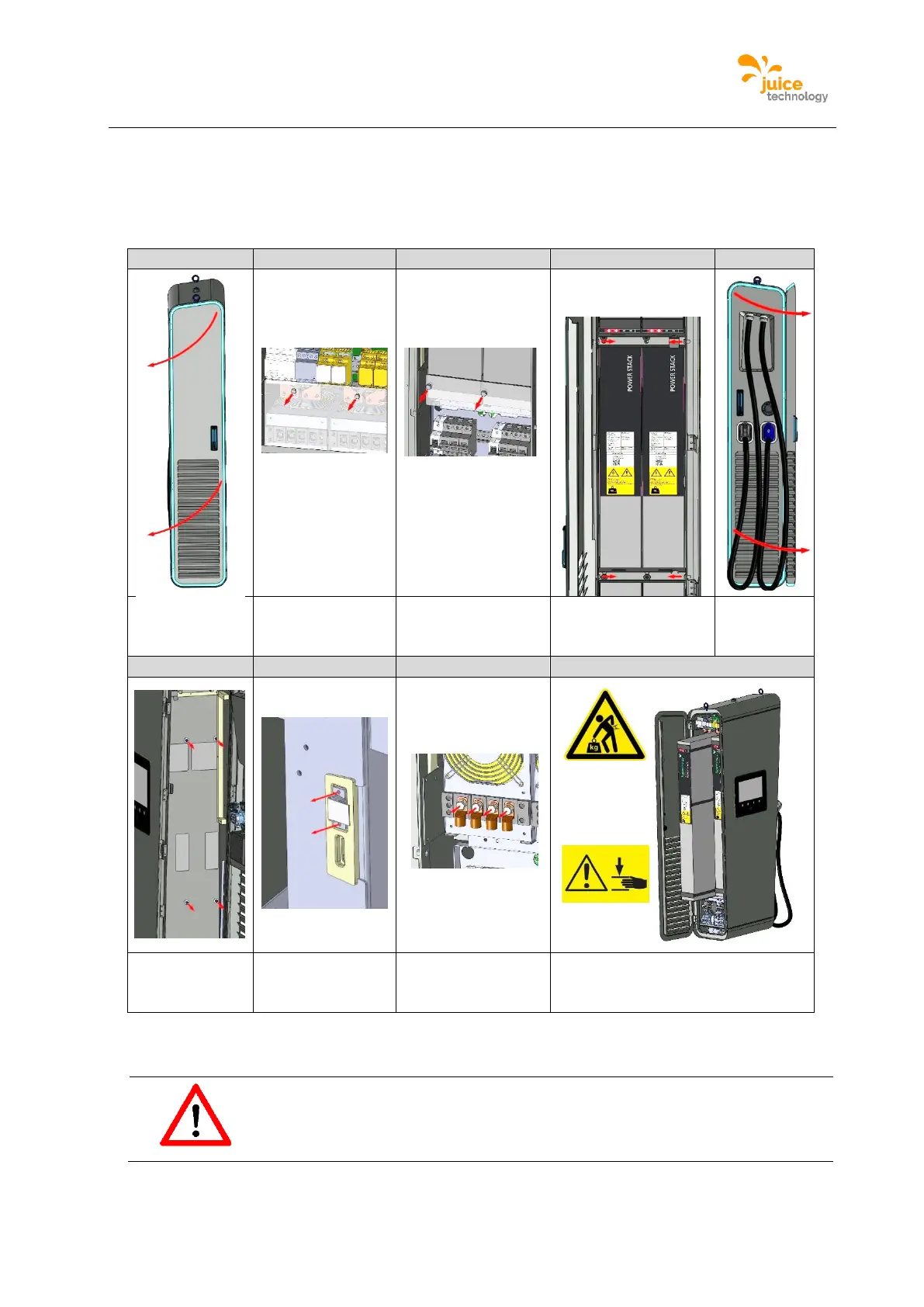
Figure 52 shows the order of steps for changing a power-stack. To install the new power-
stack, perform the steps in reverse order.

1
2
3
4
5
Open service
door
Remove cover
(upper side)
Remove cover
(lower side)
Remove the strives
Open
charging
cable door
6
7
8
9
Remove
screws
Disconnect
signal connector
Remove screws
supply and output
terminal Stack
Pull out power-stack and
remove. Attention! Use a lifting
tool for the replacement
Figure 52: Replacing a Power-Stack
Attention
A power-stack weights up to 95kg. Use a lifting tool for the replacement.

Table of Contents

Related product manuals