All rights reserved. The reproduction of this document, also partially, is allowed only with authorization by alpitronic s.r.l.
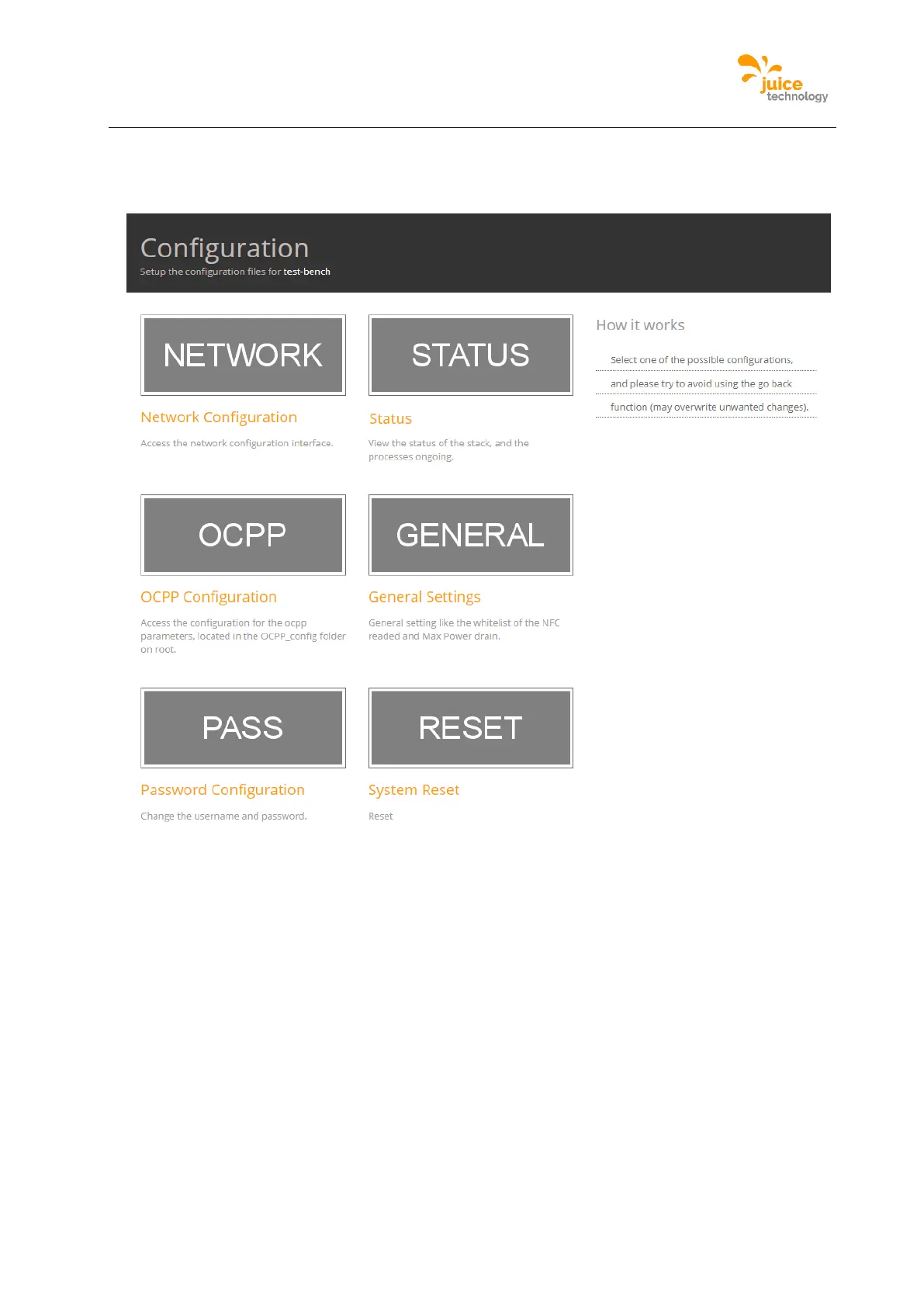
Figure 34 shows the home page. There are six links to other pages. The Diagnostics and
Parameterization options are both present on this same page.
Figure 34: Home screen of web interface
Here is a list of all functionalities of the web interface and where they are found in their
corresponding menus.
Links for Diagnosis category:
• To check the SIM Signal, you can navigate to ‘NETWORK’ from the main menu and
then following the top menu ‘SIM’ to the menu ‘Signal’ can be found.
• To check the currently running processes, you can navigate to ‘STATUS’ from the
main menu and then following the top menu ‘Processes View’ can be found.
• To check the status of the Stop Button, you can navigate to ‘STATUS’ from the main
menu and then following the top menu ‘Stop Button’ can be found.
• To check the status of the JUICE ULTRA power-stacks, you can navigate to
‘STATUS’ from the main menu and then following the top menu ‘Stacks’ can be
found.
• To check the number of cycles for each charging cable, you can navigate to


 To Next Page