Keysight N9912-90001 User’s Guide 17- 3
File Management
Saving and Recalling Files
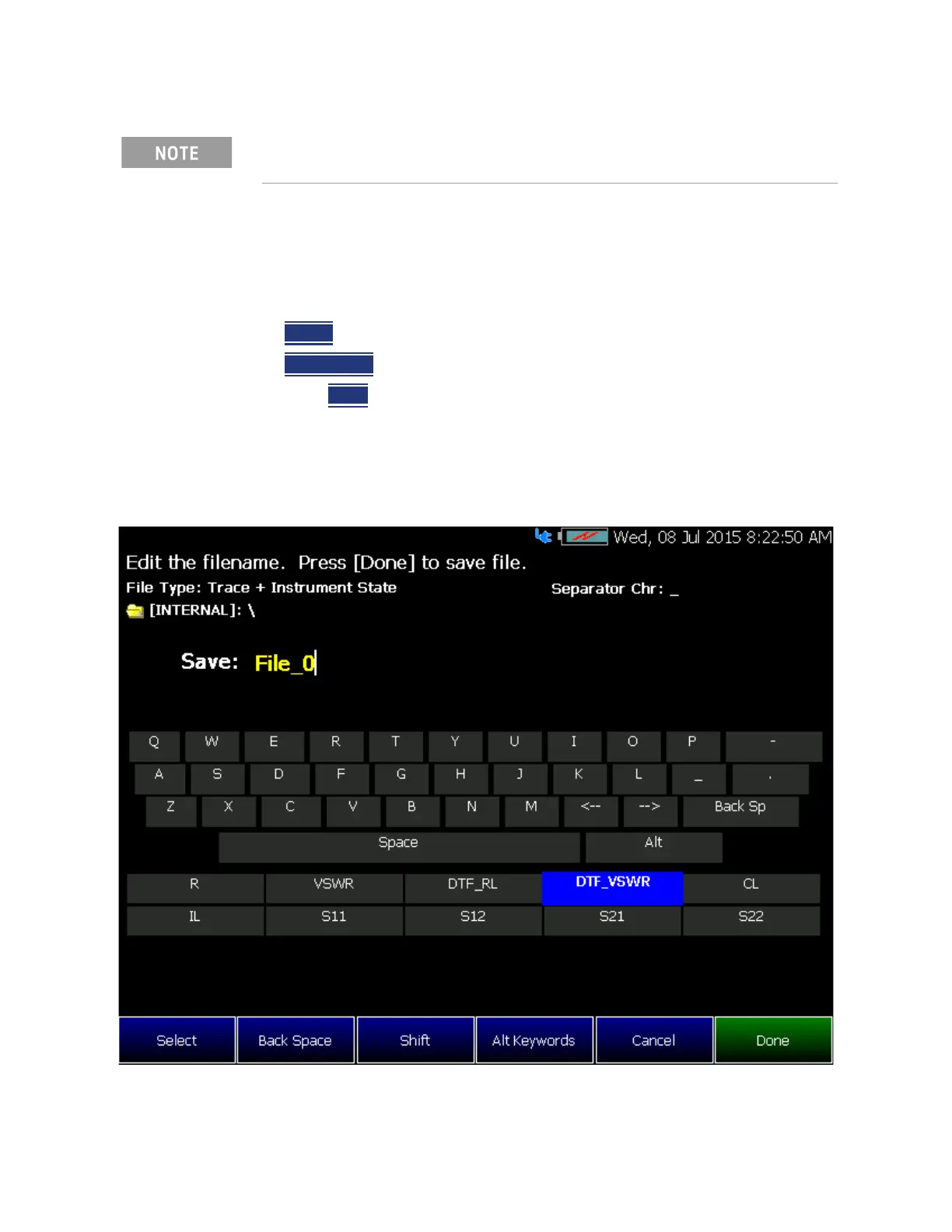
How to use the FieldFox labeler
The FieldFox labeler is used to edit or change the current filename. It is also
used for many other labeling functions, such as creating a title, prefix, and
keyword to display on the FieldFox screen. Learn “Title” on page 18-6.
— Move the cursor (see section below, How to move the cursor), then press
Select
to add the cursor character to the end of the existing filename.
— Back Space
to erase the last character(s) from the end of a filename.
—Press Clear
to erase the current filename.
— The preselected keywords (File, Site, and so forth) can be selected just like
a single character. These keywords can also be edited. Learn more in “Edit
Keywords” on page 17-9.
Figure 17-1 The FieldFox labeler
Insert only ONE USB Flash Drive in the FieldFox when saving or copying
files.



 To Next Page