35
4
4
Features of your vehicle Smart Trunk with Auto Open
䳜 Make sure to deactivate the
Smart Trunk with Auto Open
when washing your vehicle. Oth
-
erwise, the trunk may open inad
-
vertently.
Trunk lift
Make certain that you close the
trunk before driving your vehicle.
Possible damage may occur to the
trunk torsion bars and attached
hardware if the trunk is not closed
prior to driving.
Make sure objects in the rear cargo
area do not come out when opening
the trunk as this could cause serious
injury.
The key should be kept out of reach
of children. Children may inadver
-
tently open the Smart Trunk while
playing around the rear area of the
vehicle.
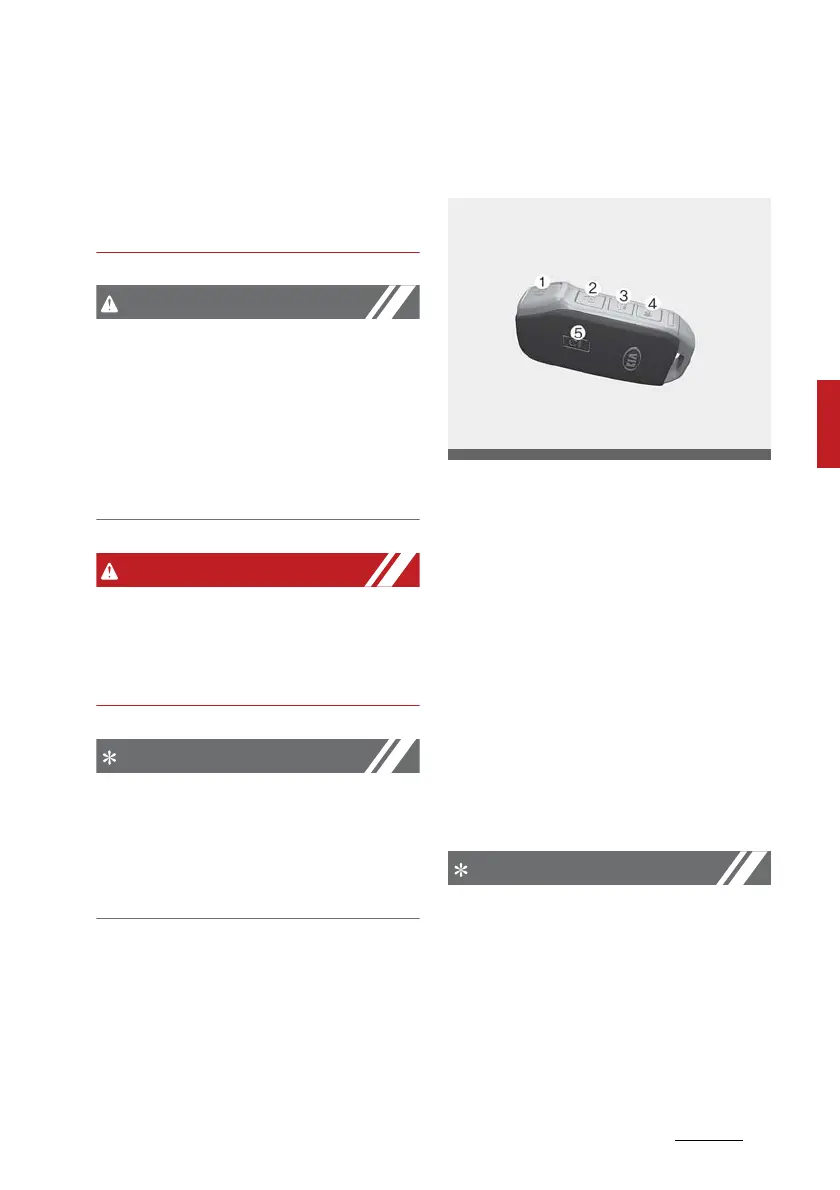
How to deactivate the Smart Trunk
with Auto Open function using the
smart key
1. Door lock
2. Door unlock
3. Trunk open
4. Panic button
5. Remote start
If you press any button of the smart
key during the Detect and Alert
stage, the Smart Trunk with Auto
Open function will be deactivated.
Make sure to be aware of how to
deactivate the Smart Trunk with
Auto Open function for emergency
situations.
䳜 If you press the door unlock but
-
ton (2), the Smart Trunk with
Auto Open function will be deacti
-
vated temporarily. But, if you do
not open any door for 30 seconds,
the Smart Trunk with Auto Open
function will be activated again.



 To Next Page