Pave Screen Alert MessagesPave Screen Alert Messages
If a fault is present, a red warning icon will ash (on
both the engine and pave screens). If the icon is solid,
the main controller is ofine and cannot communicate
with the display, therefore no fault information can be
shown. A list of paving-related fault codes is shown on
Pages 4-27 and 4-28.
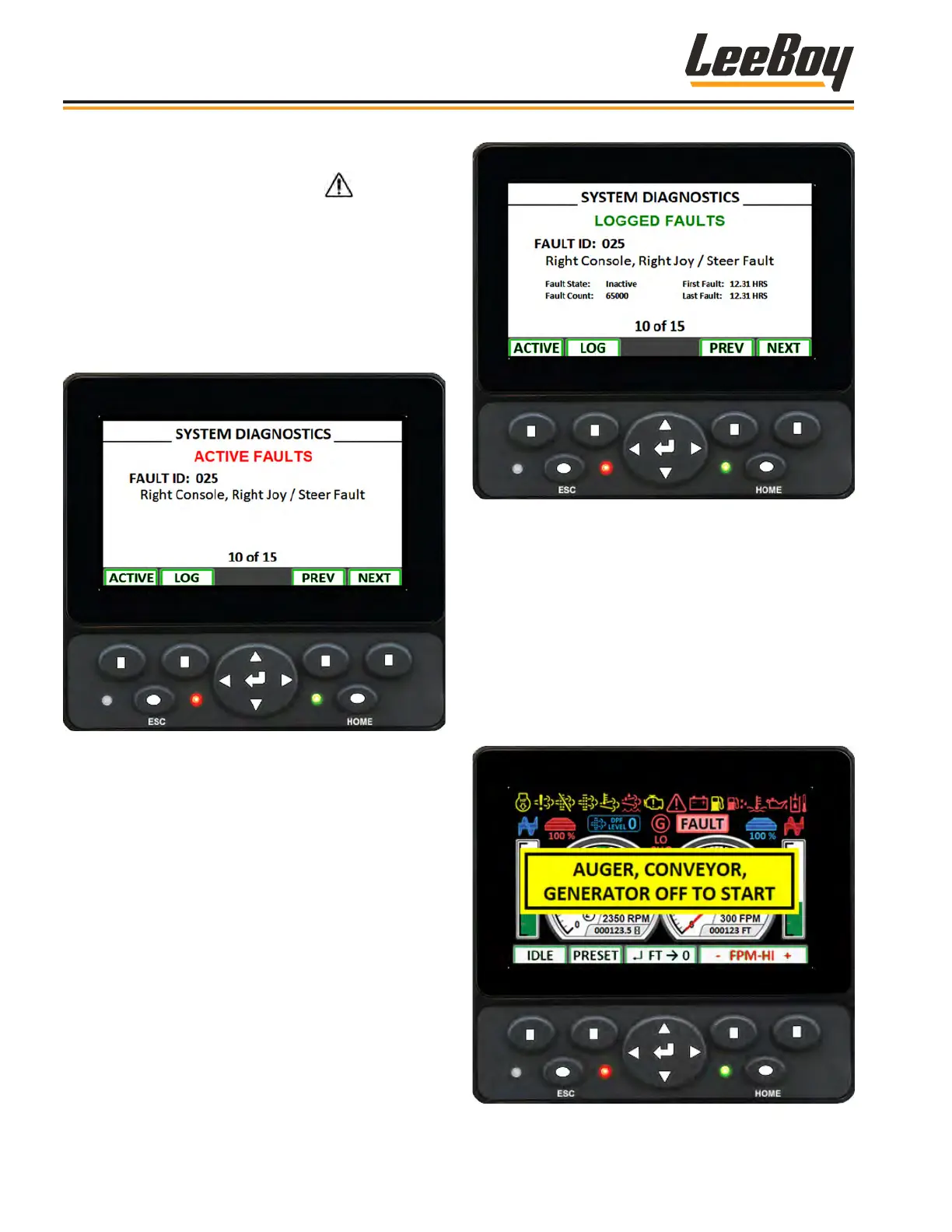
You can view active (Figure 4-22) and logged (Figure
4-23) system faults by pressing the screen navigation
left or right from any screen.
Figure 4-22. Active Paving Function Faults Screen
• Press Button #1 to view active paving function faults.
• Press Button #2 to view logged paving function
faults.
• Use Buttons #3 and #4 (PREV [previous] and NEXT)
to scroll between fault screens.
Figure 4-23. Logged Paving Function Faults Screen
Pop-Up message banners may also appear on the pave
(and engine) screen to alert the operator of an issue,
or if the operator attempts to do something under the
wrong conditions.
The following banner appears if the operator attempts to
crank the engine with the auger, conveyor or generator
are engaged. (Figure 4-24) This banner noties the
operator that the engine will not start unless these
components are turned off.
Figure 4-24. Component Engine Start Alert
Operation
LeeBoy Model 5300B Compact Paver4-24



 To Next Page